> ## Documentation Index
> Fetch the complete documentation index at: https://docs.hubtalk.ai/llms.txt
> Use this file to discover all available pages before exploring further.
# Recording and call control
> Call recording, call timers, silence reminders and the transfer failure message.
# Recording and call control
## Recording
Configure voice call recording for telephony and browser tests. Recordings are stored as MP3 files.
* **Enable call recording** — turns recording on for the agent. When enabled, the recording contains the agent and caller audio.
* **Channels: Stereo — agent / customer in separate channels** — stores the agent and caller on separate audio channels, making it easier to distinguish the speakers.
* **Channels: Mono — single mixed track** — stores both sides of the call in one mixed audio track.
* **Audio retention: Keep forever** — keeps recordings without an automatic deletion date.
* **Audio retention: Delete after N days** — deletes recordings after the configured retention period.
* **Retention period, days** — sets how many days recordings remain available when deletion after N days is selected.
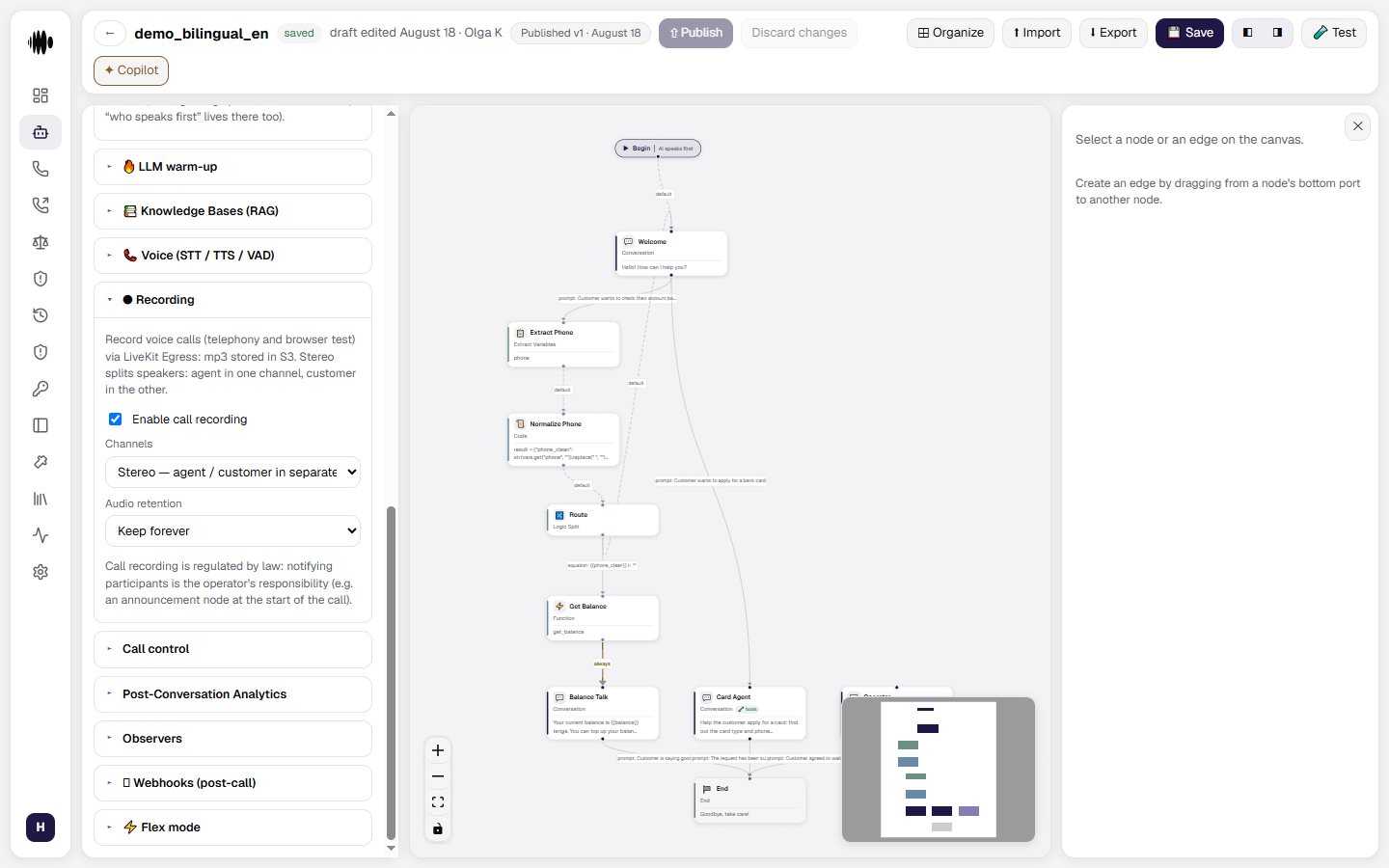 Call recording is regulated by law. The party operating the call is responsible for notifying participants, for example with an announcement at the beginning of the call.
## Call control
Call control manages timers and silence behavior. These settings are versioned with the agent, so Draft and Published versions can have different values.
* **Max call duration** — choose **Limit** to enforce a maximum duration or **No limit** to leave the call duration unrestricted.
* **Cap** — sets the maximum call duration in seconds when Limit is selected.
**No limit means "no limit of yours", not "no limit at all".** A platform-side session ceiling applies on top: a conversation longer than the ceiling is force-closed together with its telephony room, even if participants are still on the line. The default ceiling is **4 hours** (the value is configured at the platform level). It exists so a stuck session cannot live in the history for days and skew reports; if your scenario needs multi-hour conversations, raise it in advance.
* **Closing phrase (optional)** — the phrase spoken when the duration limit is reached, such as a short apology and goodbye.
* **Farewell on platform shutdown (optional)** — the phrase said before the call ends when the platform is being stopped for a release rollout. An empty field means a silent hangup.
* **Transfer failure message** — the line to say when a transfer fails and the flow has nothing to say: **Text** or **Generated (prompt)**, as with reminders. An empty field means a silent ending: the caller listens to dead air until they hang up. After the line the call ends; bringing the conversation back into the flow is the job of the transfer node's failure routes.
* **Ring duration, seconds** — sets how long an outbound call can ring before it is canceled as **No answer**. This value can be overridden for an individual call.
* **Remind when the caller is silent** — enables reminders when the caller stops speaking.
* **Silence before the first reminder** — sets how many seconds of silence trigger the first reminder.
* **Interval between reminders** — sets the delay between subsequent reminders.
* **Max reminders** — limits how many reminders can be sent before the call is ended or the flow continues.
* **Message type** — choose **Static text** for a fixed reminder or **Prompt** to let the language model generate the line.
* **Reminder message** — enter the reminder text. When empty, the agent uses the built-in “Are you still there?” message.
* **End call on silence** — ends the call when the configured silence threshold is reached.
* **Silence threshold, seconds** — sets how many seconds of silence are allowed before the call ends.
* **Pause on client request** — lets the caller ask the agent to wait without starting the silence countdown.
Call recording is regulated by law. The party operating the call is responsible for notifying participants, for example with an announcement at the beginning of the call.
## Call control
Call control manages timers and silence behavior. These settings are versioned with the agent, so Draft and Published versions can have different values.
* **Max call duration** — choose **Limit** to enforce a maximum duration or **No limit** to leave the call duration unrestricted.
* **Cap** — sets the maximum call duration in seconds when Limit is selected.
**No limit means "no limit of yours", not "no limit at all".** A platform-side session ceiling applies on top: a conversation longer than the ceiling is force-closed together with its telephony room, even if participants are still on the line. The default ceiling is **4 hours** (the value is configured at the platform level). It exists so a stuck session cannot live in the history for days and skew reports; if your scenario needs multi-hour conversations, raise it in advance.
* **Closing phrase (optional)** — the phrase spoken when the duration limit is reached, such as a short apology and goodbye.
* **Farewell on platform shutdown (optional)** — the phrase said before the call ends when the platform is being stopped for a release rollout. An empty field means a silent hangup.
* **Transfer failure message** — the line to say when a transfer fails and the flow has nothing to say: **Text** or **Generated (prompt)**, as with reminders. An empty field means a silent ending: the caller listens to dead air until they hang up. After the line the call ends; bringing the conversation back into the flow is the job of the transfer node's failure routes.
* **Ring duration, seconds** — sets how long an outbound call can ring before it is canceled as **No answer**. This value can be overridden for an individual call.
* **Remind when the caller is silent** — enables reminders when the caller stops speaking.
* **Silence before the first reminder** — sets how many seconds of silence trigger the first reminder.
* **Interval between reminders** — sets the delay between subsequent reminders.
* **Max reminders** — limits how many reminders can be sent before the call is ended or the flow continues.
* **Message type** — choose **Static text** for a fixed reminder or **Prompt** to let the language model generate the line.
* **Reminder message** — enter the reminder text. When empty, the agent uses the built-in “Are you still there?” message.
* **End call on silence** — ends the call when the configured silence threshold is reached.
* **Silence threshold, seconds** — sets how many seconds of silence are allowed before the call ends.
* **Pause on client request** — lets the caller ask the agent to wait without starting the silence countdown.
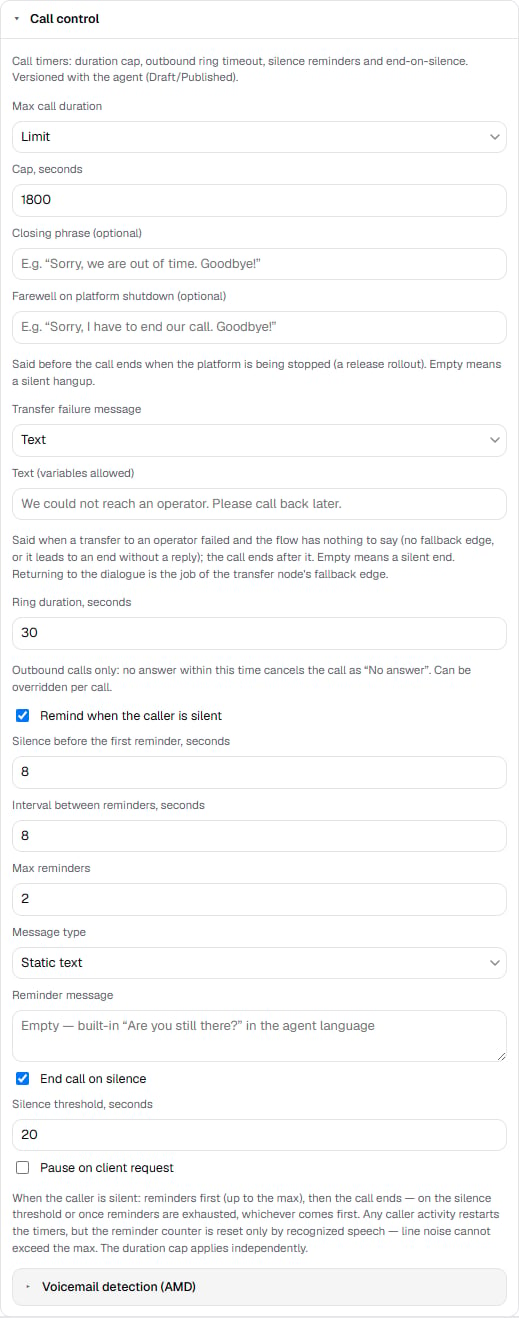 When silence handling is enabled, reminders are sent first up to the configured maximum. The call then ends when the silence threshold or reminder limit is reached, whichever comes first. Any caller speech resets the timers and the counter. The duration cap is applied independently.