> ## Documentation Index
> Fetch the complete documentation index at: https://docs.hubtalk.ai/llms.txt
> Use this file to discover all available pages before exploring further.
# Prompt, models and knowledge
> The global prompt, variables in authored text, model overrides, cache warm-up, knowledge bases and flex mode.
# Prompt, models and knowledge
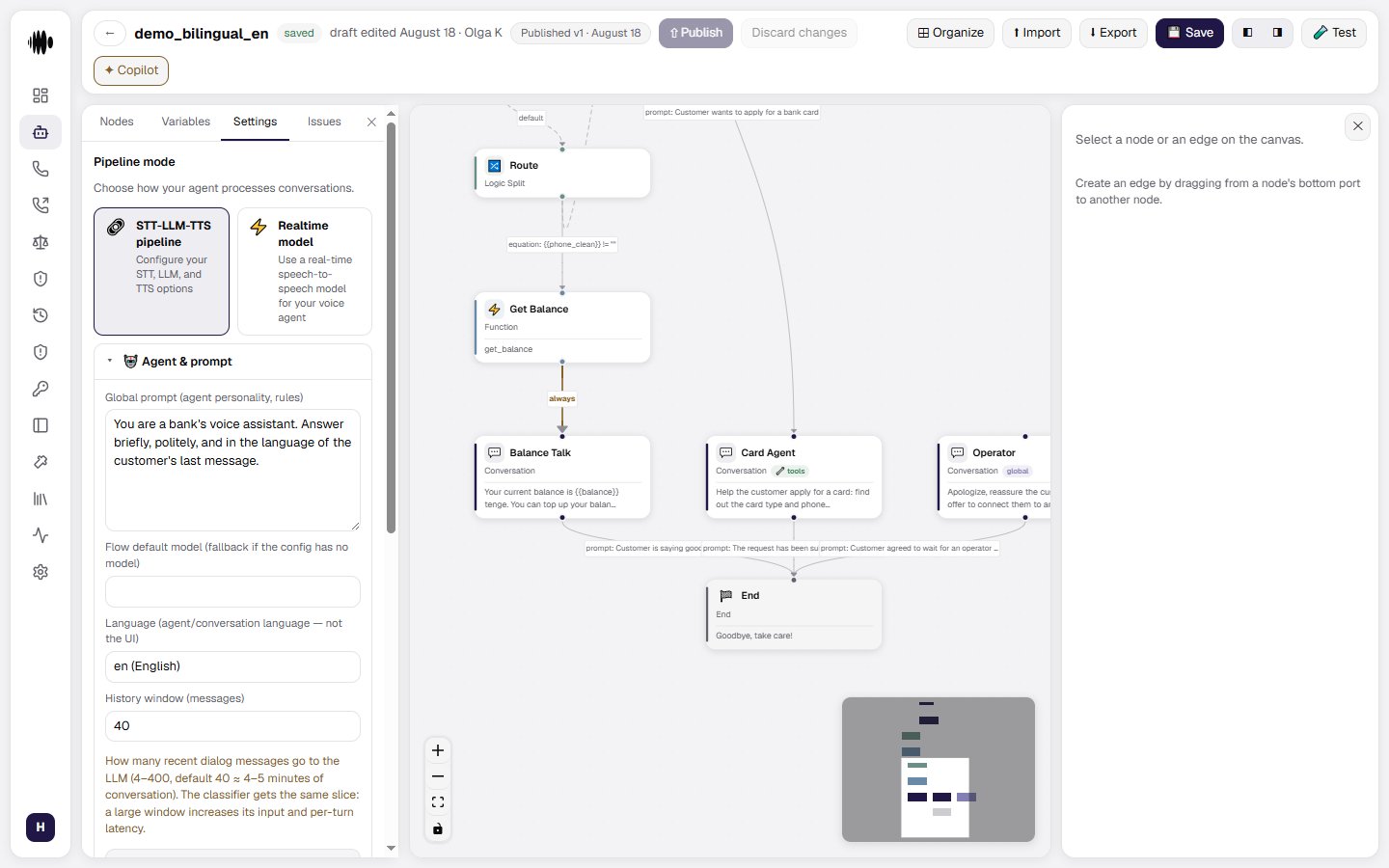
## Agent & prompt
* **Global prompt (agent personality, rules)** — the agent's personality, rules, tone and general behaviour. It applies across the whole conversation.
* **Flow default model (fallback if the config has no model)** — used when neither the node nor the configuration names a model.
* **Language (agent/conversation language — not the UI)** — the language the agent speaks in; the dashboard language does not change with it.
* **History window (messages)** — how many recent messages are sent to the model: 4 to 400, 40 by default (roughly 4–5 minutes of conversation). The classifier gets the same slice, so a large window adds latency to every turn.
* **Entry point** — set by the **Begin** node on the canvas: its single edge leads to the first node of the dialogue, and who speaks first is chosen there too.
 ### Variables in authored text
A `{{variable_name}}` placeholder is replaced with the session value **everywhere you write text**, not only in a node instruction:
* the agent's **Global prompt**;
* transition conditions, including global ones;
* the conversation goals summary;
* tool and function descriptions and arguments;
* variable extraction fields;
* the flex-mode prompt;
* the answering-machine detection hint;
* fine-tuning example texts.
**Substitution covers the global prompt, not only the node instruction.** A script placed in the global prompt reaches the model with its values filled in — there is no need to copy its text into node instructions to get substitution.
**An unknown name stays as text rather than becoming emptiness.** If the variable is not present on the call, the model sees `{{name}}` — exactly as this has always worked in a node instruction. An empty substitution would make the author's typo invisible: the agent would quietly speak with a hole in the sentence instead of a clear signal that the variable never arrived.
Campaign variables that no column covers are caught elsewhere — by warnings on the [campaign launch](/v4/platform/campaign-launch) step.
**Agents without placeholders are not affected at all.** Text with no `{{` renders to itself byte for byte, so the prompt prefix cache and its warm-up work at full strength for such agents. For an agent that does use substitution the prefix differs on every call — and warm-up skips it: warming text that will never be requested would only inflate the hit statistics.
**When the model refuses to answer, the agent apologizes in the language of the call.** If the language model declines a turn, the agent says a short fallback line instead of going silent. That line is picked for the language actually in use, resolved newest-first: the language of the current turn, then a language set by a dynamic variable, then the previous turn's language, then this **Language** setting. Choosing it costs the caller nothing — no extra turn and no network call. A language with no line of its own is skipped rather than substituted, so a caller never gets an apology in a language they were not speaking.
### Agent execution model override
The **Agent execution model (override)** section controls the model used for the agent's main runtime operations, including reply generation, tool calls, and variable extraction. By default, the agent inherits the model configuration from the flow or server.
Enable **Override for this agent** to use a separate configuration for this agent. The override can define the model, endpoint, API key or environment variable, and temperature. Agent-level settings take priority over the server configuration.
The **Flow default model** field is a legacy name-only option. It is applied only when the server configuration does not contain a model. Leave the override disabled when the shared flow or server configuration should control the execution model.
### Agent classifier model override
The **Agent classifier model override** controls the model used for per-turn transition or stay decisions. The classifier decides whether the conversation should move to another node or remain on the current one.
Enable **Override for this agent** to provide a classifier model specifically for this agent. If the override is disabled, the classifier is inherited from the server configuration. This is a latency-sensitive part of the pipeline, so a fast non-reasoning model is usually a better choice.
Unlike execution model settings, classifier overrides are configured at the agent level and are not replaced by a node-level classifier setting.
### Service tier
A model slot — both the agent's and one set on a node — has a **Service tier** select: the priority the provider serves the request with. This is not a different model, it is the same model served faster or cheaper:
* **Provider default (not sent)** — no tier is requested at all, so behaviour is unchanged;
* **priority** — for speed, at a higher price;
* **flex** — cheaper but slower;
* **auto** — the choice is left to the provider;
* **default** — an explicit request for the provider's ordinary tier.
The select appears only on models carrying the **Supports service tiers (OpenAI service\_tier)** flag; for the rest it is absent.
A hint next to the select warns about poor combinations: **flex** in a live conversational turn makes the caller wait longer, while **priority** where nobody is waiting for the answer — background analytics — only spends money. It is a hint, not a restriction.
**You are billed for the tier actually applied, not the one requested.** Under load the provider may serve a request at a lower tier, and that is the one that lands in your cost. If the applied tier has no price in the catalog, the cost row says **no data** — billing it at the base rate would show a wrong number instead of an honest gap.
## LLM warm-up
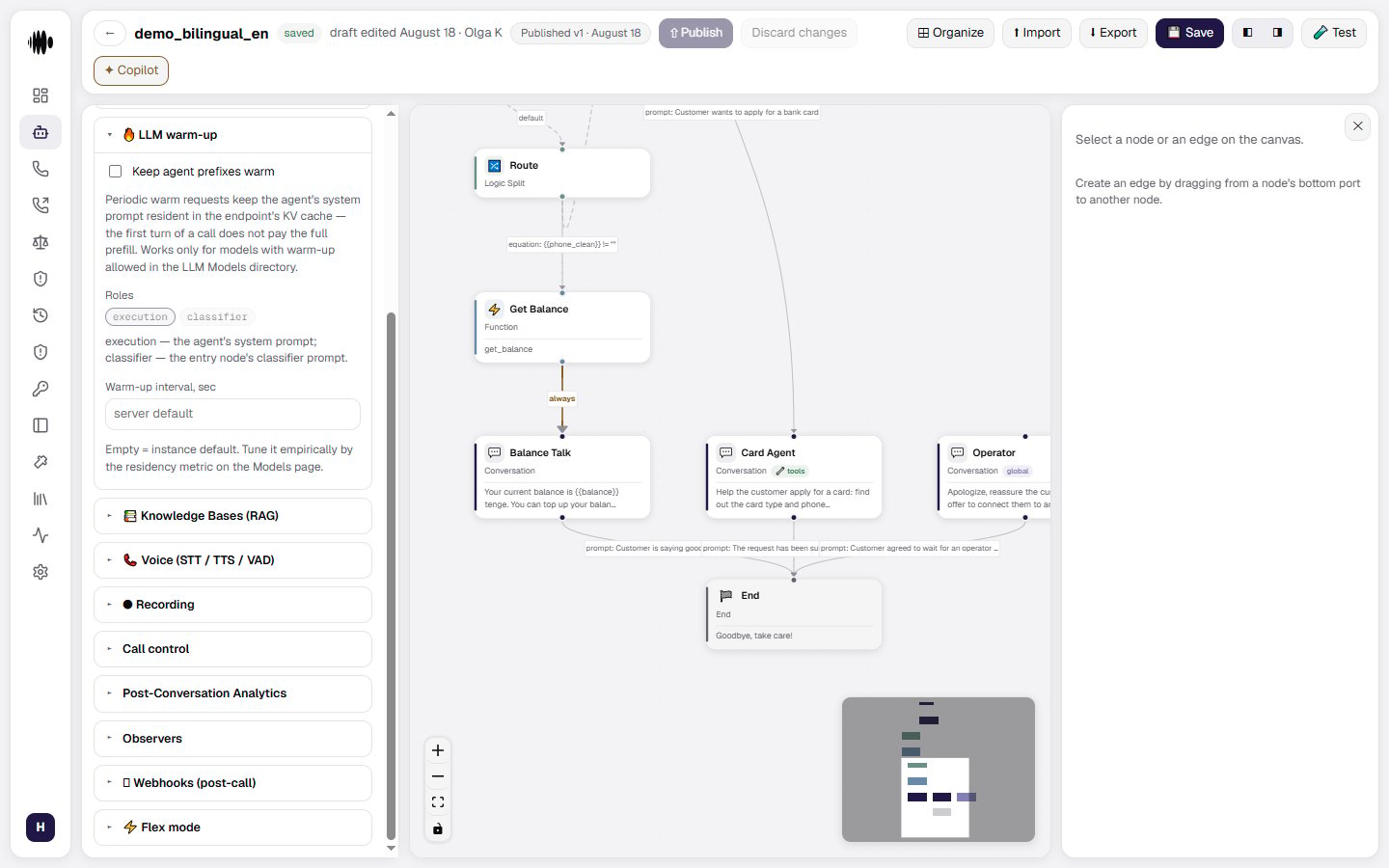
LLM warm-up keeps the agent's system prompt prefixes warm in the model provider's KV cache. This can reduce the amount of context that must be processed on the first turn of a call, so the agent can respond sooner.
* **Keep agent prefixes warm** — enables the periodic warm-up requests. Turn it off when the extra traffic is not wanted.
* **Roles** — which prompt to keep cached: `execution` is the agent's system prompt, `classifier` is the classifier prompt of the entry node.
* **Warm-up interval, sec** — how often the requests go out. An empty field means the server default.
Warm-up only works with models from the model directory.
### Variables in authored text
A `{{variable_name}}` placeholder is replaced with the session value **everywhere you write text**, not only in a node instruction:
* the agent's **Global prompt**;
* transition conditions, including global ones;
* the conversation goals summary;
* tool and function descriptions and arguments;
* variable extraction fields;
* the flex-mode prompt;
* the answering-machine detection hint;
* fine-tuning example texts.
**Substitution covers the global prompt, not only the node instruction.** A script placed in the global prompt reaches the model with its values filled in — there is no need to copy its text into node instructions to get substitution.
**An unknown name stays as text rather than becoming emptiness.** If the variable is not present on the call, the model sees `{{name}}` — exactly as this has always worked in a node instruction. An empty substitution would make the author's typo invisible: the agent would quietly speak with a hole in the sentence instead of a clear signal that the variable never arrived.
Campaign variables that no column covers are caught elsewhere — by warnings on the [campaign launch](/v4/platform/campaign-launch) step.
**Agents without placeholders are not affected at all.** Text with no `{{` renders to itself byte for byte, so the prompt prefix cache and its warm-up work at full strength for such agents. For an agent that does use substitution the prefix differs on every call — and warm-up skips it: warming text that will never be requested would only inflate the hit statistics.
**When the model refuses to answer, the agent apologizes in the language of the call.** If the language model declines a turn, the agent says a short fallback line instead of going silent. That line is picked for the language actually in use, resolved newest-first: the language of the current turn, then a language set by a dynamic variable, then the previous turn's language, then this **Language** setting. Choosing it costs the caller nothing — no extra turn and no network call. A language with no line of its own is skipped rather than substituted, so a caller never gets an apology in a language they were not speaking.
### Agent execution model override
The **Agent execution model (override)** section controls the model used for the agent's main runtime operations, including reply generation, tool calls, and variable extraction. By default, the agent inherits the model configuration from the flow or server.
Enable **Override for this agent** to use a separate configuration for this agent. The override can define the model, endpoint, API key or environment variable, and temperature. Agent-level settings take priority over the server configuration.
The **Flow default model** field is a legacy name-only option. It is applied only when the server configuration does not contain a model. Leave the override disabled when the shared flow or server configuration should control the execution model.
### Agent classifier model override
The **Agent classifier model override** controls the model used for per-turn transition or stay decisions. The classifier decides whether the conversation should move to another node or remain on the current one.
Enable **Override for this agent** to provide a classifier model specifically for this agent. If the override is disabled, the classifier is inherited from the server configuration. This is a latency-sensitive part of the pipeline, so a fast non-reasoning model is usually a better choice.
Unlike execution model settings, classifier overrides are configured at the agent level and are not replaced by a node-level classifier setting.
### Service tier
A model slot — both the agent's and one set on a node — has a **Service tier** select: the priority the provider serves the request with. This is not a different model, it is the same model served faster or cheaper:
* **Provider default (not sent)** — no tier is requested at all, so behaviour is unchanged;
* **priority** — for speed, at a higher price;
* **flex** — cheaper but slower;
* **auto** — the choice is left to the provider;
* **default** — an explicit request for the provider's ordinary tier.
The select appears only on models carrying the **Supports service tiers (OpenAI service\_tier)** flag; for the rest it is absent.
A hint next to the select warns about poor combinations: **flex** in a live conversational turn makes the caller wait longer, while **priority** where nobody is waiting for the answer — background analytics — only spends money. It is a hint, not a restriction.
**You are billed for the tier actually applied, not the one requested.** Under load the provider may serve a request at a lower tier, and that is the one that lands in your cost. If the applied tier has no price in the catalog, the cost row says **no data** — billing it at the base rate would show a wrong number instead of an honest gap.
## LLM warm-up
LLM warm-up keeps the agent's system prompt prefixes warm in the model provider's KV cache. This can reduce the amount of context that must be processed on the first turn of a call, so the agent can respond sooner.
* **Keep agent prefixes warm** — enables the periodic warm-up requests. Turn it off when the extra traffic is not wanted.
* **Roles** — which prompt to keep cached: `execution` is the agent's system prompt, `classifier` is the classifier prompt of the entry node.
* **Warm-up interval, sec** — how often the requests go out. An empty field means the server default.
Warm-up only works with models from the model directory.
 ## Knowledge Bases (RAG)
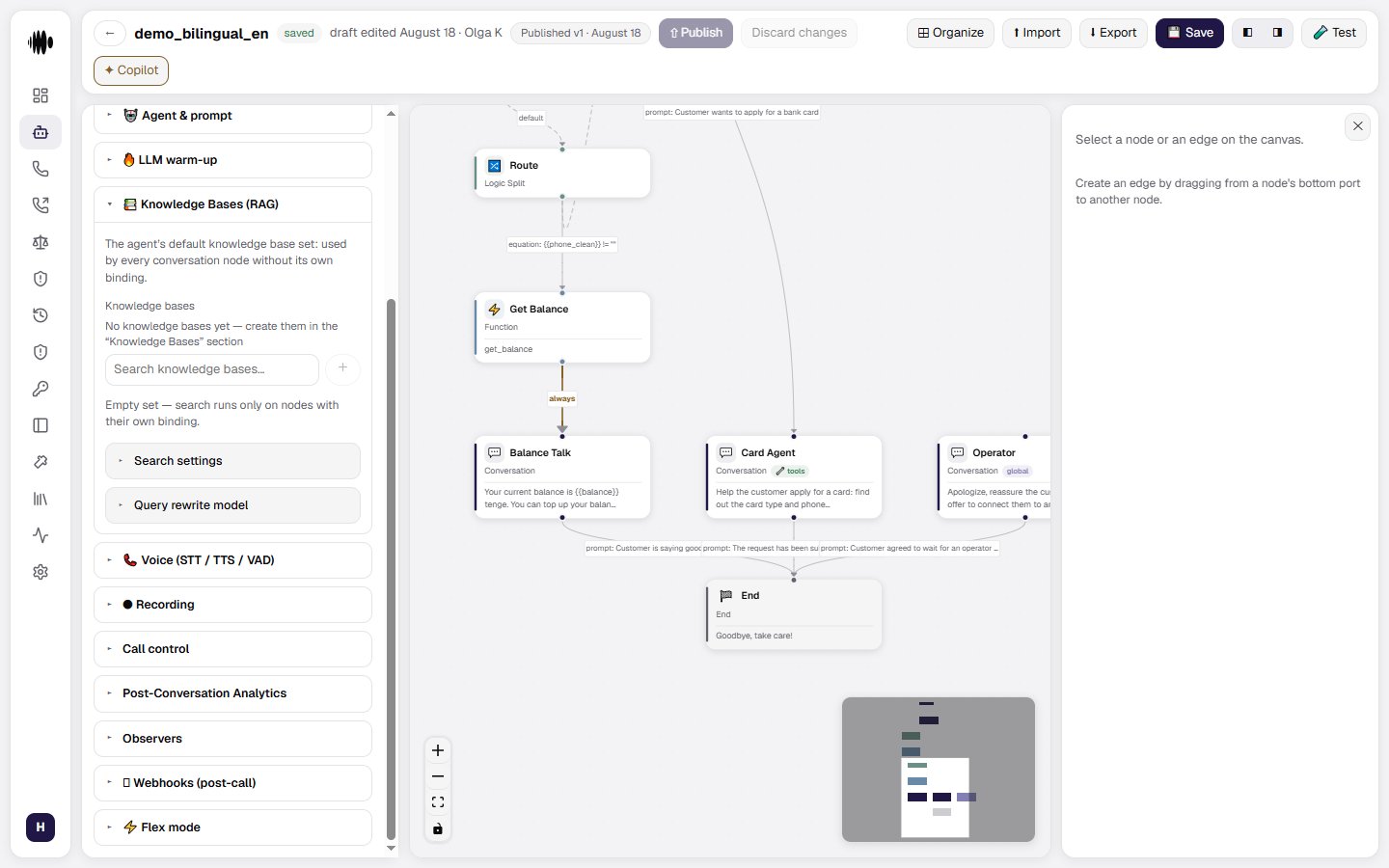
The agent has a default knowledge base set that is used by every Conversation node unless that node has its own knowledge base binding.
* **Knowledge bases** — find and add bases to the agent's default set.
* **+ button** — creates a new base straight from the settings panel.
* **An empty set** — search then runs only on the nodes that define a set of their own.
## Knowledge Bases (RAG)
The agent has a default knowledge base set that is used by every Conversation node unless that node has its own knowledge base binding.
* **Knowledge bases** — find and add bases to the agent's default set.
* **+ button** — creates a new base straight from the settings panel.
* **An empty set** — search then runs only on the nodes that define a set of their own.
 ### Search settings
* **Search type** — how the selected bases are searched; the **default (hybrid)** value combines several retrieval signals.
* **Similarity threshold (0..1)** — the minimum relevance a result must reach. A higher value returns fewer but more precise hits.
* **Max results (1..100)** — the ceiling on the number of hits.
* **Query rewrite (LLM)** — whether the query is rewritten before the search: **Default (inherit)**, **Off (gate + merge)** or **LLM rewrite**.
### Query rewrite model
A separate model is used when **LLM rewrite** is selected. If no separate model is configured, the classifier model is used with a fast, low-temperature configuration.
* **Override for this agent** — turns on a dedicated rewrite model instead of the inherited setting.
## Flex mode
**Flex mode** sends the whole flow to the model as one structured prompt instead of processing each part only through the standard node flow.
* **Flex mode** — enable the option to process the complete agent flow as a single structured prompt.
* **Component summary** — when enabled, the settings show how many nodes are included and approximately how many prompt tokens they use, for example `2 nodes, ~389 prompt tokens`.
### Search settings
* **Search type** — how the selected bases are searched; the **default (hybrid)** value combines several retrieval signals.
* **Similarity threshold (0..1)** — the minimum relevance a result must reach. A higher value returns fewer but more precise hits.
* **Max results (1..100)** — the ceiling on the number of hits.
* **Query rewrite (LLM)** — whether the query is rewritten before the search: **Default (inherit)**, **Off (gate + merge)** or **LLM rewrite**.
### Query rewrite model
A separate model is used when **LLM rewrite** is selected. If no separate model is configured, the classifier model is used with a fast, low-temperature configuration.
* **Override for this agent** — turns on a dedicated rewrite model instead of the inherited setting.
## Flex mode
**Flex mode** sends the whole flow to the model as one structured prompt instead of processing each part only through the standard node flow.
* **Flex mode** — enable the option to process the complete agent flow as a single structured prompt.
* **Component summary** — when enabled, the settings show how many nodes are included and approximately how many prompt tokens they use, for example `2 nodes, ~389 prompt tokens`.
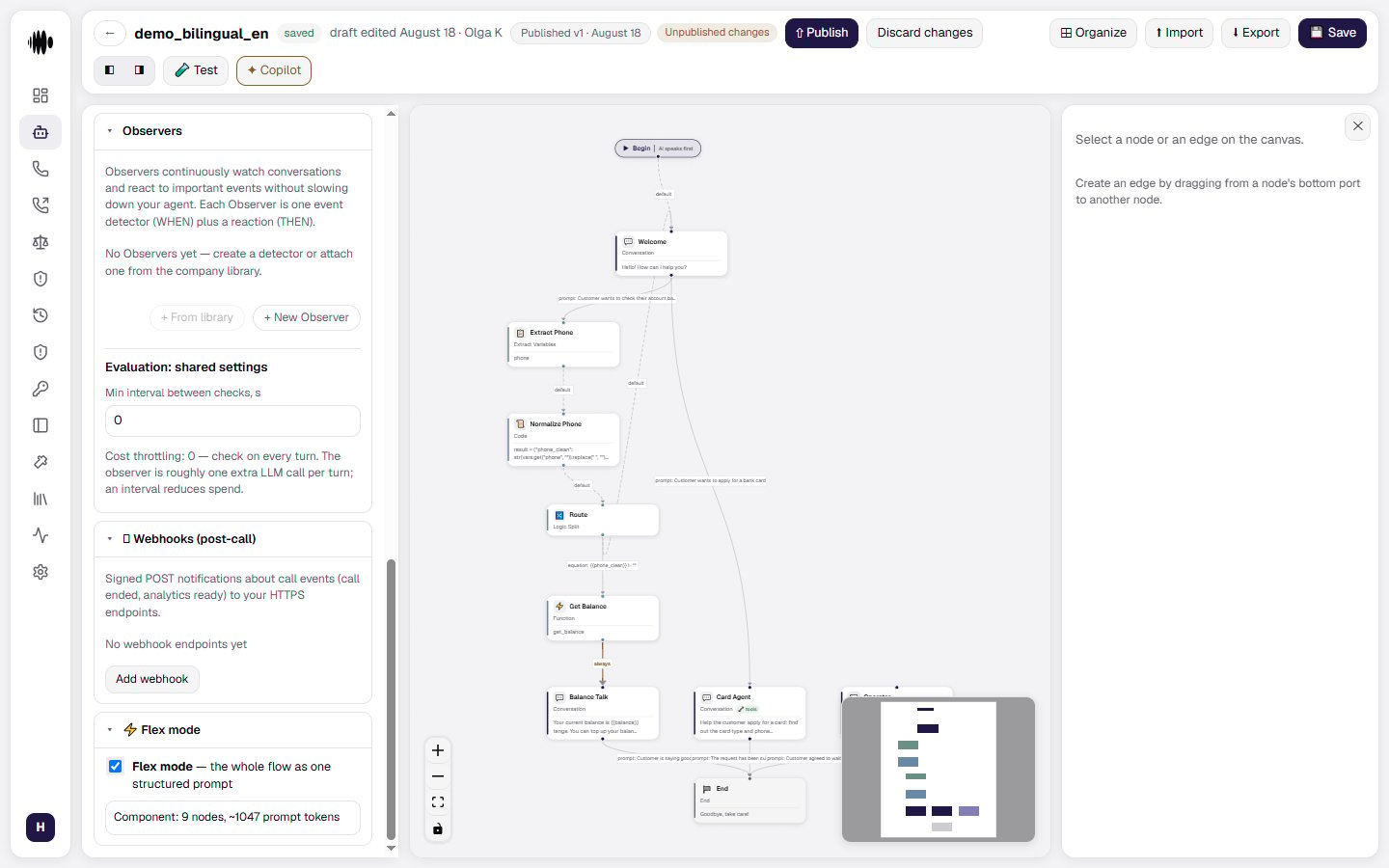 Use the summary to understand the size of the generated prompt before running the agent. Leave Flex mode disabled when the standard node-by-node flow is the better fit for the agent.