> ## Documentation Index
> Fetch the complete documentation index at: https://docs.hubtalk.ai/llms.txt
> Use this file to discover all available pages before exploring further.
# Post-call functions
> The run condition, the call and analysis variables, waiting for post-call analysis, and testing a condition without a call.
# Post-call functions
Post-call functions run once at finalization — with the call's final variables, its summary and the result of post-call analysis. The block has no overall budget, but there is a cap on how long it waits for the analysis.
## Run condition
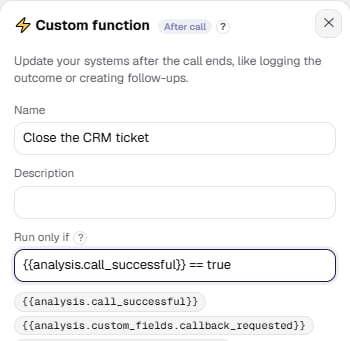
A post-call function form has a **Run only if** field — empty by default, which means "always". The condition uses the same language as transition conditions between nodes:
| Goal | Condition |
| ------------------------------------- | ----------------------------------------------------------------- |
| Successful calls only | `{{analysis.call_successful}} == true` |
| Unsuccessful calls only | `{{analysis.call_successful}} == false` |
| Leave the CRM alone for short calls | `{{call.duration}} > 30` |
| Successful and longer than 30 seconds | `{{analysis.call_successful}} == true AND {{call.duration}} > 30` |
The card shows an "if …" line with your expression under the name. A false condition means the function is **not called at all**: the history gets an event with the status "skipped" and the note "skipped by condition", and no result variables are written. The condition is checked before the budget, so an excluded function costs the block no time.
 ## What the variables hold
Besides the final call variables, post-call functions get two reserved ones.
**`call`** — the call summary: the same object that goes into the `call_ended` webhook (direction, numbers, duration, status, end reason, transcript).
**`analysis`** — the post-call analysis result:
| Field | Value |
| -------------------------------- | ----------------------------------------------------------------- |
| `analysis.status` | `done`, `skipped`, `disabled`, `pending`, `failed`, `interrupted` |
| `analysis.reason` | the reason, for example `analytics_disabled` |
| `analysis.summary` | conversation summary |
| `analysis.sentiment` | sentiment |
| `analysis.call_successful` | whether the call was successful |
| `analysis.custom_fields.` | the fields you configured in the agent's post-call analytics |
The keys are always present; the meaningful fields are filled only when `status = "done"`.
Nested values are reached with a dot, and they work not only in the condition but inside the request itself: `{{analysis.summary}}` can go into the message body for a manager, `{{call.duration}}` into a CRM field. A whole dictionary (`{{call}}`, `{{analysis}}`) is substituted as JSON.
## When they run
Post-call functions wait for the conversation analysis to finish, but no longer than **60 seconds** (the value is a platform setting).
* Post-call analytics is off, or the analysis was skipped by outcome — the functions run immediately with `analysis.status` set to `skipped`.
* The analysis is still queued — the block is deferred and runs as soon as the analysis is done; the delay after that is seconds.
* The analysis did not finish in time — the functions run with `analysis.status = "pending"`, and a late result will not re-run them.
Events appearing in the history a dozen seconds after the call ended are normal, not a failure.
## Testing a condition without a call
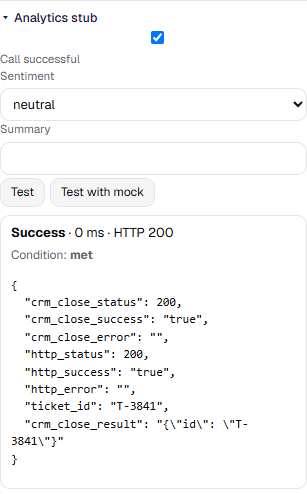
The analytics result does not exist before the call, so a trial run of a post-call function is given a stub. Expand the **Analytics stub** above the test buttons: it has the **Call successful** toggle, a **Sentiment** selector, and a **Summary** field. Change them, run the test, and watch the line "Condition: met" or "Condition: not met" — it only appears when a condition is set.
## What the variables hold
Besides the final call variables, post-call functions get two reserved ones.
**`call`** — the call summary: the same object that goes into the `call_ended` webhook (direction, numbers, duration, status, end reason, transcript).
**`analysis`** — the post-call analysis result:
| Field | Value |
| -------------------------------- | ----------------------------------------------------------------- |
| `analysis.status` | `done`, `skipped`, `disabled`, `pending`, `failed`, `interrupted` |
| `analysis.reason` | the reason, for example `analytics_disabled` |
| `analysis.summary` | conversation summary |
| `analysis.sentiment` | sentiment |
| `analysis.call_successful` | whether the call was successful |
| `analysis.custom_fields.` | the fields you configured in the agent's post-call analytics |
The keys are always present; the meaningful fields are filled only when `status = "done"`.
Nested values are reached with a dot, and they work not only in the condition but inside the request itself: `{{analysis.summary}}` can go into the message body for a manager, `{{call.duration}}` into a CRM field. A whole dictionary (`{{call}}`, `{{analysis}}`) is substituted as JSON.
## When they run
Post-call functions wait for the conversation analysis to finish, but no longer than **60 seconds** (the value is a platform setting).
* Post-call analytics is off, or the analysis was skipped by outcome — the functions run immediately with `analysis.status` set to `skipped`.
* The analysis is still queued — the block is deferred and runs as soon as the analysis is done; the delay after that is seconds.
* The analysis did not finish in time — the functions run with `analysis.status = "pending"`, and a late result will not re-run them.
Events appearing in the history a dozen seconds after the call ended are normal, not a failure.
## Testing a condition without a call
The analytics result does not exist before the call, so a trial run of a post-call function is given a stub. Expand the **Analytics stub** above the test buttons: it has the **Call successful** toggle, a **Sentiment** selector, and a **Summary** field. Change them, run the test, and watch the line "Condition: met" or "Condition: not met" — it only appears when a condition is set.