> ## Documentation Index
> Fetch the complete documentation index at: https://docs.hubtalk.ai/llms.txt
> Use this file to discover all available pages before exploring further.
# Campaign contacts
> The contact file and its requirements, adding batches, file retention and do-not-call screening.
# Campaign contacts
## Contacts upload and import results
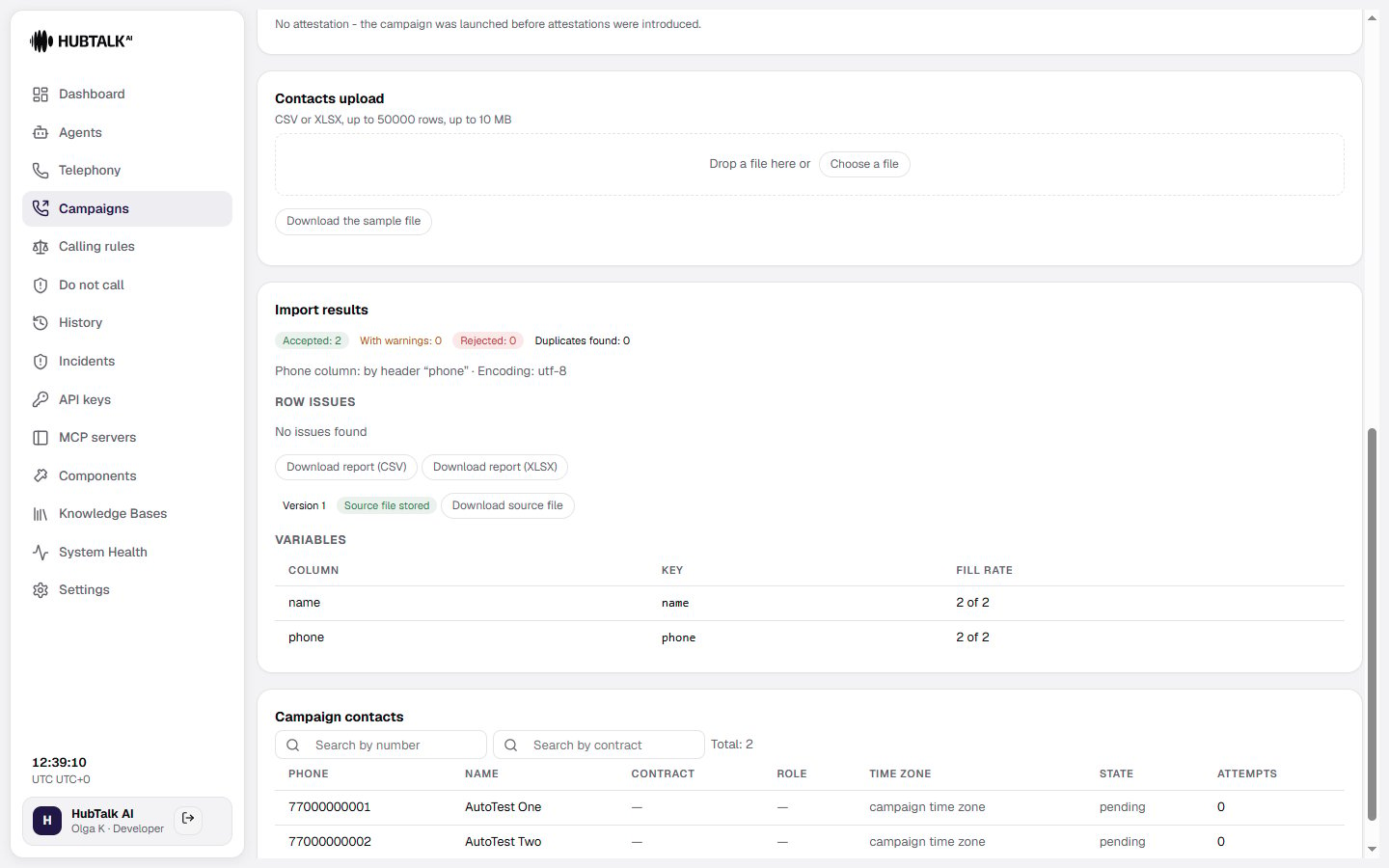
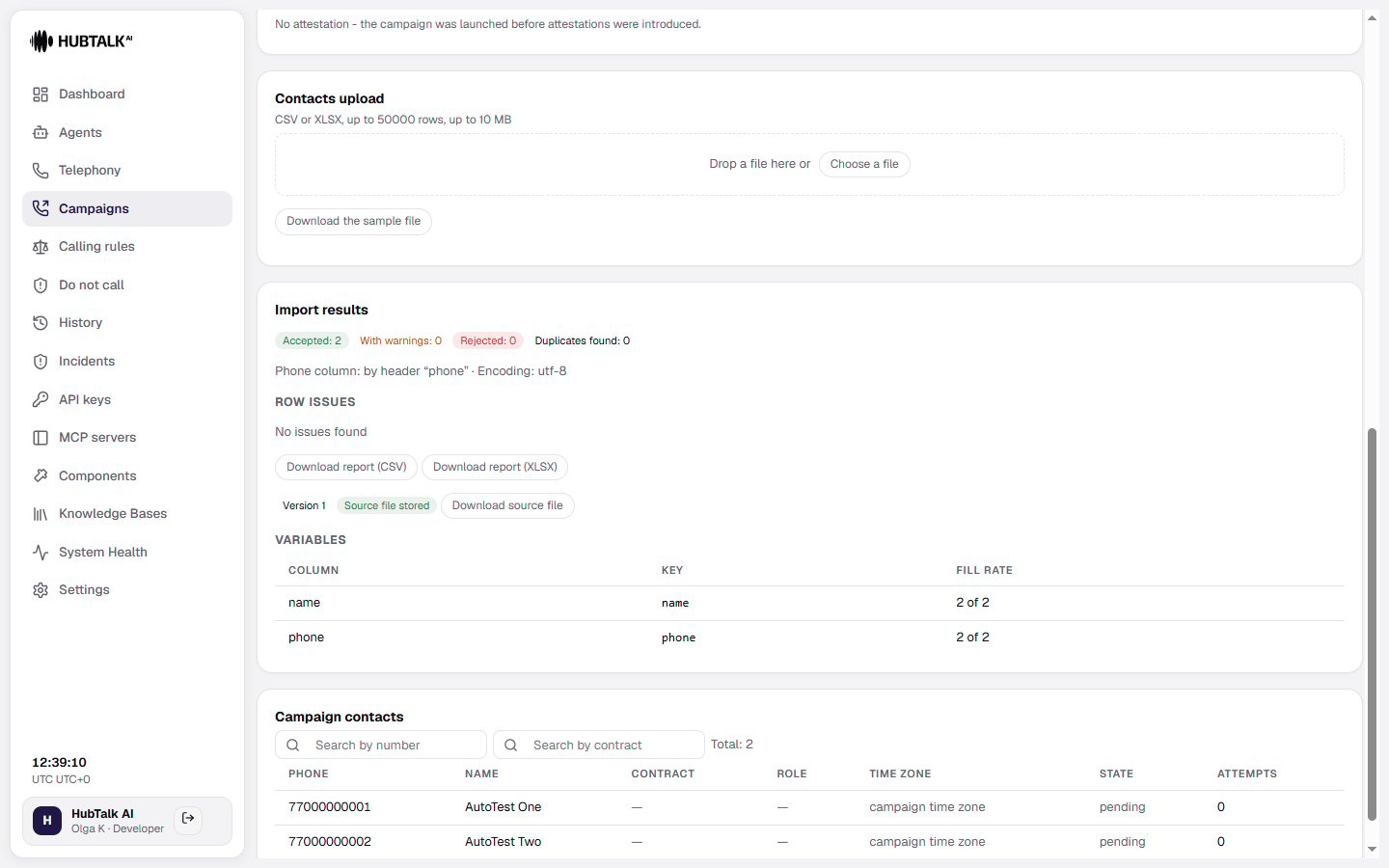
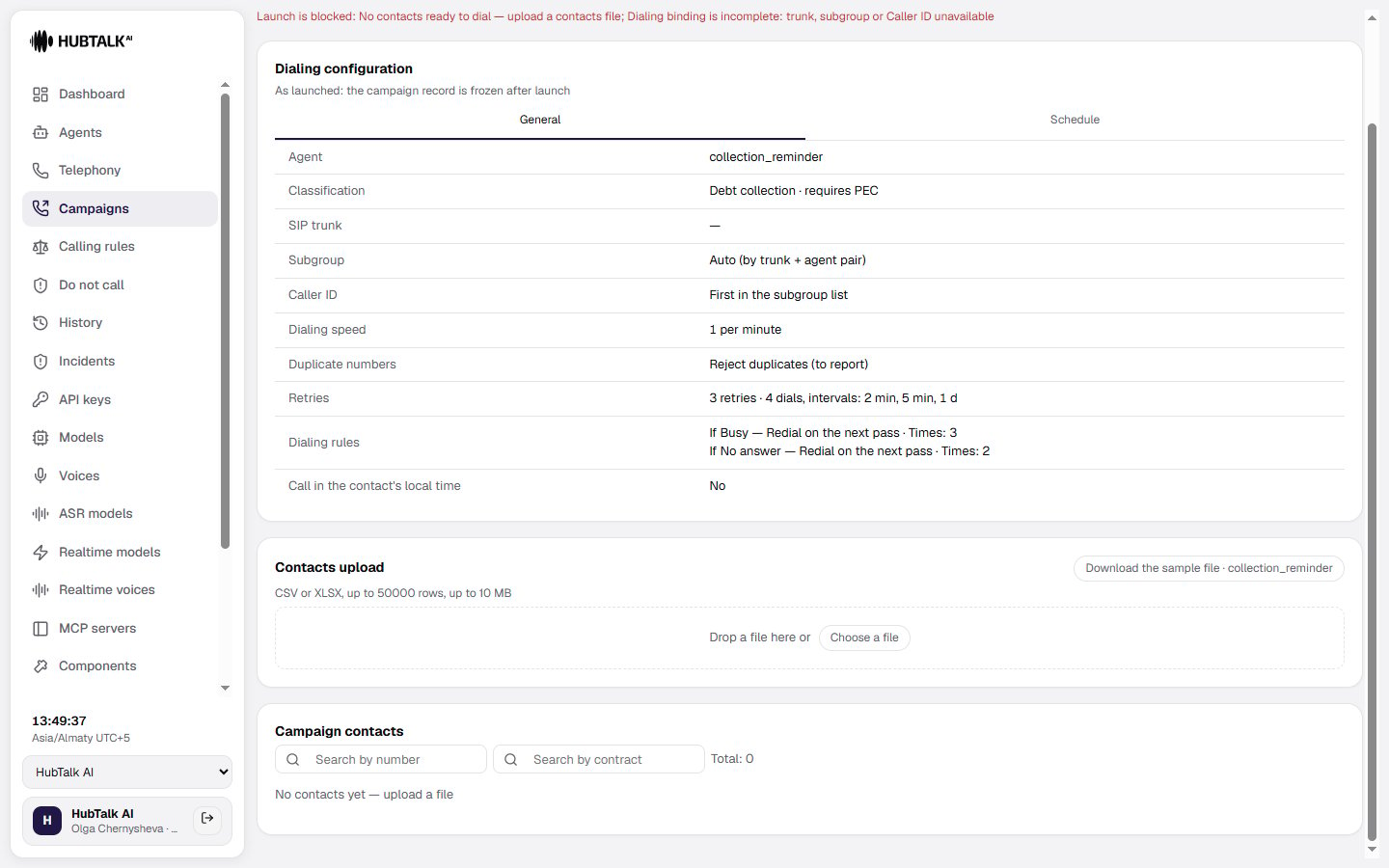
The **Contacts upload** block lets you upload the contact file. The **Import results** section shows accepted rows, warnings, rejected rows, duplicates, the phone column used, and row issues. You can download CSV or XLSX reports when validation produces issues.
The variables table lists imported columns, their variable keys, and fill rates. **Upload history** shows uploaded files, upload times, and how many rows were accepted.
 ## Contact file requirements
**CSV** and **XLSX** are accepted. The legacy **XLS format is not supported** — re-save the file. Limits: up to **50,000 rows** and up to **10 MB**; a file over the limit is **rejected in full, not truncated**.
* **Phone number** — the only always-mandatory column. The platform finds it by header (`phone`, `phone_number`, `mobile`, `cell`, `tel`, and similar), and falls back to detecting it by content when no recognizable header exists. Rows with an unreadable number are not dropped silently: they appear in the import report with their row number.
* **Name** is read from a `name` / `full_name` column, or assembled from `first_name` and `last_name`.
* **Any other column** becomes a call variable: amount owed, contract number, payment date.
**Download the sample file from the campaign form.** The sample is generated **for a specific agent** — it already contains the columns that agent uses in its prompts. It is the fastest way to avoid empty variables during the conversation, so take the sample for the agent you are actually going to run.
**Duplicate numbers.** The same person may appear in the file several times, and you choose what happens:
* **Reject duplicates** (the default) — the first occurrence stays, the rest go into the report as errors. This is the loud option: repeated rows usually mean the export from your system is misbehaving, and that is worth knowing.
* **Keep the first occurrence** — duplicates are dropped without errors.
* **Keep the last occurrence** — for when corrected rows are appended to the end of the file.
Whichever you pick, **a number enters the campaign at most once**. Repeat dials of the same person only happen as retries after a failed dial.
**Why a file may be rejected in full:** the phone column was not found or cannot be identified unambiguously; not a single row has usable data; the 50,000-row or 10 MB limit is exceeded; an unsupported format (XLS included) or a corrupted file; for US campaigns — neither `contact_zip` nor `contact_state` is present. The exact reason is given in the upload message.
## Contact file requirements
**CSV** and **XLSX** are accepted. The legacy **XLS format is not supported** — re-save the file. Limits: up to **50,000 rows** and up to **10 MB**; a file over the limit is **rejected in full, not truncated**.
* **Phone number** — the only always-mandatory column. The platform finds it by header (`phone`, `phone_number`, `mobile`, `cell`, `tel`, and similar), and falls back to detecting it by content when no recognizable header exists. Rows with an unreadable number are not dropped silently: they appear in the import report with their row number.
* **Name** is read from a `name` / `full_name` column, or assembled from `first_name` and `last_name`.
* **Any other column** becomes a call variable: amount owed, contract number, payment date.
**Download the sample file from the campaign form.** The sample is generated **for a specific agent** — it already contains the columns that agent uses in its prompts. It is the fastest way to avoid empty variables during the conversation, so take the sample for the agent you are actually going to run.
**Duplicate numbers.** The same person may appear in the file several times, and you choose what happens:
* **Reject duplicates** (the default) — the first occurrence stays, the rest go into the report as errors. This is the loud option: repeated rows usually mean the export from your system is misbehaving, and that is worth knowing.
* **Keep the first occurrence** — duplicates are dropped without errors.
* **Keep the last occurrence** — for when corrected rows are appended to the end of the file.
Whichever you pick, **a number enters the campaign at most once**. Repeat dials of the same person only happen as retries after a failed dial.
**Why a file may be rejected in full:** the phone column was not found or cannot be identified unambiguously; not a single row has usable data; the 50,000-row or 10 MB limit is exceeded; an unsupported format (XLS included) or a corrupted file; for US campaigns — neither `contact_zip` nor `contact_state` is present. The exact reason is given in the upload message.
 ## Adding calls to a running campaign
An ordinary campaign closes itself as soon as its queue runs dry, and accepts no numbers after that. If numbers will arrive in batches, create the campaign **open to call additions**: an empty queue does not end it — only the end date or a cancellation does.
Contacts are added to such a campaign straight from the cabinet, while it runs:
* **a batch is accepted whole or not at all.** Half a file will not get in: either every row passed, or the whole file is rejected with reasons;
* **each batch carries its own attestation.** The signature under the first file does not extend to the next one — the right to call is confirmed per batch;
* **a batch appears on the campaign card as its own row**, so "what was there originally and what was added later" does not turn into one pile.
**An open campaign must have an end date**, and it cannot be more than 30 days out: a campaign with neither a queue nor a date would never finish. The same batches can be sent [through the Web API](/v4/web-api) — it is one and the same mechanism.
## File retention
Uploaded files are kept: the attestation signature points at a specific document, and the file can always be downloaded exactly as the campaign was launched with it.
The full retention period is counted **from the campaign launch** and is configured per organization. The file of a campaign that was never launched is kept only briefly — two weeks by default. Retention can be switched off entirely: only the file's metadata and checksum remain, but you lose the ability to produce the very file you attested the right to call under. When the period expires the file is deleted, and that is recorded too: its metadata and the deletion date are kept.
## Do-not-call screening
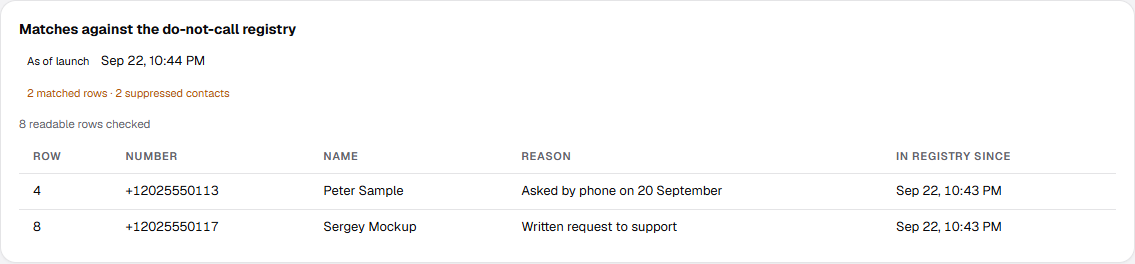
The uploaded file is screened against the do-not-call registry, and the **Matches against the do-not-call registry** block shows the whole result of that screening:
* **readable rows checked** — how many rows of the file had a readable phone and were screened;
* **rows not screened** — the phone could not be read; these rows do not count as clean and are named separately;
* **matched rows · suppressed contacts** — two different figures: the same number may appear in the file more than once;
* a table of matches with the columns **row**, **number**, **name**, **reason** and **in registry since** — quoted in full, not hinted at. When there are many matches the preview is truncated, and a **Download exact list** button (CSV or XLSX) appears beside it.
With a zero result the block does not stay silent — it states that there are no matches and how many rows were checked.
## Adding calls to a running campaign
An ordinary campaign closes itself as soon as its queue runs dry, and accepts no numbers after that. If numbers will arrive in batches, create the campaign **open to call additions**: an empty queue does not end it — only the end date or a cancellation does.
Contacts are added to such a campaign straight from the cabinet, while it runs:
* **a batch is accepted whole or not at all.** Half a file will not get in: either every row passed, or the whole file is rejected with reasons;
* **each batch carries its own attestation.** The signature under the first file does not extend to the next one — the right to call is confirmed per batch;
* **a batch appears on the campaign card as its own row**, so "what was there originally and what was added later" does not turn into one pile.
**An open campaign must have an end date**, and it cannot be more than 30 days out: a campaign with neither a queue nor a date would never finish. The same batches can be sent [through the Web API](/v4/web-api) — it is one and the same mechanism.
## File retention
Uploaded files are kept: the attestation signature points at a specific document, and the file can always be downloaded exactly as the campaign was launched with it.
The full retention period is counted **from the campaign launch** and is configured per organization. The file of a campaign that was never launched is kept only briefly — two weeks by default. Retention can be switched off entirely: only the file's metadata and checksum remain, but you lose the ability to produce the very file you attested the right to call under. When the period expires the file is deleted, and that is recorded too: its metadata and the deletion date are kept.
## Do-not-call screening
The uploaded file is screened against the do-not-call registry, and the **Matches against the do-not-call registry** block shows the whole result of that screening:
* **readable rows checked** — how many rows of the file had a readable phone and were screened;
* **rows not screened** — the phone could not be read; these rows do not count as clean and are named separately;
* **matched rows · suppressed contacts** — two different figures: the same number may appear in the file more than once;
* a table of matches with the columns **row**, **number**, **name**, **reason** and **in registry since** — quoted in full, not hinted at. When there are many matches the preview is truncated, and a **Download exact list** button (CSV or XLSX) appears beside it.
With a zero result the block does not stay silent — it states that there are no matches and how many rows were checked.
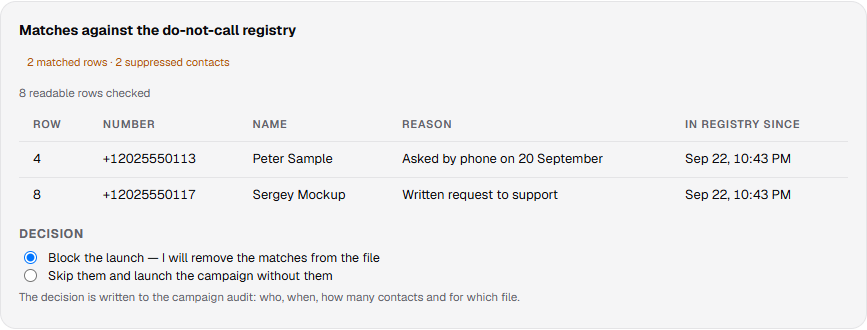 A decision is required before launch: **block the launch** (the default) or **skip the matches and launch the campaign without them**. The decision is written to the campaign audit — who, when, how many contacts, and for which file; a new upload voids the previous decision. If no callable contact remains, skipping is unavailable.
The file itself is not modified: the rows stay as they are, and the platform refuses at dial time.
After launch the screen is **frozen** and labelled "As of launch" — the grounds on which the campaign went dialing are not recomputed after the fact.
A decision is required before launch: **block the launch** (the default) or **skip the matches and launch the campaign without them**. The decision is written to the campaign audit — who, when, how many contacts, and for which file; a new upload voids the previous decision. If no callable contact remains, skipping is unavailable.
The file itself is not modified: the rows stay as they are, and the platform refuses at dial time.
After launch the screen is **frozen** and labelled "As of launch" — the grounds on which the campaign went dialing are not recomputed after the fact.
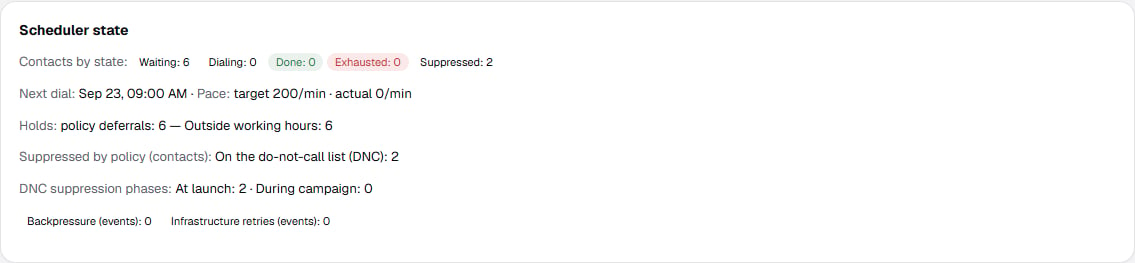
 The suppression phases themselves — **at launch** and **during the campaign** — are counted in the "Scheduler state" block on the campaign card, next to the "Suppressed by policy" line.
 The dashboard and the [Web API](/v4/web-api) run this screening through the same code, so the result and its evidence are identical no matter where the campaign was launched from. The Member role sees the campaign and screening screens read-only.
## Campaign contacts
The **Campaign contacts** table contains the contacts loaded into the campaign. Search by phone number and review the total count, phone, name, time zone, state, and number of attempts for each contact.
The dashboard and the [Web API](/v4/web-api) run this screening through the same code, so the result and its evidence are identical no matter where the campaign was launched from. The Member role sees the campaign and screening screens read-only.
## Campaign contacts
The **Campaign contacts** table contains the contacts loaded into the campaign. Search by phone number and review the total count, phone, name, time zone, state, and number of attempts for each contact.