> ## Documentation Index
> Fetch the complete documentation index at: https://docs.hubtalk.ai/llms.txt
> Use this file to discover all available pages before exploring further.
# Telephony
> Platform guide for telephony setup in HubTalk AI v4.
# Telephony
Telephony connects your HubTalk AI v4 agent to real phone calls. This page explains how to bind numbers, test calls, and make sure voice routing works smoothly.
## Why telephony matters
Your agent can only serve callers when a phone number is attached and the call route is configured correctly. Telephony setup lets you:
* receive inbound calls
* place outbound calls
* route transfers to human operators
* manage the voice channel for your agent
## What to set up
Start with these steps:
1. Attach a phone number or SIP trunk to the agent.
2. Define which number routes to which agent.
3. Configure call transfer and fallback behavior.
4. Test inbound and outbound calls.
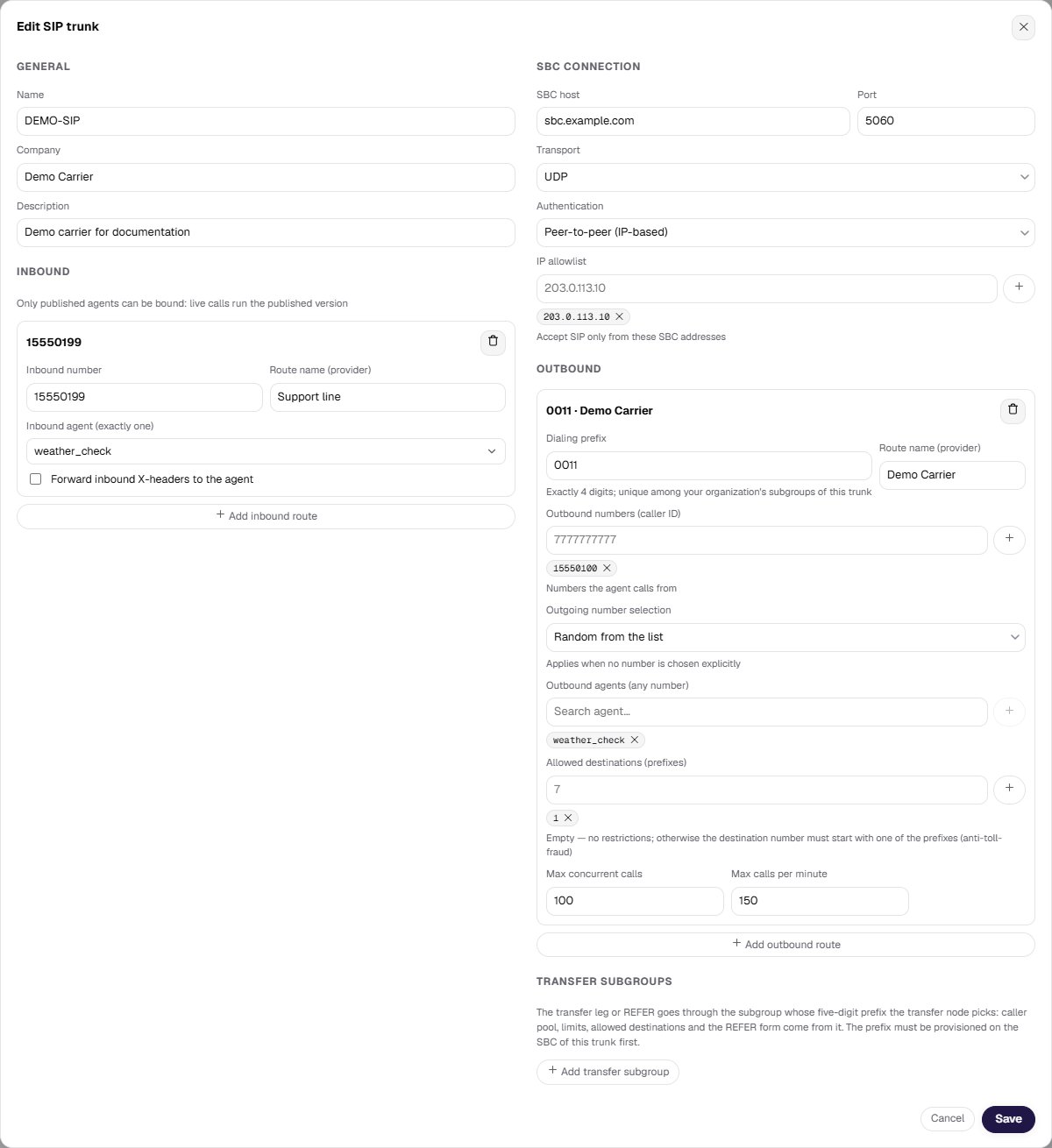 Wherever an agent is picked from a list — the inbound subgroup card, the test call dialog, the campaign form, a phrase fixup rule — the field is a **searchable list**: type a few letters of the name instead of scrolling. These are exactly the lists that grow with the organization, and in a large one the right agent is not findable by eye.
## Which number the call goes out from
An outbound subgroup usually holds more than one number. **Outgoing number selection** in the subgroup card decides which one a call takes when nobody names a number explicitly:
* **Random from the list** — a number is picked at random for each call. This is the default.
* **Round-robin over the list** — numbers are used in turn, so the pool is spread evenly.
The policy applies wherever a call starts without an explicit number: the dashboard, the [Web API](/v4/web-api) when the request omits the number, and every campaign attempt. Call and campaign forms offer **By subgroup policy** as their number option, which hands the choice back to this setting.
Candidates are the subgroup's pool **intersected with the pool the route permits**. When that intersection is empty, the call is refused with a clear error rather than placed from some other number. Once chosen, the number is fixed for the whole call: a transfer leg goes out from the same number that was dialed from.
**Check what your traffic analytics rests on.** Outbound calls go out from different numbers of the pool — the policy picks a number for each call separately. A report that assumes every outbound call comes from the same number will give a false picture.
## An inbound number belongs to one agent
**An inbound number is bound only once.** It cannot be registered twice — neither on another trunk nor again on this one: the platform refuses the write on all paths, not only in the form.
## The line transfers go out on
A trunk has a third direction next to inbound and outbound — **transfer**. In the trunk settings it is the **Transfer subgroups** block: a card with its own numbers, limits and permitted destinations, exactly like an outbound one. This is the line a call to an operator goes out on, and the one a transfer node in the flow points at.
Worth knowing:
* **A transfer subgroup prefix is five digits**, an outbound one is four. A prefix is unique **among the subgroups of one organization on one trunk**: it stands for exactly one of your lines, so two identical ones would put two lines on one rule.
* The prefixes must exist **on the telephony side before** anyone picks them in a flow. Otherwise the transfer never reaches the operator.
* **The transfer address format** is set in the transfer subgroup card; outbound subgroup cards do not carry the field. A value saved in an outbound subgroup keeps working until you create a transfer subgroup.
**Prefixes already saved are not re-validated.** The format and uniqueness checks apply only to a **new or changed** value: a subgroup with a non-standard prefix, or with a duplicate, does not stop you from saving the trunk, and the platform will not rename or archive it for you.
## Testing the connection
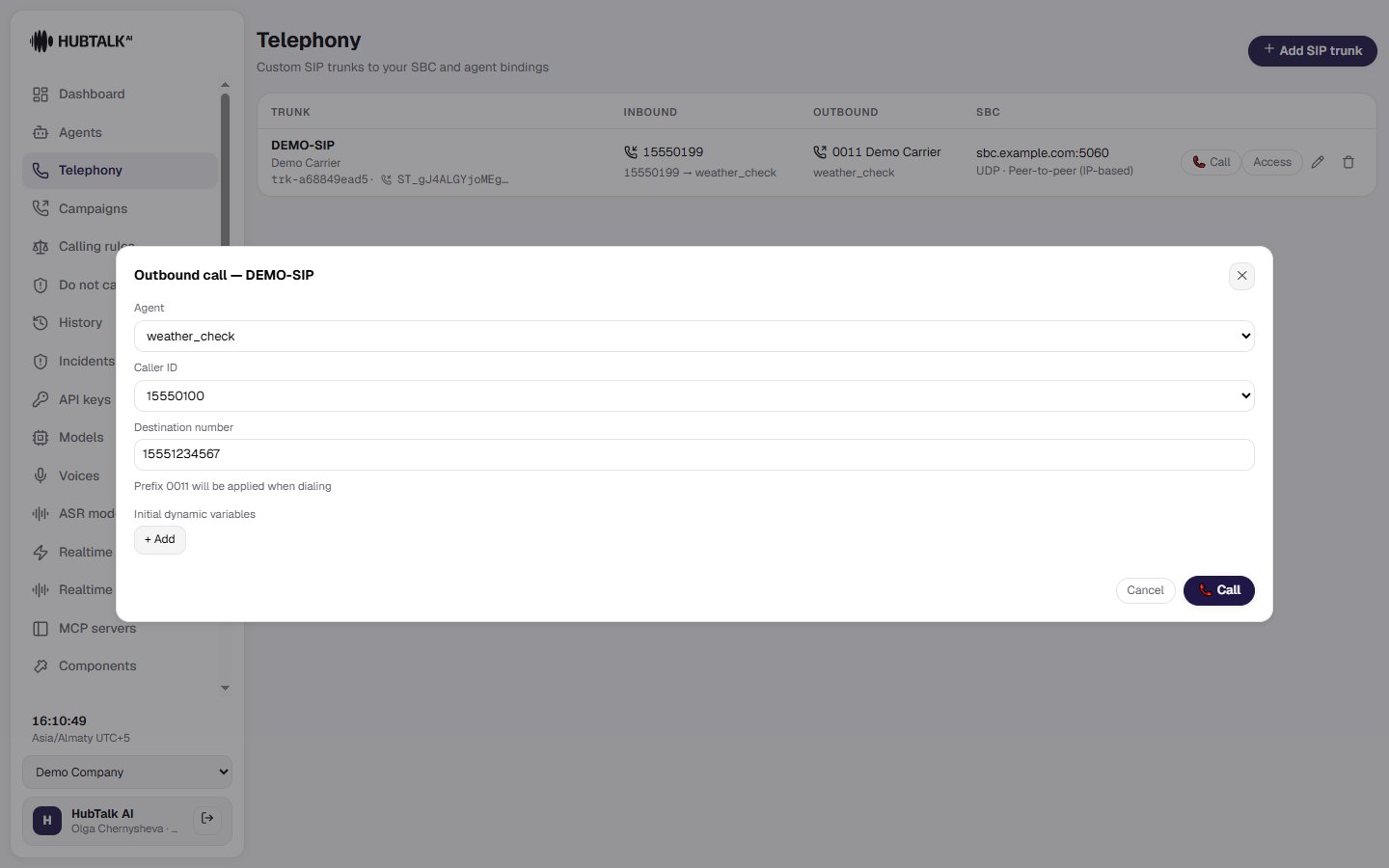
Run a few real test calls to confirm:
* the call reaches the correct agent
* audio is clear and stable
* the agent answers promptly
* transfers go to the right destination
Wherever an agent is picked from a list — the inbound subgroup card, the test call dialog, the campaign form, a phrase fixup rule — the field is a **searchable list**: type a few letters of the name instead of scrolling. These are exactly the lists that grow with the organization, and in a large one the right agent is not findable by eye.
## Which number the call goes out from
An outbound subgroup usually holds more than one number. **Outgoing number selection** in the subgroup card decides which one a call takes when nobody names a number explicitly:
* **Random from the list** — a number is picked at random for each call. This is the default.
* **Round-robin over the list** — numbers are used in turn, so the pool is spread evenly.
The policy applies wherever a call starts without an explicit number: the dashboard, the [Web API](/v4/web-api) when the request omits the number, and every campaign attempt. Call and campaign forms offer **By subgroup policy** as their number option, which hands the choice back to this setting.
Candidates are the subgroup's pool **intersected with the pool the route permits**. When that intersection is empty, the call is refused with a clear error rather than placed from some other number. Once chosen, the number is fixed for the whole call: a transfer leg goes out from the same number that was dialed from.
**Check what your traffic analytics rests on.** Outbound calls go out from different numbers of the pool — the policy picks a number for each call separately. A report that assumes every outbound call comes from the same number will give a false picture.
## An inbound number belongs to one agent
**An inbound number is bound only once.** It cannot be registered twice — neither on another trunk nor again on this one: the platform refuses the write on all paths, not only in the form.
## The line transfers go out on
A trunk has a third direction next to inbound and outbound — **transfer**. In the trunk settings it is the **Transfer subgroups** block: a card with its own numbers, limits and permitted destinations, exactly like an outbound one. This is the line a call to an operator goes out on, and the one a transfer node in the flow points at.
Worth knowing:
* **A transfer subgroup prefix is five digits**, an outbound one is four. A prefix is unique **among the subgroups of one organization on one trunk**: it stands for exactly one of your lines, so two identical ones would put two lines on one rule.
* The prefixes must exist **on the telephony side before** anyone picks them in a flow. Otherwise the transfer never reaches the operator.
* **The transfer address format** is set in the transfer subgroup card; outbound subgroup cards do not carry the field. A value saved in an outbound subgroup keeps working until you create a transfer subgroup.
**Prefixes already saved are not re-validated.** The format and uniqueness checks apply only to a **new or changed** value: a subgroup with a non-standard prefix, or with a duplicate, does not stop you from saving the trunk, and the platform will not rename or archive it for you.
## Testing the connection
Run a few real test calls to confirm:
* the call reaches the correct agent
* audio is clear and stable
* the agent answers promptly
* transfers go to the right destination
 ## Common checks
* correct phone number assignment
* active SIP trunk or number mapping
* transfer rules and operator contacts
* call recording and logging if needed
## When to get help
If a call does not connect, review the number binding and telephony settings first. For infrastructure support, work with your telephony team or contact HubTalk AI support.
## Common checks
* correct phone number assignment
* active SIP trunk or number mapping
* transfer rules and operator contacts
* call recording and logging if needed
## When to get help
If a call does not connect, review the number binding and telephony settings first. For infrastructure support, work with your telephony team or contact HubTalk AI support.