

Fields and variables
The Fields and variables tab in the registry script window. On the right are the V2 request fields; on the left are the variables of the agent’s published version and where each gets its value. A field without an entry goes to the agent as is, under its own name.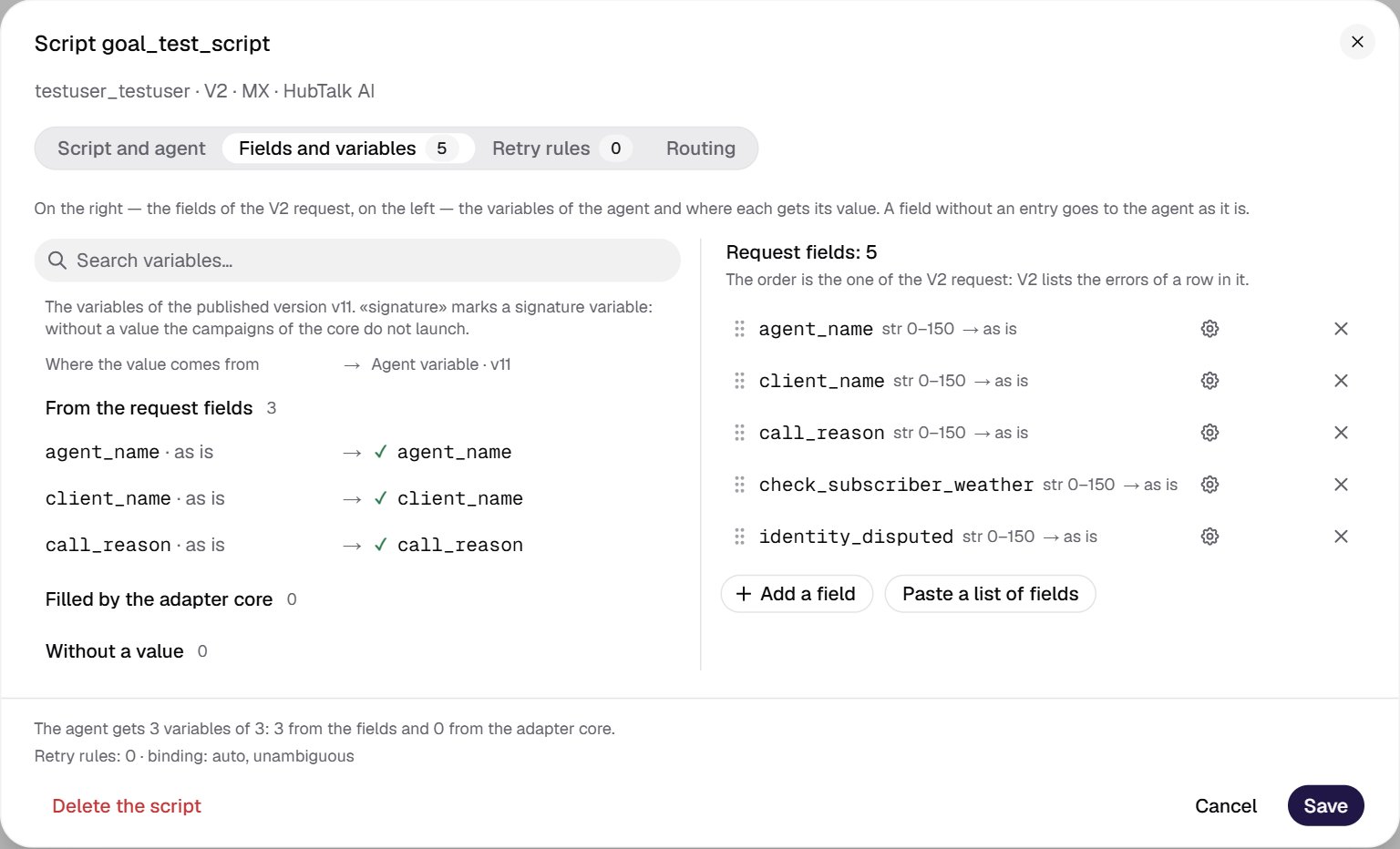
- Agent variable search.
- From the request fields: variables that get a value from fields; “as is” — a field without an entry.
- Filled by the adapter core:
rl_today— the campaign day. - Without a value: the agent default applies; a signature variable here is a red blocker.
- Field row: name, form (
str 0–150), target ”→ as is”. - Row controls: the ⋮⋮ handle on the left — drag, ⚙ settings, × remove. The ↑↓ order arrows appear when you hover over the row.
- Add a field one at a time or Paste a list of fields — one name per line.
How to add fields
1
Take the row schema from a real client request
All keys of a
data[] row except the four common ones must be schema fields. An extra key in the request gives the refusal “#key# does not exist in the format of the request”, a missing one — “The required field is missing #key#”. All schema fields are required in every row.2
Paste the list of fields
The Paste a list of fields button, one name per line. Each name becomes a
str 0–150 field with any characters and goes to the agent as is. Duplicates are skipped; the result is “Added N, skipped M”.3
Set the order
Drag by the ⋮⋮ handle, or use the ↑↓ arrows that appear when you hover over the row. The order matters for the text of V2 errors and nothing else.
4
Open ⚙ on the field and refine the form
See Field forms. The form and limits repeat the V2 checks: a row V2 would reject is rejected by the adapter too.
5
Assign the agent variable
As is, Into a variable or Do not pass. Check the left panel: no signature variable of the agent may remain “without a value”.
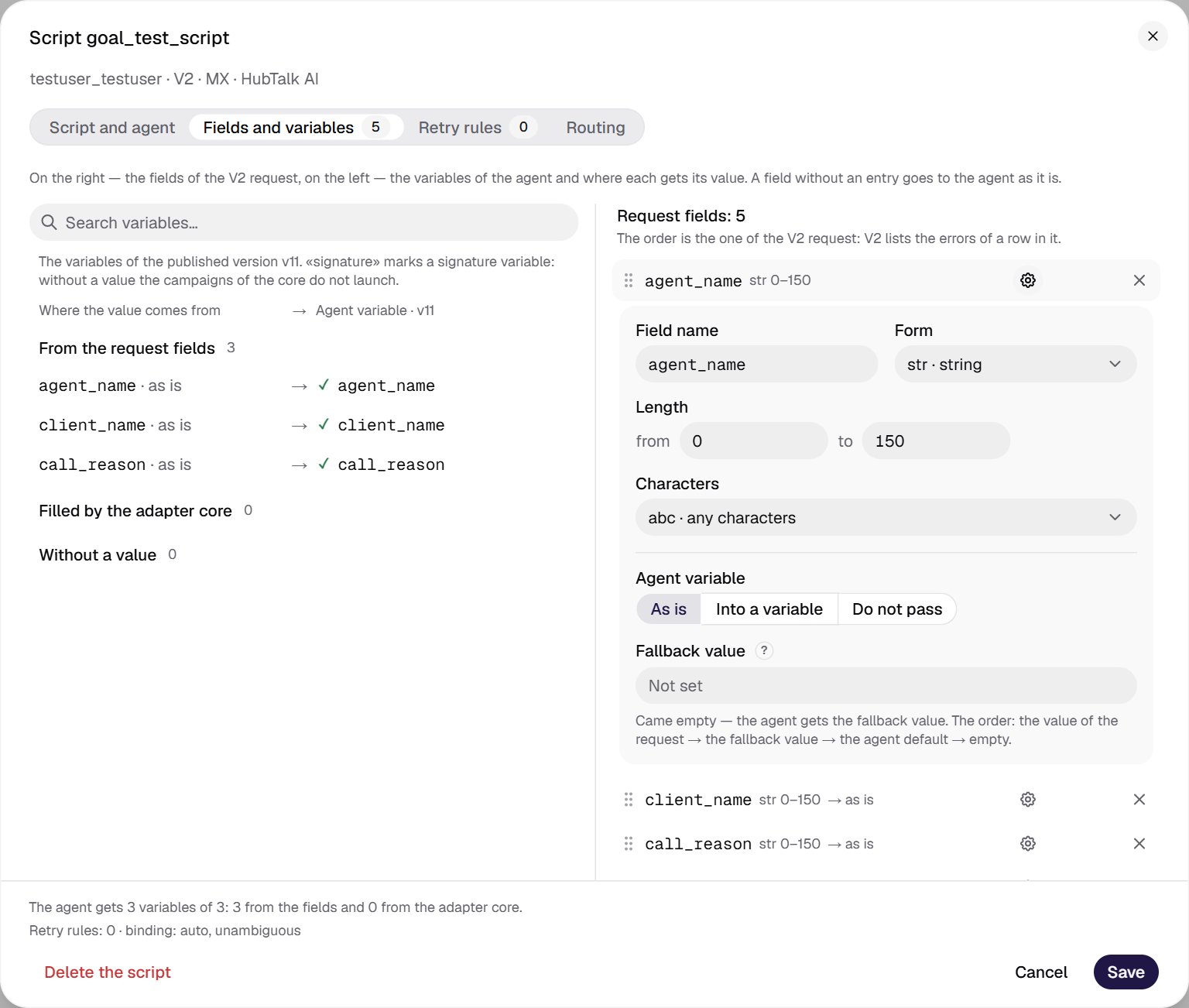
agent_name field: form str 0–150, goes to the agent as is.
- Field name — the key in the request row.
- Form:
str,int,dte,dte_usa,arr. - Length for
str(or Value from/to forint). - Characters for
str:abc,123,alphabet,ru,arabic. - Agent variable: As is, Into a variable, Do not pass.
- Fallback value if the value arrived empty: request → fallback → agent default → empty.
Field forms
Variable assignment
- A fallback value is available only for
strwith a minimum length of 0: V2 does not let an empty value of other forms through. Order: value from the request → fallback value → agent default → empty. An empty value without a fallback is not passed to the agent at all, and the variable’s default in the agent applies. The fallback must fit the field form and be no longer than 1000 characters. foreign_id— the external record ID on the client side. By default it is not passed to the agent; an Into a variable entry puts a copy of it into an agent variable. It has no fallback.- Reserved names:
phone_number,type,gender_voice,languageand the service columns of contact upload (phone,mobile,cell,msisdn,timezone, contract group and role headers). They cannot be made a schema field or an entry target. - Variables set by the platform (
from_number,to_number,today,call_dateand the like) cannot be an entry target.
rl_today and signature variables. The adapter core fills exactly one variable — rl_today, the campaign day in DD.MM.YYYY format. It overrides a request field of the same name.The agent’s signature variables (marked signature in the left panel) must get a value — from a field, a map entry or the core — otherwise the script is not saved: campaigns without signature variables do not launch. For agent variables, see Variables.How a field reaches the agent: the final order
For eachdata[] row:
- Common fields:
phone_numberandtypenever become variables;gender_voiceandlanguagego to the agent as variables under their own names. - A schema field without a map entry goes as is, under the field name.
- An Into a variable entry renames the field to the selected agent variable; Do not pass — the field is not passed.
- An empty value takes the entry’s fallback value; without a fallback the key is not passed, and the variable’s default in the agent applies.
foreign_idgoes to the agent only through an Into a variable entry.- The core writes
rl_todaylast.
{{name}}. Where to check what reached the agent — see Passing variables to the agent.