Call frequency

Calling windows say when a number may be dialed. Frequency limits say how often. They apply to each phone number across all campaigns of the organization, so two campaigns calling the same person share one budget.

Where the numbers come from

Your organization sets a frequency policy — calls per subscriber over a rolling 7 days, calls per subscriber per day, a cooldown after a marketing conversation, a cooldown after a servicing conversation, a cap on voicemails, and a decay after several windows without contact. A campaign can carry its own Setting for this campaign on top of that.
A campaign setting can only tighten, never loosen. Lower the limits or increase the waiting time and it is accepted; anything looser than the organization setting is refused by the server when you save. The campaign wizard and the campaign card say so in the field itself, so the rule is visible before you try.The one exception is the on/off switch below, which is not a value but a separate control, and which only a platform administrator may turn off.
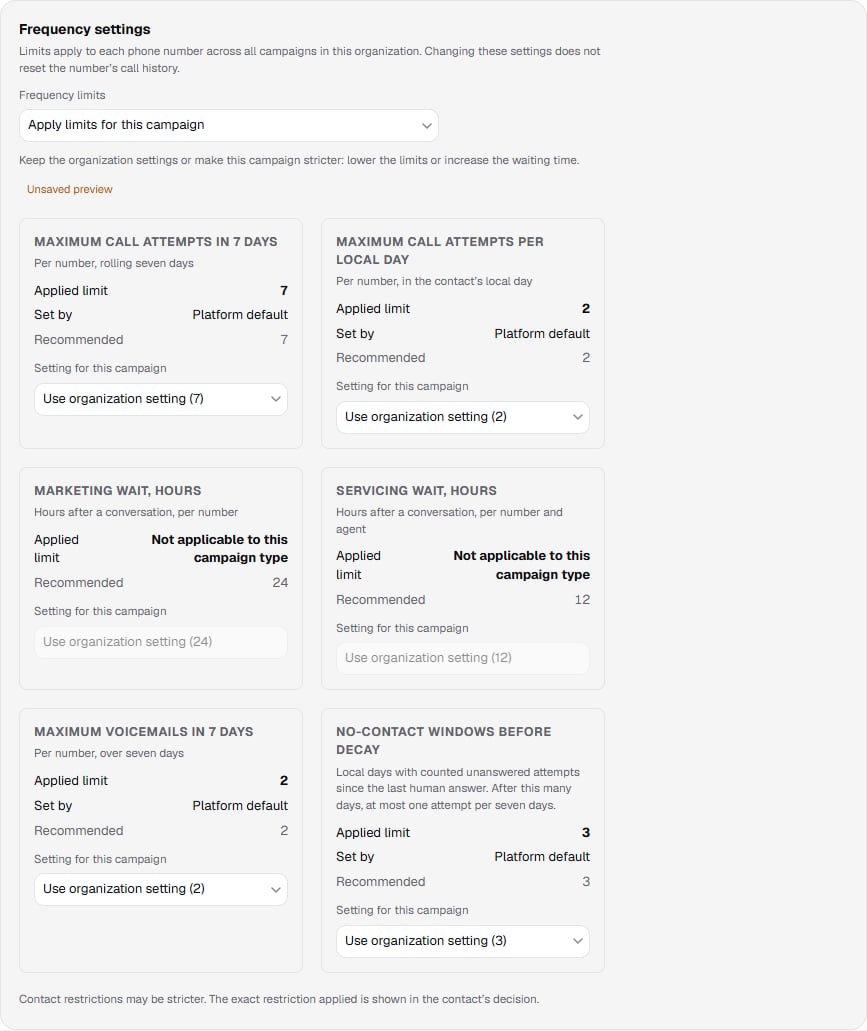
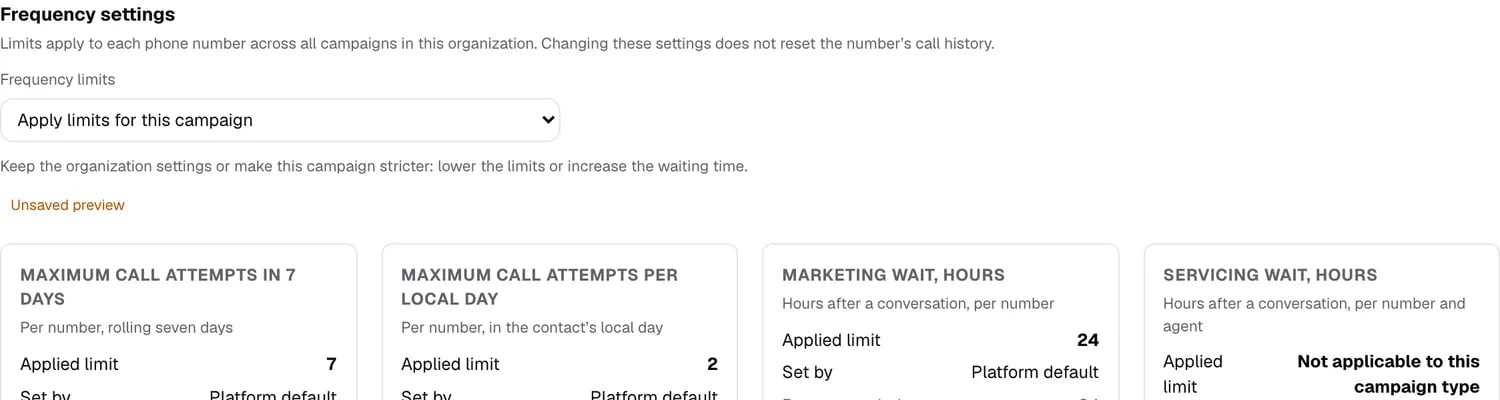
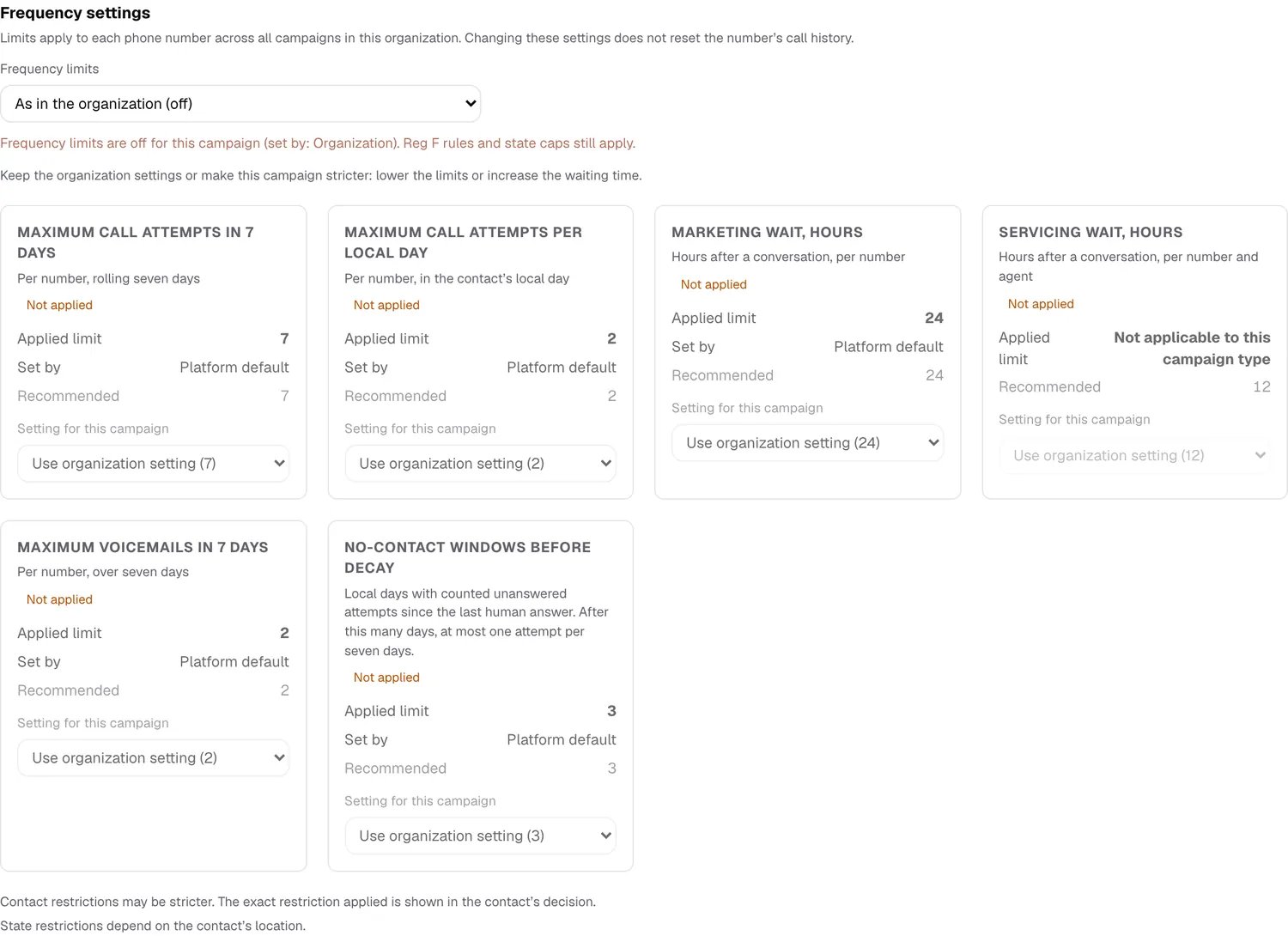
Each limit in the wizard and the campaign card shows four things: the Applied limit that is actually in force, the Source it came from (organization setting, campaign setting, or a legal cap), the Recommended value, and, where relevant, Not applicable to this campaign type. The warning about exceeding the recommendation follows the applied limit of the campaign, not the raw value you typed. The Frequency settings block on the Dialing step: applied limit, source, recommendation, and the not-applicable note

Switching the limits off

Frequency limits can be switched off — for the whole company, or for a single campaign. This exists for trials: the platform switches them off while a feature is being tested, and you switch them on when you are confident. Two settings. Organization sets the default for the company. Campaign inherits it and can override it. Switching them on is yours; switching them off is the platform administrator’s.
Which way the switch starts is decided by the organization’s market.
  • US profile — a new organization is created with the limits on: there frequency is part of compliance, with state law and Reg F on top of it.
  • Kazakh profile — with the limits off: the market norm is the calling window and the do-not-call registry, not frequency caps.
A Kazakh organization has its limits switched off by default — in Kazakhstan they are a company’s voluntary self-restriction, not a legal requirement. You can switch them on at any time: the values you entered are stored and apply again as soon as the switch goes back on.Moving an organization to a different market profile resets the switch to the new market’s default: to the US profile switches it on, back switches it off. The activity log records that as its own entry, so an automatic change is distinguishable from a manual one.

The company setting

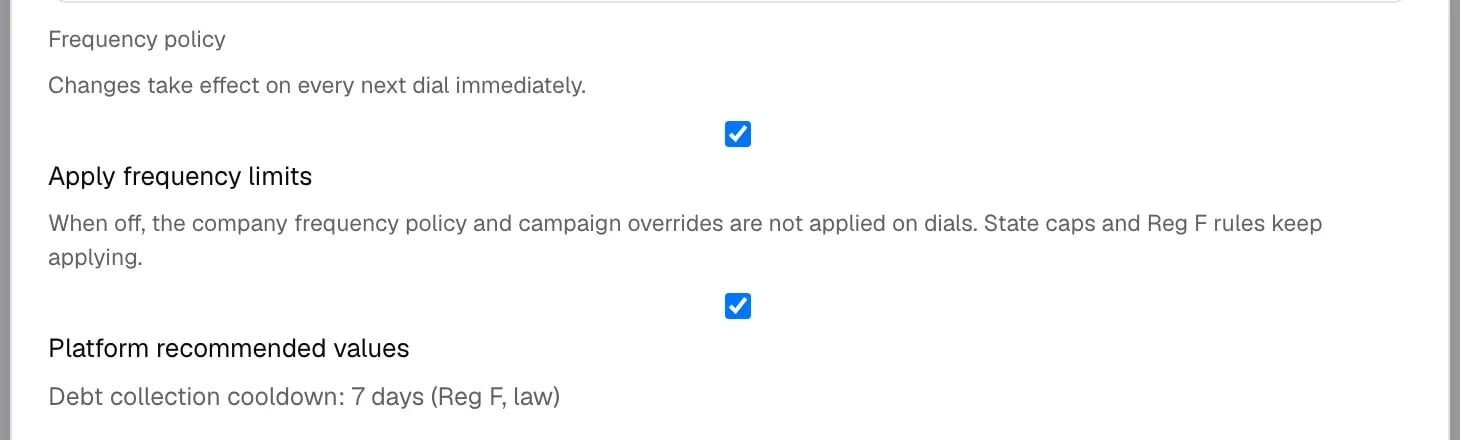
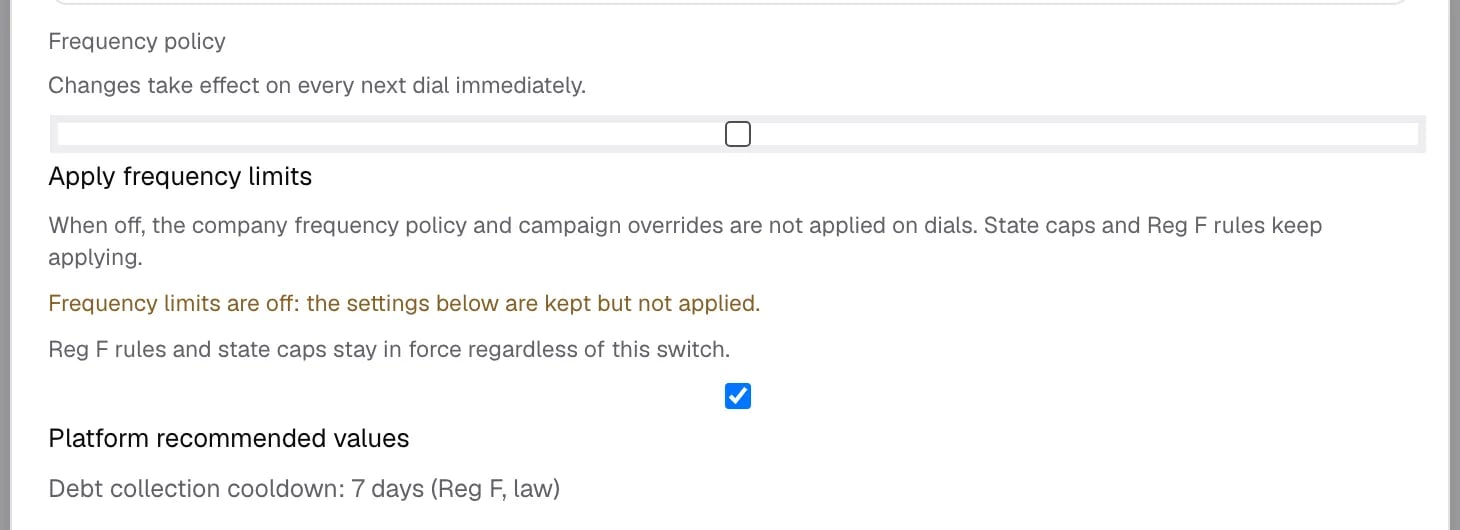
Open Organization → the pencil icon next to the company → Edit organization. The switch sits above the six limits. Frequency policy block with the Apply frequency limits switch turned on Untick it and the block says plainly what changed. The six values below stay saved — they are simply not applied until the switch goes back on. The same block with the switch off, showing the two notices Press Save. The change takes effect on the very next dial; nothing needs restarting.
The campaign setting

Open the campaign → Frequency settings. The control at the top has three states: Inheritance is resolved at dial time, not copied when the campaign is created: flip the company switch and every inheriting campaign follows. Campaign frequency settings inheriting an organization with limits off Inheriting a company that has the limits off: a banner names the source, and every one of the six cards is marked Not applied. Switch the control to Apply limits for this campaign and both the banner and the marks go. The same control switched to Apply limits for this campaign Frequency settings are editable while the campaign is a draft. Before launching, the review screen carries the same statement: the company limits are off and who set them off. On the US profile it adds that Reg F rules and state caps still apply; on the Kazakh profile that sentence is absent — promising a legal layer where there is none would be untrue.
What the switch does not touch

  • State caps and Reg F stay on — on the US market profile. They are law, not a client setting — see Legal caps below. The Kazakh profile has no legal layer at all: Reg F applies only on the market that declared it.
  • Calling hours stay on. A contact waiting because of the time of day keeps waiting. If a test campaign still does not dial, check the hours before the limits.
  • The do-not-call registry stays on.
Calls made with the limits off still count later. They are written to the number’s call history as usual, and when the limits come back on those calls count towards them. The switch gives you freedom to dial during testing, not a clean history afterwards. If a clean history matters, use a separate test organization.

Who can do what

Every switch is written to the activity log — who, when, and the value before and after. Each call also records which mode it was placed in, so the call history stays honest about the calls made with the limits off.

Watching it during the run

The campaign progress has a Frequency block that separates two outcomes: contacts held by frequency restriction — waiting, to be dialed once the window passes — and contacts closed by frequency restriction, which will not be dialed by this campaign at all. The contact listing carries the reason next to each contact and the stored frequency decision behind it: the governing restriction that decided the case, the counters at the moment of the decision, and the end of the restriction. The decision is stored, not recomputed — a contact shows the rule that applied when it was evaluated.

One voicemail per day

A separate rule next to the frequency policy: a subscriber gets no more than one voicemail a day from the whole organization. The switch lives in the organization settings, directly under the time zone — the neighbourhood is deliberate, because the day is the contact’s local day. The rule is off by default and is switched on by the organization administrator. With the rule on:
  • the first answering machine of the contact’s local day gets a message, as usual;
  • later that day the call is still placed and ends in silence — the campaign attempt is spent in full, while the weekly voicemail cap is not;
  • the decision covers the organization, not one campaign: two campaigns calling the same person cannot both leave a message.
The scope is the organization, and that is the point. The promise “one message a day” only holds when a neighbouring campaign cannot break it. A per-campaign switch would look like a guarantee without being one.
Two honest limits.The rule works where the answering machine was detected. If the platform did not recognize one, there is nothing for it to count.And a suppressed call is not entirely silent: the agent says hello before the verdict arrives, so the start of the greeting still lands in the mailbox. Complete silence is not available in this scenario.
In the call history such a call carries its own end reason, so “the agent is configured not to leave messages” and “the rule forbade it today” can be told apart.

Answering-machine detection

An answering machine that talks without pausing is recognized by its characteristic phrases (“you have reached…”, “leave a message”) in the text as it accumulates, without waiting for a pause in the speech. In the call event and in History such a verdict is labelled marker on interim transcript.
The limit is stated plainly. If a long greeting contains no characteristic phrase and has no pause either, the verdict will still come out as “human” by timeout. This is the first part of the work; detecting an answering machine by voice, by phrases of your own, and suppressing the echo of the agent’s own speech are separate tasks.
The rule is independent of the frequency limits switch — they are two separate controls. Limits can be off while the rule works, and the other way round. For organizations on the US market profile, jurisdictions add their own caps on top of your policy, and the strictest wins. A sub-jurisdiction identified by ZIP prefix is resolved before the statewide rule; which edition of a rule applies is decided by its effective date in the contact’s time zone. Servicing calls are exempt from state restrictions — organization restrictions still apply to them. Each cap records the citation of the norm it comes from, and that citation travels with the decision into the audit trail.
Check the citations before you lean on them. The shipped reference includes entries marked “norm citation not found”. They are real caps with an unverified source, and it is better to discover that here than in an audit.