

Pre-call functions
Pre-call functions run before the conversation — before the number is dialed on an outbound call, and after the connection but before the agent’s first line on an inbound one. Their result lands in the call’s variables, so the agent knows them from its first word. When exactly the block starts and what budget it has is on Pre- and post-call functions.Adding a pre-call function
In the pre-call functions block, click + Add and pick a kind:- Custom function — an HTTP request to your system;
- Code — a short Python script in a sandbox.
Shared fields
- Name — the heading of the card and of the panel. It is a label only; it does not affect variables.
- Description — a note for you and your colleagues.
- When to run — “After previous” or “Parallel with previous” (see Ordering and parallelism).
Custom function (HTTP)
- Name — inside the function form this is a second, different field, and it is the prefix of the result variables. A function named
crmwritescrm_status,crm_success,crm_error,crm_result. Both fields are labeled “Name”: the one at the top of the panel is the card title, the one inside the function form is the prefix. - Execution mode — “Mock (fixed response)” or “HTTP (real call)”. While you are still building the flow, keep the mock: nothing leaves the platform.
- Method, URL, headers, query parameters, body — every one of these fields supports
{{variable}}substitution. - Response variables (variable ← JSONPath) — the variable name the flow will see is on the left, the path in the JSON response on the right, for example
$.data.balance. Only what is listed here becomes a variable. - Timeout, s — 10 by default, 30 maximum.
- Retries and Backoff, s — 0 by default, so there are no retries. A retry fires on a network error, a timeout, and a 5xx response; a 4xx is not retried. Remember that retries run inside the block timeout.
- Successful response statuses —
2xxby default; you can list your own codes and ranges, for example200-299, 404.

Code
- Code — a Python sandbox. It exposes
vars(the call variables),metadata(call metadata),http(...)(a request under the same URL policy as a custom function), andnow("Asia/Almaty"). There are no imports, no file access, and noprint. - Output variables (comma-separated) — the names your code put into
result; they become dynamic variables of the call. A name the code did not fill stays empty. The namesvars,result,now,metadata, andhttpbelong to the sandbox itself: an output variable named like one of them never reaches the call variables, and the builder warns about it. - Timeout, s — 10 by default, 30 maximum.

The variables a function produces
A custom function always writes a service set, even with an empty response mapping:
Plus everything you listed under response variables. On a name clash your mapped variable wins over the service one.
A code function writes
<id>_success and <id>_error — its prefix is not the name but the internal card id (cf1, cf2) — plus the result variables you declared.
Ordering and parallelism
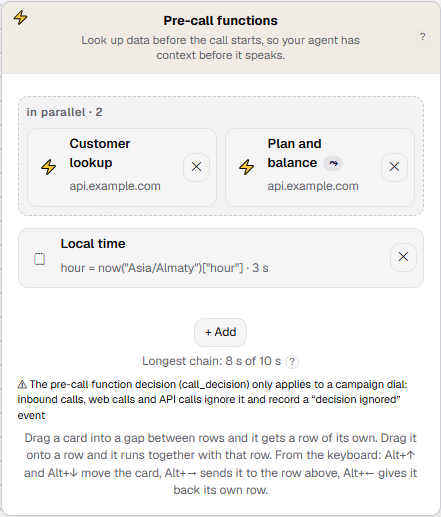
Cards run top to bottom in the order the system executes them. One row is one step. To make two functions run at the same time, drag one card onto the other’s row; while dragging, the hint reads “Runs with this row”. A row of two or more cards is outlined with a dashed border and labeled “in parallel · N”. To restore the queue, drag the card into the gap between rows (“Gets a row of its own”). Without a mouse the same is done by:- the When to run field in the function form — “After previous” or “Parallel with previous”;
- keys on the focused card:
Alt+↑andAlt+↓move the card one row up or down,Alt+→puts it into the row above,Alt+←returns it to its own row.
- Variable visibility is by row, not by arrow. A function in row k sees the variables of every earlier row, not just of the ones it was placed after. The results of a row are merged into the shared set once the whole row has finished, in card order left to right — which is why
http_*ends up belonging to the last card of the row. - Two functions in one row cannot write the same thing. The same prefix (function name) or overlapping result-variable names within one row is an error: the outcome would depend on who finished first. Across rows it is allowed, and the later row wins.
- A failure does not cancel what follows. If a function fails or times out, the one placed after it still starts and sees
<name>_success = "false". - Cards do not move between the pre and post blocks: a function has no phase switch.
Testing without calling anyone
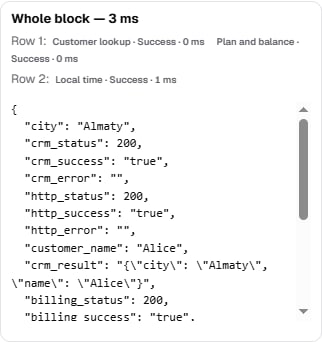
One function. Select the card. A custom function has two buttons at the bottom of the panel: Test — a real call to your URL — and Test with mock — the same run with the mock mode forced, so nothing leaves the platform. A code function has a single button, Run Code. Pre-call functions also carry a Trial budget selector with two values — “Before the first reply (inbound, web)” and “Before dialing (outbound)” — so you can see that a slow request misses the first budget and fits the second. The result appears under the buttons and on the card: Success, Error, Timeout, or Skipped (budget exhausted), plus the time in milliseconds, the status code, and the list of variables written. If a pre-call function returned a dial decision, a line right there reads “Decision: dial / cancel the dial / defer the contact”, along with a warning when the value was not recognized. The whole block. Once a block holds more than one function, a Test the block button appears: it runs them the way a real call would. The answer shows “Whole block — N ms” and a per-row breakdown: “Row 1:”, “Row 2:”, and the status of each function. This is the fastest way to confirm that parallelism is set up the way you intended. The trial result lives until the page is reloaded and is never saved into the flow.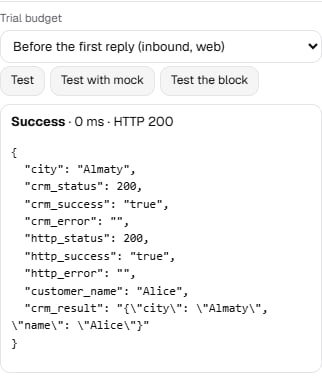
Late delivery of a result
On inbound and web calls, a function that misses the budget before the first reply is not cut off. The agent starts speaking on budget while the function keeps running in the background with its own timeout, and the result flows into the ongoing conversation — the next flow node that reads variables will see it. The history holds two events for such a function: first “waiting for the result”, then the final status. An utterance already spoken is not replayed: if the agent greeted the caller without a name, it will not retrofit one. Boundaries:- outbound calls have no late delivery — the 60 seconds before dialing are enough;
- in realtime mode late data reaches variables and tools, but not the system prompt that was already assembled;
- the chat test in the editor stays synchronous.