

Do-not-call registry
The Do not call section of the cabinet menu keeps the numbers of people who asked your organization not to call them. A number in the registry is never dialed by any campaign of the organization.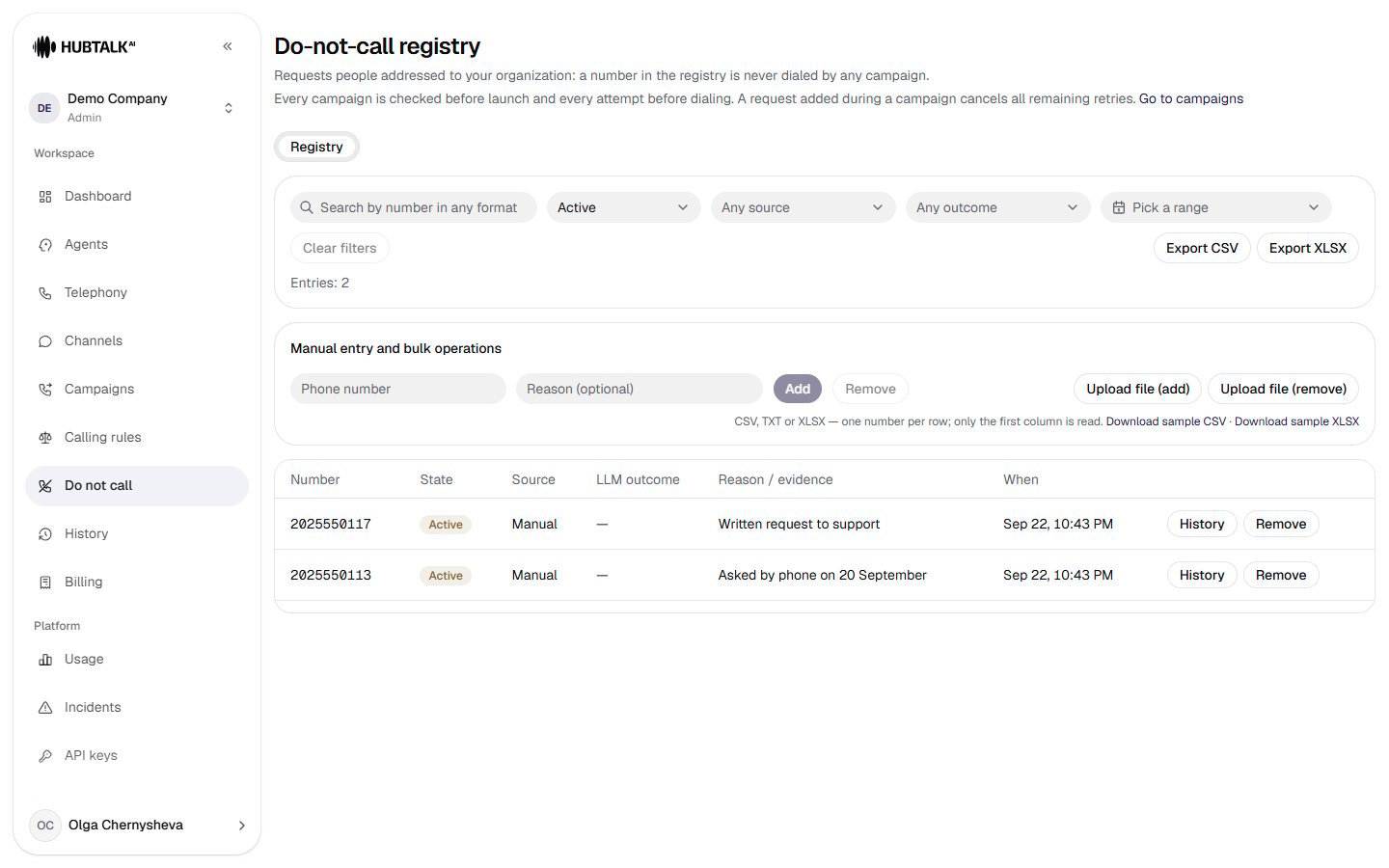
How the registry protects campaigns
- Before launch, every campaign checks its contacts against the registry. If there are matches, the wizard asks what to do with them — see Do-not-call matches.
- Before every dial, the number is checked again. So a number added to the registry during a campaign is no longer dialed: all its remaining retries are cancelled.
- Numbers are compared by their last 10 digits, so the format does not matter:
+1 (202) 555-0117,12025550117and2025550117are the same number.
How a number gets into the registry
Every entry has a source — the Source column of the table:
Automatic entries — all except manual and uploaded ones — appear when a call ends: outbound, inbound and calls placed through the API. Such an entry has a piece of the transcript in the Snippet column — the evidence the number was added on. Test calls from the cabinet do not add to the registry.
The model’s outcome. Entries from the model show Confirmed refusal or Uncertain in the LLM outcome column. A number with the uncertain outcome is not dialed either, but its entry goes to the Review queue: find it with the outcome filter, check the snippet and click Confirm — the entry gets the “reviewed” mark. If the model decides there is no refusal, no entry is created.
Finding a number
- Search by number in any format — part of the number is enough.
- The state filter: Active (default), Removed or All.
- Filters by source, model outcome and period.
- Clear filters brings back the default view.
Adding and removing a number by hand
In the Manual entry and bulk operations block:- Type the number in the Phone number field and, if you like, a Reason — for example, “Written request to support”.
- Click Add to add the number, or Remove to take it out of the registry.
Uploading a file
- Upload file (add) adds every number in the file to the registry.
- Upload file (remove) removes every number in the file.
.xls format is not accepted — save the file as .xlsx or .csv. Samples are under the buttons: Download sample CSV and Download sample XLSX.
After the upload the cabinet shows a report: Applied, skipped, unreadable and duplicates. Skipped are numbers already in the registry (when adding) or not in it (when removing); unreadable are rows no 10-digit number can be read from; duplicates are numbers repeated in the file.
Trigger phrases and the model
Organizations with the US market profile have a second tab in this section — Capture: it sets how numbers get into the registry from calls.- Organization trigger phrases apply on top of the platform set. An empty list means the platform set is in effect; changes apply at once, without a restart.
- Model classification — the model that decides on a candidate put forward by a trigger phrase. Without a model, the phrases add the number by themselves.
- Classifier prompt — every edit is saved as a new version with its author and time, and every registry entry refers to the version it was decided by.
- What is in effect now — the result: how many phrases work and which statuses and fields count as a refusal.