

History & reports
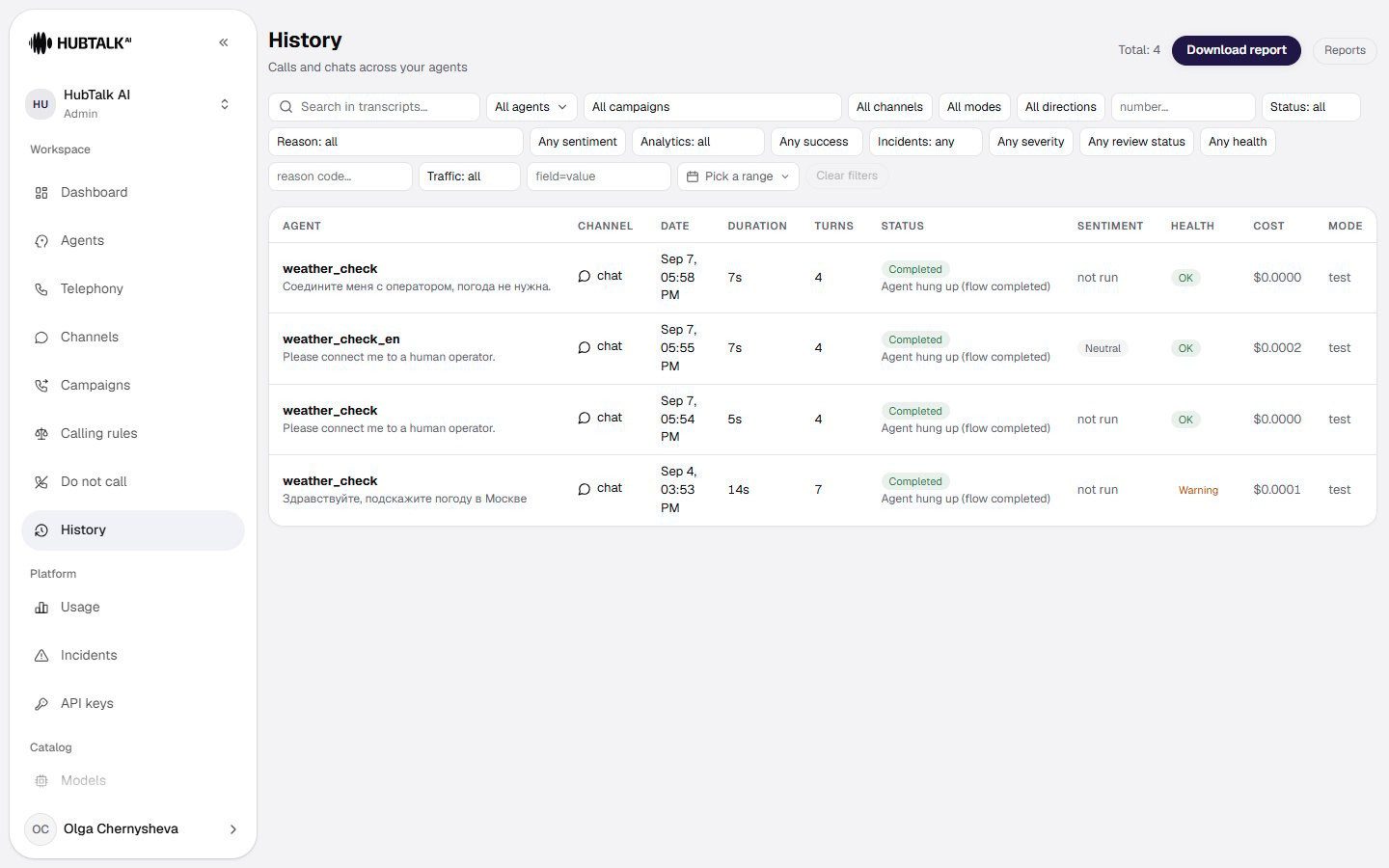
The History page contains calls and chats across agents. Use it to review conversations, inspect statuses and outcomes, filter the history, and download reports. This page is about finding the conversation you need. What the card of a found call shows, and how to download an export, are on separate pages listed at the bottom.History table
The table includes:- Agent — the agent that ran the conversation. The caller’s opening line sits under the name, so rows can be told apart at a glance.
- Channel — where the conversation came from; the values are spelled out below.
- Date — date and time of the conversation.
- Duration — conversation duration. For a call that never connected it is empty: there was no conversation. When a call is transferred to a human operator, the duration is counted up to the moment the caller is handed over — the conversation with the operator is not included.
- Turns — number of dialogue turns.
- Status — how the conversation ended: Completed, Not connected or Platform error, and for one still running, active. The end reason sits under the status, for example “Agent hung up (flow completed)”.
- Sentiment — the post-call analytics verdict: positive, neutral or negative. When analytics did not run, the cell says so — not run.
- Health — the technical verdict: OK, Warning or Error.
- Mode —
livefor a real conversation,testfor a dashboard test.
Conversation channels
The channel answers the question “where did this conversation come from”. It appears in the table column, in the header of the call card, in the filter and in report exports — the same value everywhere.Channel and mode answer different questions. The channel says which line the conversation arrived on; Mode says whether it was live or a test. Dashboard tests (
chat and voice) are always test, while phone and web come in both: a test call to your own number is phone + test.This is the most common source of mismatched figures: the dashboard counts only phone in live mode, while History shows every channel and both modes. The numbers will not agree, and that is not an error.Filters
The filters sit in the page header, in this order:- Search in transcripts — searches the words that were actually said in the conversation.
- All agents — pick an agent. The list holds live agents only: deleted and archived ones are gone from it. Their calls have not disappeared from the history — they are still found by a direct filter.
- All campaigns — narrow the history to one campaign. Calls are resolved through the campaign’s attempt log, so a call belongs to the campaign that actually dialed it.
- All channels — chat, voice, phone, web or WhatsApp; what each one means is above.
- All modes — Live or Test.
- All directions — inbound or outbound.
- number… — search by phone number: the whole number or its tail (the last 10 digits, or with the country code), in any format. Extra digits in front will not find it; this is not a substring search. An eleven-digit entry starting with 8 and one starting with 7 are the same spelling: a number stored with the 8 is found by the 7 as well. An entry shorter than 10 digits finds nothing, and the hint Whole number needed — at least 10 digits appears under the field. The same filter applies to the report.
- Status: all — Completed, Not connected or Platform error.
- Reason: all — the reason the call ended, from “Agent hung up (flow completed)” and “Caller hung up” to “Busy”, “Voicemail” and “Provider unavailable”.
- Any sentiment — positive, neutral or negative.
- Analytics: all — keep only calls whose post-call analytics has finished.
- Any success — whether the call was successful, by the post-call analytics verdict.
- Incidents: any — with or without observer incidents.
- Any severity — low, medium or high incident severity.
- Any review status — open, reviewed, resolved or false positive.
- Any health — the technical verdict: OK, warning or error.
- reason code… — filter by the verdict reason code, for example
rag_degraded. - Traffic: all — Load tests only or Real calls only. This is about load-testing the platform, not about the call mode: live and test are separated by the All modes filter.
- field=value — filter by an extracted field, for example
appointment_booked=false. - Pick a range — the period to display.
- Clear filters — returns the list to its default; the button stays disabled until a filter is set.
The filters live in the page address. You can send a colleague a link to the selection you found and they will see the same list, not an empty History.
Where to go next
Call details
Transcript and events, turn latency, post-call analytics, health, the operator code, the recording and webhook deliveries.
Reports: how to download
What goes into the file, which period is exported and how the build queue works.
A report for one campaign
An export within the bounds of one campaign, the Campaign field, and ready-made forms for migration.
Report columns
Presets, the transcript as a column, the column builder and columns for those migrating.
Report template
Column labels, value replacements, extra columns, and the structure and language of the file.