

Report columns
Column presets
Choose a column preset when requesting a report:- Operational — call identification, telephony details, duration, status, and health. This is the default preset.
- Quality — adds sentiment, success evaluation, interruption counts, incident summaries, and response-time percentiles.
- Business — adds the call summary and any custom analytics fields configured for the agents included in the report.
- Full — includes everything, plus a link to the call recording and the full conversation transcript.
The transcript as a column
The Full preset carries a whole-transcript column: the entire dialogue in one cell,Agent: and User: in utterance order, with the interrupted and not-played marks preserved. In XLSX the cell comes with line breaks and a fixed column width so the file stays readable.
A transcript reaches the file only when the column was actually picked: an explicit column list overrides the preset entirely, so Full with a trimmed list carries no transcripts.
The column builder
If you need a specific set of fields rather than a whole preset, build it in the report form. The left panel is the catalog of available columns, grouped as Call, Quality, Content, Cost, Result v2, Campaign and your own analytics fields, each with a readable label and a search box; the right panel is what you selected, in the order it will appear in the file — drag a row, or move it with the up and down buttons. A preset is the starting point rather than a separate mode: pick one, see exactly which boxes it ticks, adjust, and the selector switches to Custom template. An empty selection cannot be generated — a report with no columns would silently fall back to a preset. The catalog comes from the server, built by the same code that builds the report itself, so “it was in the list but not in the file” cannot happen. One detail is worth knowing:- Custom analytics fields are listed per organization, or per agent when the filter names one — not per call in the period. The list is therefore a superset: a field that exists on an agent but has no calls in the selected period will be exported as an empty column. You can see what you are choosing, which is the point.
Columns for moving from the previous version
The catalog holds 19 columns whose job is to make the file look the way it looked on the platform you are moving from:- Result v2 — five columns carrying the call’s status and result in the form and the words the previous version used.
- Campaign — columns about the campaign, the contact and the attempt: campaign id and name, the contact’s number exactly as you uploaded it, name, external key, row number in your file, attempt number, flags for the last and the counted attempt, plus the internal contact and attempt identifiers.
- The Call group carries voice gender and the language the conversation started in; Content carries two transcript formats of the previous platform and a column holding the caller’s speech alone.
One column will not match completely, and that is not a defect. Checked against production data, three of four columns matched the old platform 100%, the fourth 69%. The cause is in the old platform itself: there the value was overwritten by the dialing strategy after the export. Full agreement on it is unreachable, and it is better to know that before the first file comparison than after.
session_id, started_at) rather than the readable labels from the interface: parsers on your side depend on them, and renaming them by default would break integrations silently. When you do want a readable header, set it yourself — see Column labels.
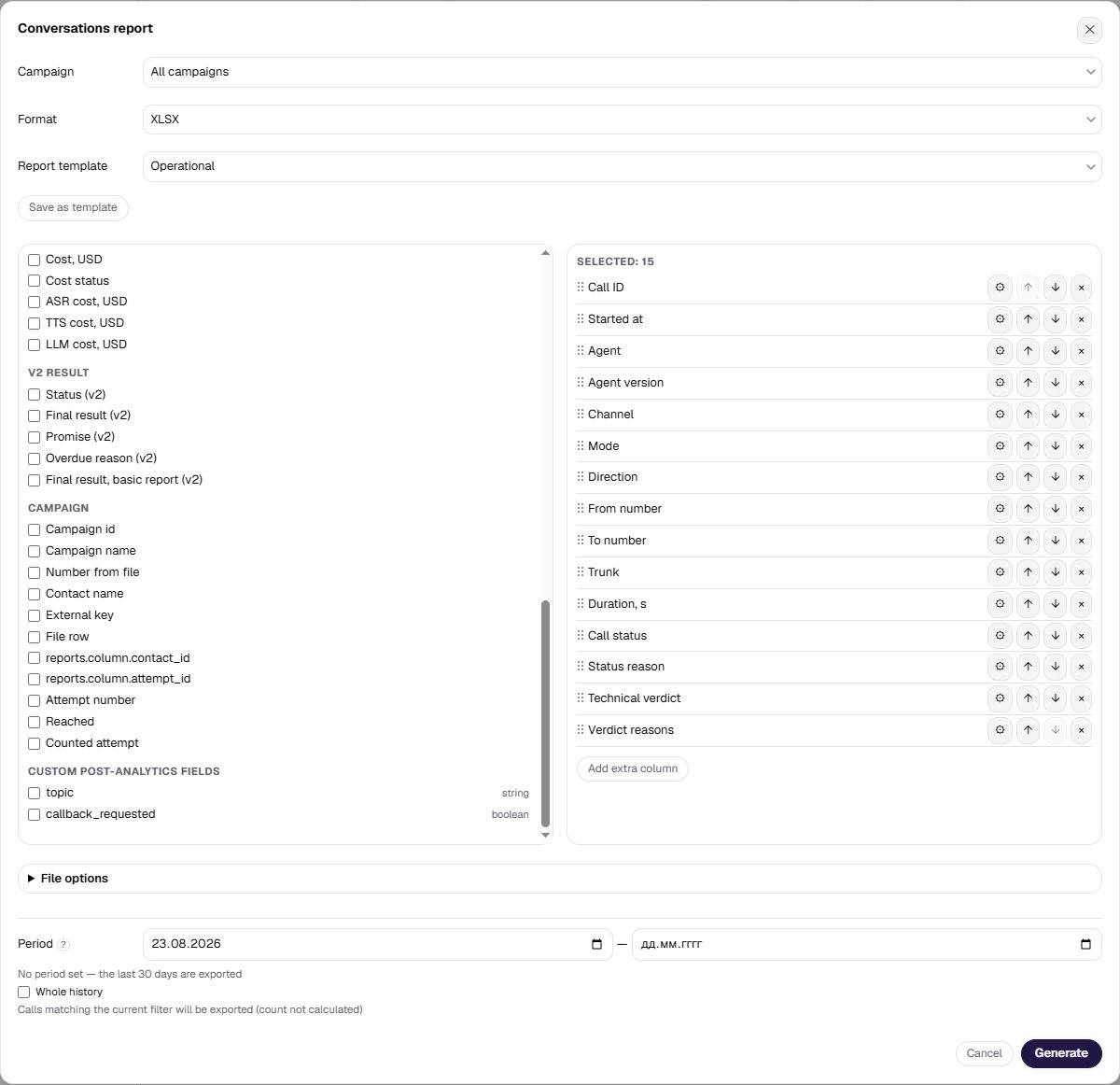
Columns are picked from the catalog, not typed as a comma-separated list of keys. The catalog shows everything available, your custom analytics fields included, and fills the key in for you. If you build reports through the API, the column keys there are the same.