

Observers
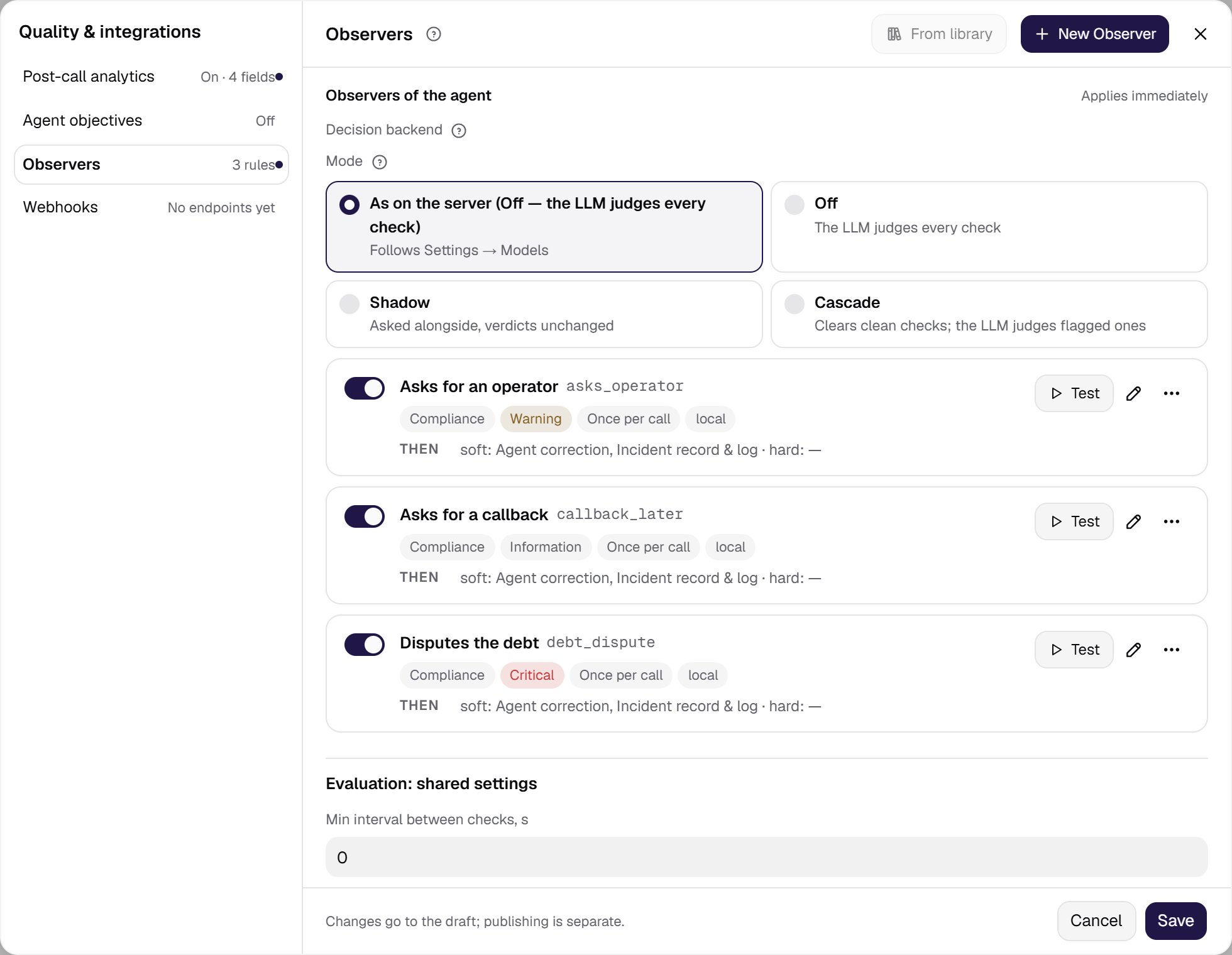
Observers continuously watch conversations and react to important events without slowing the agent down. One observer detects one event and runs actions when it happens. Observers are a section of the Quality & integrations card in the agent settings. The Observers row shows the number of rules; a click on the row opens the Quality & integrations window on this section. The navigation on the left switches between the window’s sections: next to it are post-call analytics, agent objectives and webhooks. How changes are saved. The list of the agent’s observers is marked Applies immediately: it is saved at once, is not part of the draft and needs no publishing. The shared check settings are edited in a copy: the window’s Save writes them to the draft, and closing the window with unsaved edits asks Discard changes?.Observers of the agent
Two buttons sit in the section header:- From library — attaches a ready-made detector from the company library.
- New Observer — creates your own detector for this agent or for the library.
Decision backend
Normally the LLM judges every observer check — on every turn, even though the event almost never happens. The Decision backend block under the observer list puts a decision model — the System One (Jev) model — in front of the LLM. It does not write a verdict; it only estimates how likely each event is. The block appears once at least one observer is attached to the agent. Mode has four options:- As on the server — the default. The agent follows the platform default; on the platform the mode is off by default.
- Off — the LLM judges every check, as before.
- Shadow — every check is also sent to the decision model in the background. Its probabilities and what the cascade would have missed go to the call events; verdicts and hints do not change. Use it to try the model on your own calls without changing anything.
- Cascade — the decision model screens the checks: when the probability of every event in the group is below the threshold, the check is clean without an LLM call. Otherwise the LLM judges it with the same input as in the off mode.
- Decision model — a model directory record with the “decision” role. Without a selected record publishing is blocked. The record is frozen in the published version.
- Confidence threshold — cascade only: a check goes to the LLM when any observer’s event probability reaches this value. An empty field means the platform value (0.02 by default). Keep the threshold low: above 0.05 missed violations grow.
- Timeout, ms — how long one decision-model call may run; the agent’s reply never waits for it. An empty field means the platform value (1500 ms by default).
Turn on cascade only after shadow mode. First see on live calls what share of checks would have been cleared without the LLM and which violations the cascade would have missed — per observer.
Observer editor
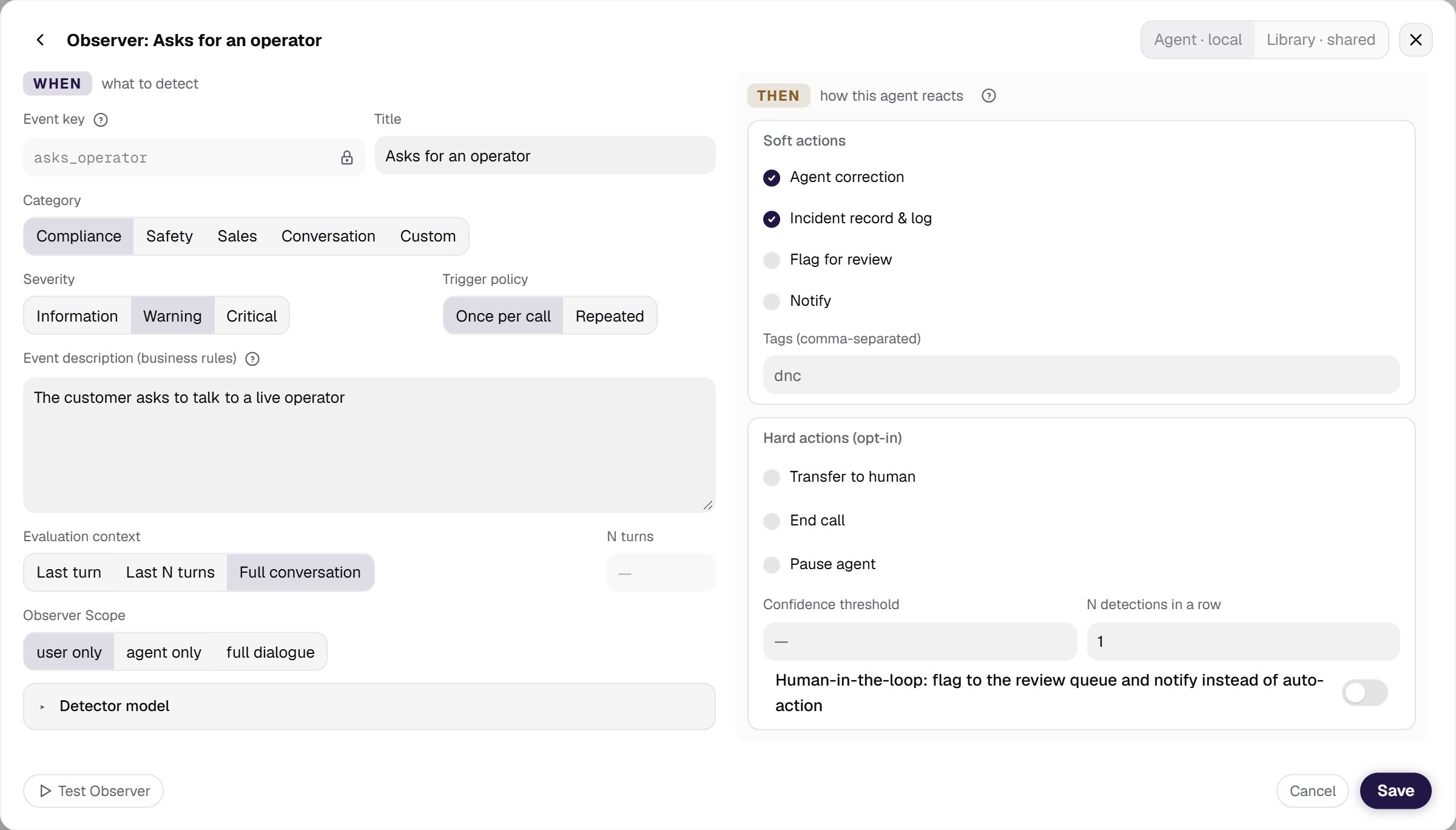
The observer editor opens over the window. Back to Observers in its header returns to the list; next to the title is the level: Agent · local (this agent only) or Library · shared (shared across the company) — it is chosen only when creating. The editor has two columns, WHEN and THEN.WHEN — what to detect
- Event key — a unique identifier of lowercase Latin letters, digits and underscores, such as
do_not_call. It sets the incident type and cannot be renamed. - Title — a readable name for the event, shown in the interface.
- Category — Compliance, Safety, Sales, Conversation or Custom.
- Severity — Information, Warning or Critical. These are the same three levels that History and Incidents show as low, medium and high.
- Trigger policy — Once per call or Repeated.
- Event description (business rules) — free text: what to look for and what hints to give the agent. The auditor role and the strict response format are built in and need not be described.
- Evaluation context — Last turn, Last N turns or Full conversation. The N turns field is available only for Last N turns.
- Observer Scope — what the observer listens to: user only, agent only or full dialogue. It is set per observer, so two observers on the same agent can watch different sides.
- Detector model — the model that detects the event.
THEN — how to react
The reaction belongs to this agent: other agents using the same detector may react differently.- Soft actions — reactions that do not stop the flow: Agent correction, Incident record & log, Flag for review, Notify, and Tags (comma-separated) — a non-empty list of tags turns tagging on.
- Hard actions (opt-in) — switched on deliberately: Transfer to human (with Transfer destination), End call (with Farewell message), Pause agent.
- Confidence threshold — the minimum detector confidence at which the reaction fires.
- N detections in a row — requires the event to be detected that many times consecutively.
- Human-in-the-loop — a switch: flags the event to the review queue and notifies a person instead of acting automatically.
- Test Observer — runs the detector against a conversation to confirm that detection and reaction work.
- Save / Cancel.