

Webhooks
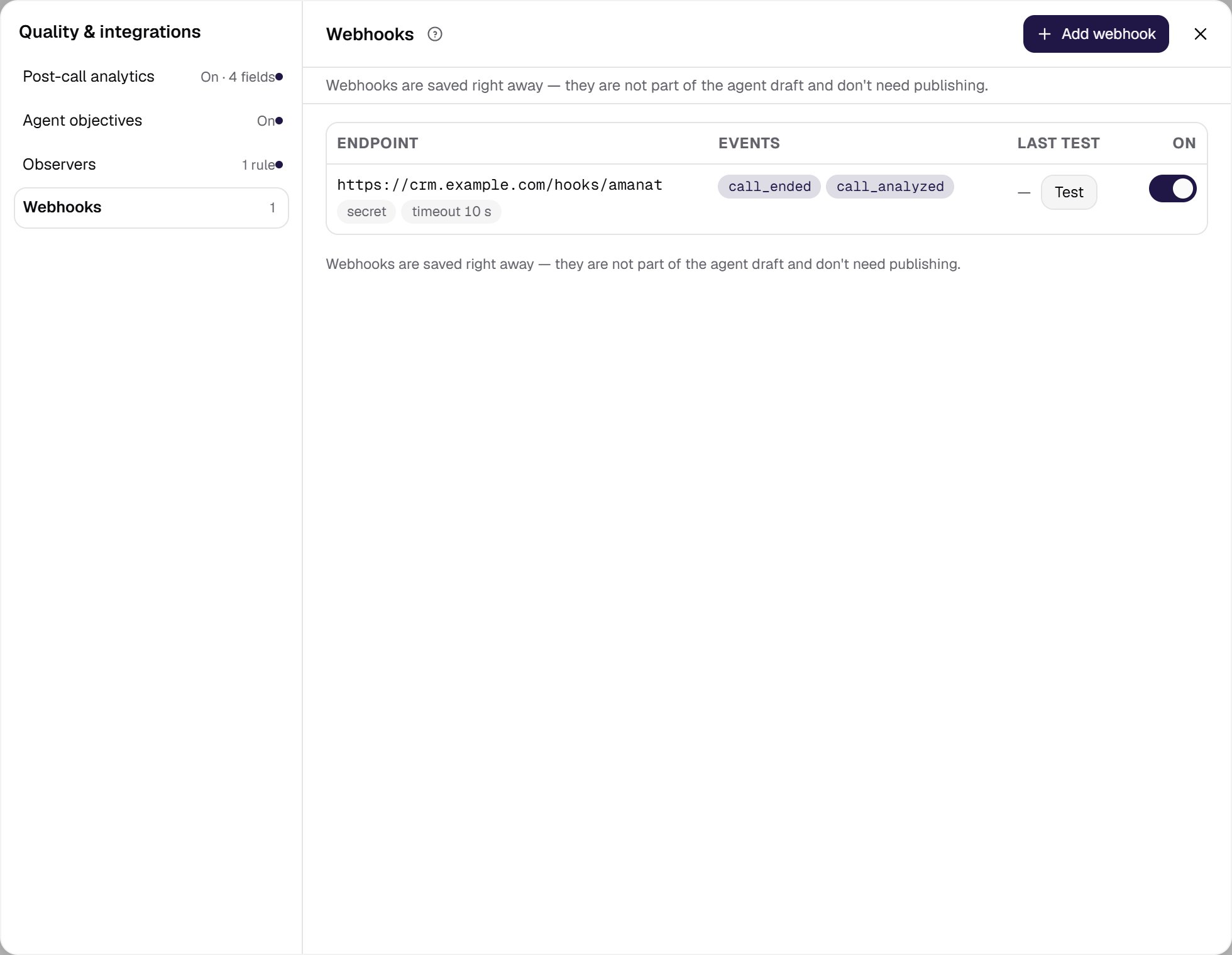
The Webhooks section sends signed POST notifications about call events to your endpoints. It is a section of the Quality & integrations card in the agent settings: the Webhooks row shows the number of the agent’s endpoints or No endpoints yet, and a click on the row opens the Quality & integrations window on this section. The navigation on the left switches between the window’s sections: next to it are post-call analytics, agent objectives and observers. Webhooks are marked Applies immediately: they are saved right away, are not part of the agent draft and don’t need publishing.The agent’s endpoints
The agent’s endpoints are a table:- Endpoint — the address, with secret and timeout N s chips when they are set.
- Events — the events the endpoint receives.
- Last test — the result of the latest trial notification: OK or Failed with the code or reason, and its time; — if there was none. The Test button next to it sends a trial notification without waiting for a real call.
- On — the Enabled switch: delivery can be paused without deleting the address. It applies at once.
The webhook form
Add webhook in the section header opens a side panel, New webhook; a click on a row opens the same panel, Edit webhook:- Endpoint URL — the address that receives the notifications. Use
https://;http://is accepted too. The address is checked on save: a disallowed address — for examplelocalhost,127.0.0.1or the cloud metadata address169.254.169.254— is not saved, and the form shows “The webhook address is refused by the outgoing request policy” with the reason. Webhooks are not sent to internal network addresses —10.x.x.x,172.16.x.x–172.31.x.x,192.168.x.x,100.64.x.x–100.127.x.xand names ending in.localor.internaleither: the form does not save an IP address in such a network, and a name that leads into the internal network is refused at delivery. If your system receives webhooks inside an internal network, contact support to have the address allowed for your organization. A saved webhook can be turned off or deleted without changing its address. - Events — what to send: Call ended (
call_ended) — right after the call finishes, and Analytics ready (call_analyzed) — once post-call analysis and the recording are ready. Both are selected by default. - Signing secret — env variable name — only the reference is stored: the value is read from the environment and never hits the database or the logs.
- Response timeout — the maximum wait for your endpoint’s response, in seconds;
0uses the pipeline default. - Enabled — delivery can be paused without deleting the address.
- Send test-session events — off by default, so tests from the editor do not fire the webhook.
- Send events of calls abandoned before answer — on by default. Turn it off if your system does not expect inbound calls the caller hung up before the agent answered: such calls will not send
call_endedandcall_analyzed. They have no conversation and no variables from SIP headers, and an integration may take them for a failure. All other calls arrive as usual. - Delete webhook… — deletes the endpoint after a confirmation; the delivery history is kept.
agent_id in the payload tells them apart.
What the notifications contain, with examples, is on the Webhooks page; signing, retries and delivery order are in the Web API.