

Flow nodes
Use nodes to build the agent’s conversation flow. Each node represents a step in the dialogue or an action the agent can take.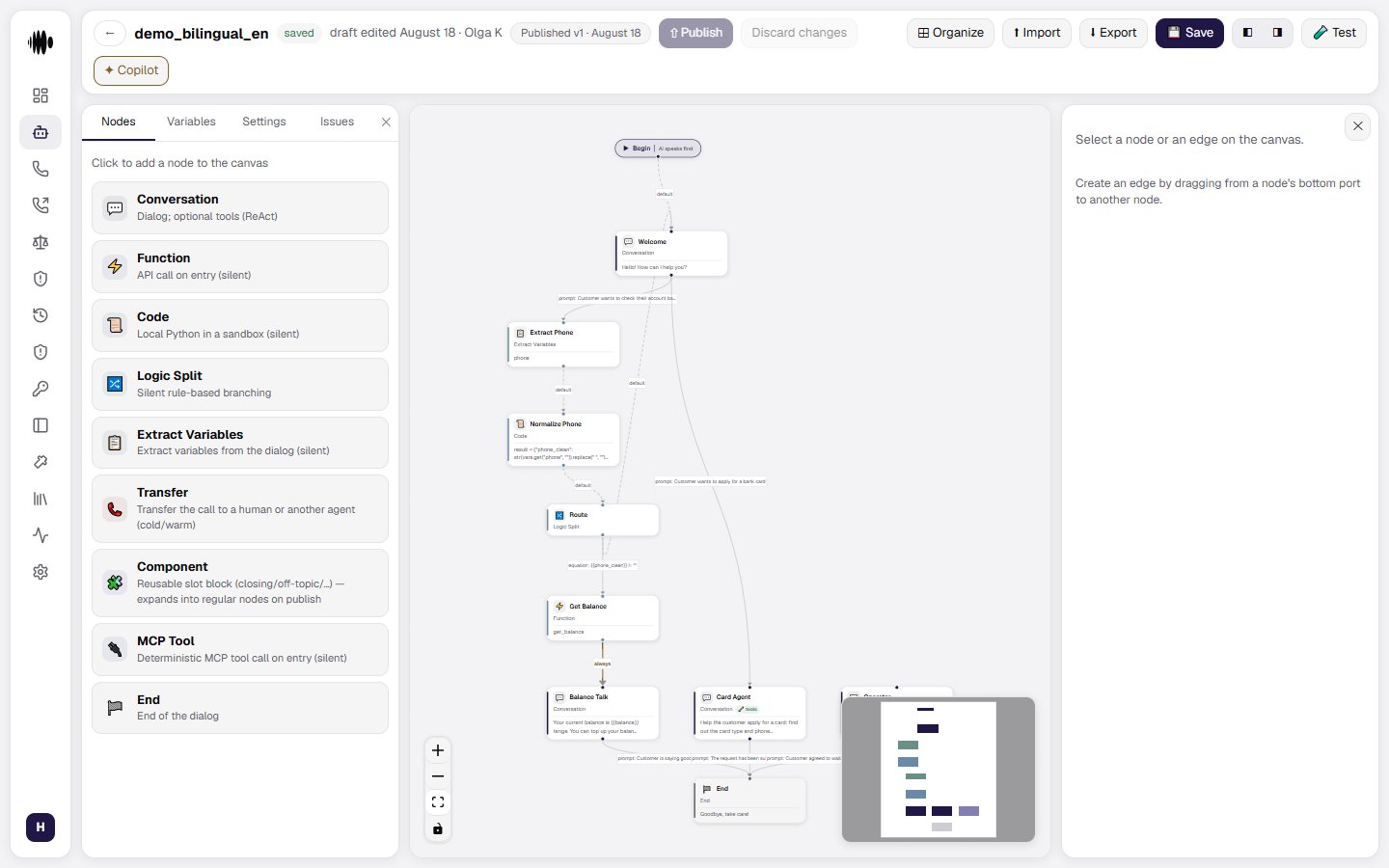
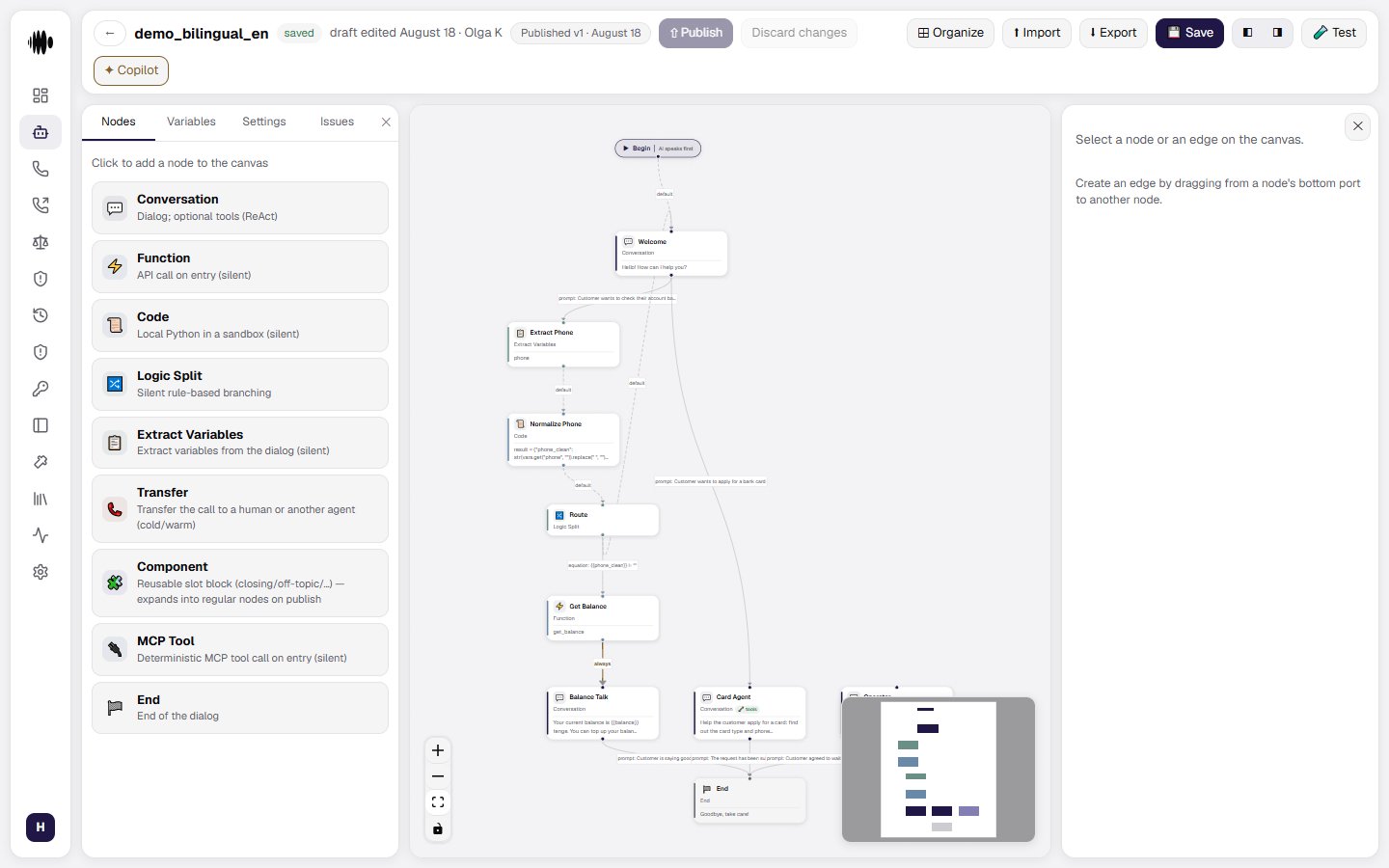
- Conversation — lets the agent talk with the caller, ask questions, provide information, and continue the dialogue.
- Function — starts an external action, such as checking data or sending a request to another service.
- Code — runs a custom piece of logic when the standard nodes are not enough.
- Logic Split — sends the conversation in different directions depending on the caller’s answer or a condition.
- Extract Variables — finds important details in the conversation and saves them for later steps.
- Transfer — transfers the call to a human operator or another agent.
- Component — groups a reusable part of a flow so it can be used in several places.
- MCP Tool — connects the agent to an MCP tool that can perform a specific action.
- End — finishes the conversation with a final message.
Conversation node
The Conversation node is used for a spoken interaction with the caller. It can ask questions, explain information, collect details, and send the conversation to the next node.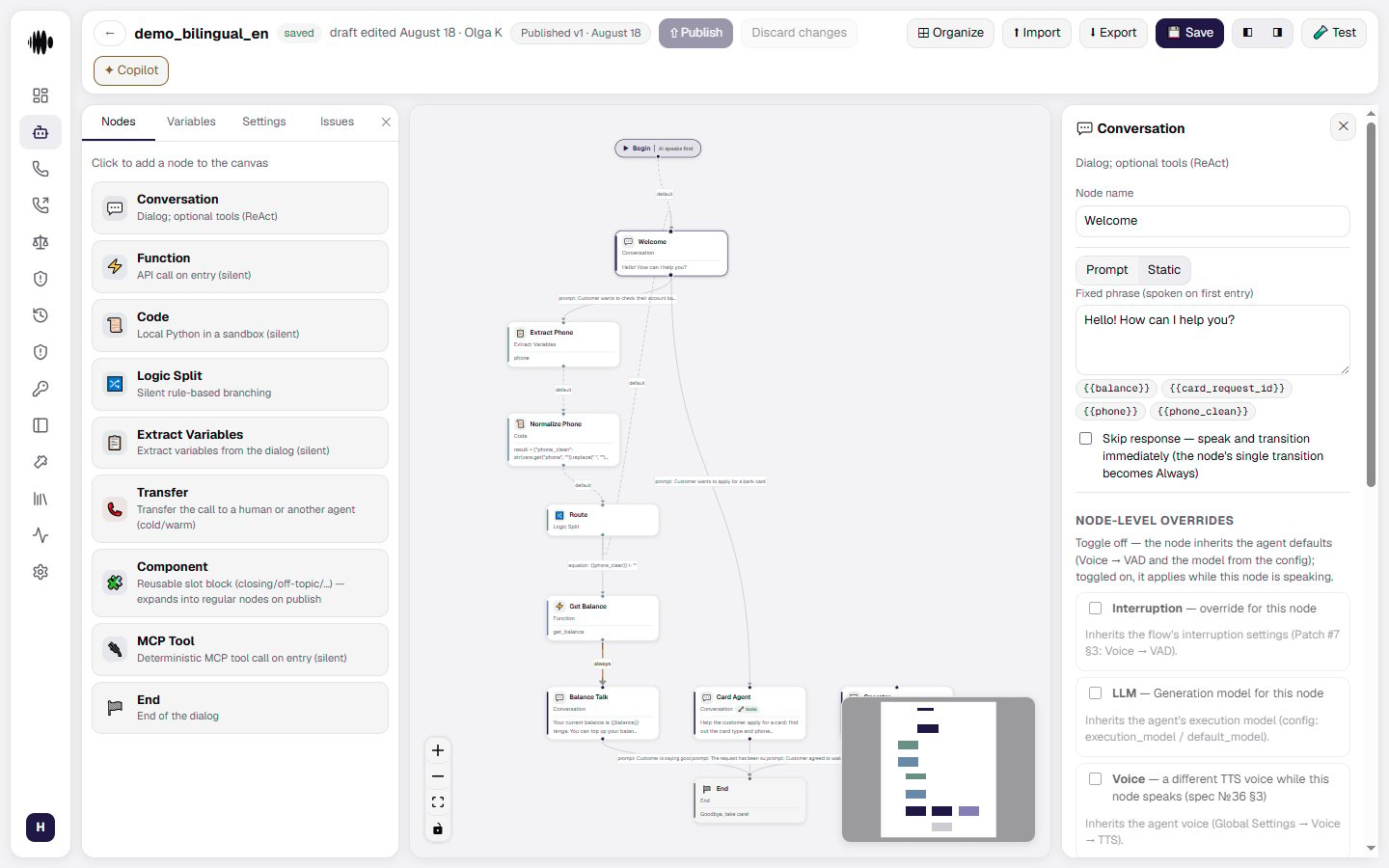
- Node name — gives the step a clear name so it is easy to recognize in the flow.
- Prompt / Static — two tabs: generate the reply from an instruction, or speak a fixed phrase.
- Instruction (the LLM generates the reply) — what the agent should say or do at this step. You can use variables, such as
{{transfer_status}}or{{transfer_success}}, in the instruction. - Skip response — speak and transition immediately — the node’s single transition then becomes Always.
- Node-level overrides — a toggle left off means the node inherits the agent defaults. Interruption, the generation model and the Voice — a different TTS voice while this node speaks — can each be overridden.
- Knowledge bases — optionally select a knowledge base for this node instead of using the agent’s default knowledge base and search settings.
- Finetune examples (transcript → expected transition) — pairs that show the classifier where to take the conversation.
- Tools (the LLM calls them itself) — an optional list. With tools, the model calls them on its own and a dialogue turn takes longer.
- Transitions — define where the conversation goes next. An Always transition is unconditional and blocks other transitions from the same node.
- Global node — make the node reachable from any point in the flow.
- Delete node — remove the node from the agent flow.
Function node
The Function node runs an external action, such as checking a customer’s data or sending information to another system. It can use a real HTTP request in production or a mock response while you develop and test the flow.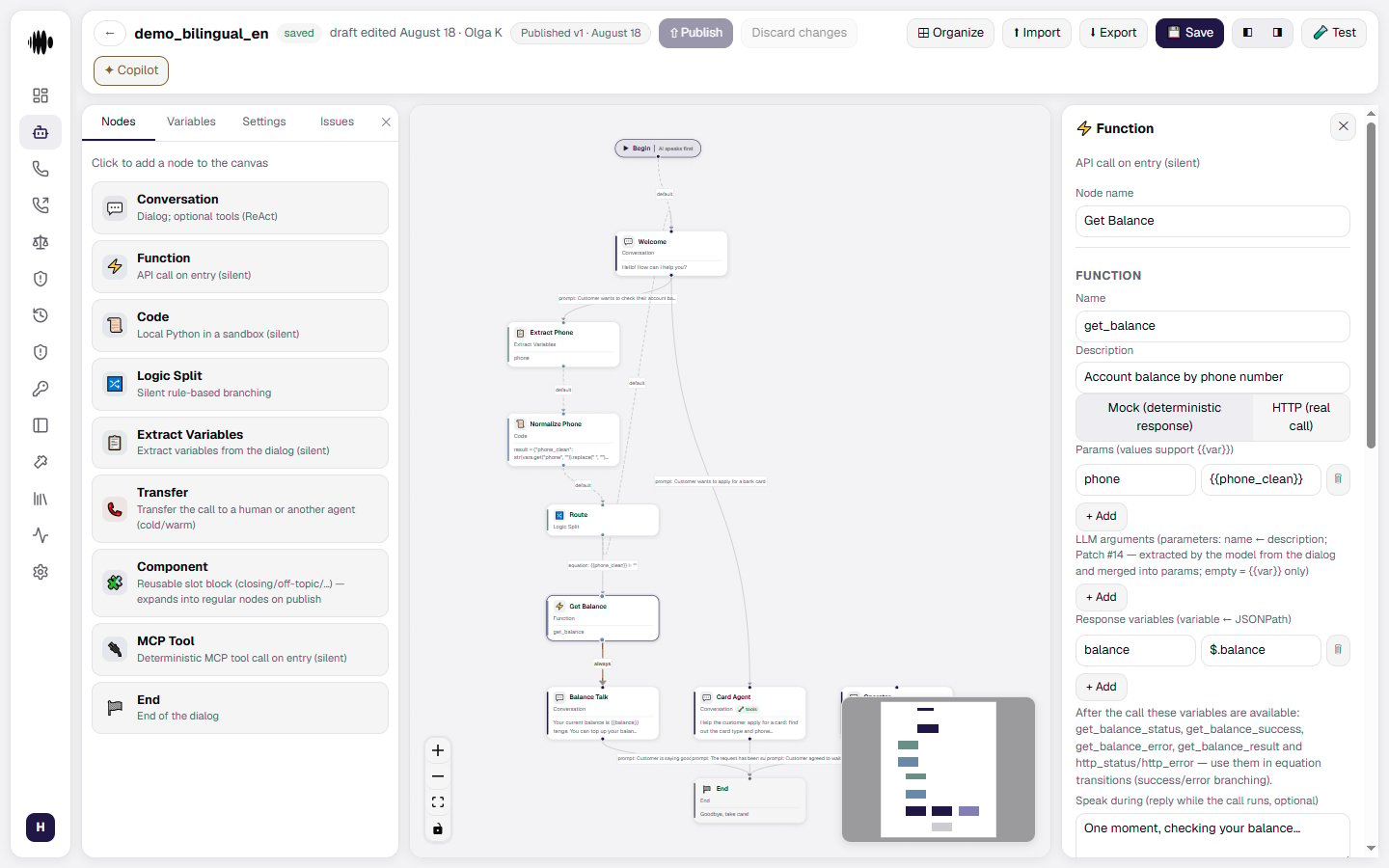
- Node name — identifies the function step in the flow.
- Name and Description in the Function block — what the function is called and what it does.
- Mock mode (deterministic response without HTTP) — a toggle between a predictable stub for development and a real HTTP call.
- Params (values support
{{example}}) — the function’s input values, with call variables substituted into them. - LLM arguments (parameters: name ← description) — arguments the model extracts from the dialogue and merges into the params. An empty field means
{{example}}substitution only. - Response variables (variable ← JSONPath) — map values from the function response into call variables. These variables can be used in later nodes and transitions, including success, error, and timeout branches.
- Speak during (reply while the call runs, optional) — what the agent says while the function is working.
- Mock response (JSON, supports
{{example}}) and scenarios — the status and body of the stubbed call, then add named success, error, or timeout scenarios. Mock scenarios keep tests from calling real endpoints. - Node-level overrides — a dedicated argument extraction model for this node. The override applies only to LLM-built arguments: plain
{{example}}substitution does not use the model, so there is nothing to override there. - Transitions — add a destination node for the function result. Use response variables to create success and error branches.
- Global node — make the function reachable from any point in the flow.
- Delete node — remove the function from the agent flow.
Code node
The Code node runs custom Python logic in a sandbox. Use it when the flow needs a calculation, data transformation, or another small action that is not covered by the standard nodes.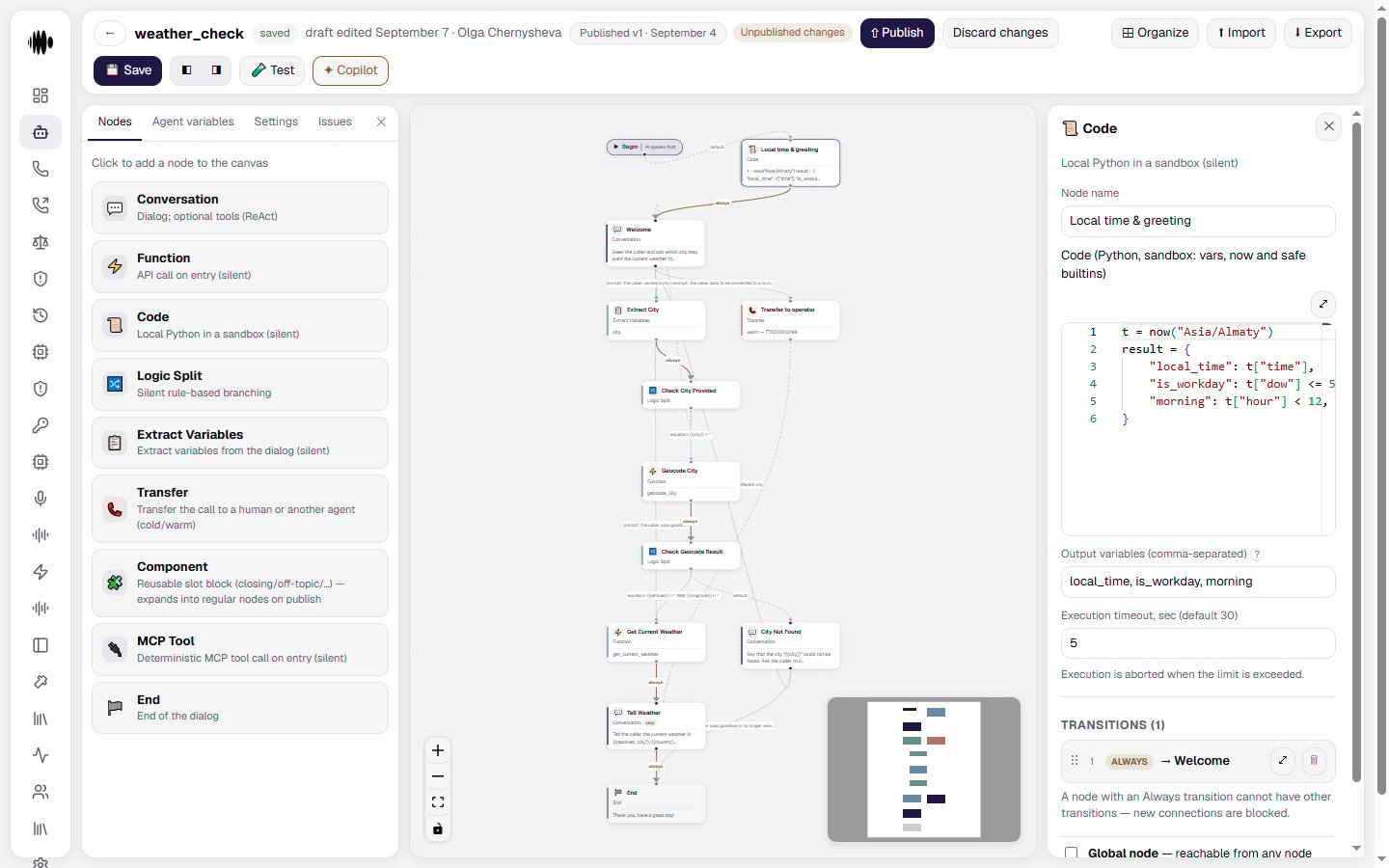
- Node name — identifies the code step in the flow.
- Code editor — write the Python code that the node should execute. The sandbox provides the
varsdictionary, theresultvariable, thenowclock and safe built-ins;import,openandevalare unavailable, and there is no access to the network or the file system. - Current time —
now("Asia/Almaty")returns the time in an IANA time zone as a dictionary:epoch,iso,date,time(HH:MM),hour,minute,second,dow(1-7, Monday first),weekday(0-6, Monday first) andtz. The zone is required:now()without an argument, an empty string or an unknown zone raises an error and the node leaves through its error branch. Daylight-saving shifts are handled by the zone database, so a time-of-day check does not need a Function call to an external time service. - Output variables — list the names of values produced by the code, separated by commas. These variables become available to later nodes and transitions. Names that belong to the sandbox itself —
vars,result,now— are never exported: the validator warns about such a name, because the variable would always stay empty. - Execution timeout — sets the maximum time allowed for the code to run. The execution is stopped when the limit is exceeded.
- Transitions — connect the code result to the next node in the flow.
- Global node — make the code node reachable from any point in the flow.
- Delete node — remove the code step from the agent flow.
Logic Split node
The Logic Split node routes the flow silently according to equation-based conditions. It does not speak or wait for the caller; instead, it evaluates the available values and chooses the first matching transition.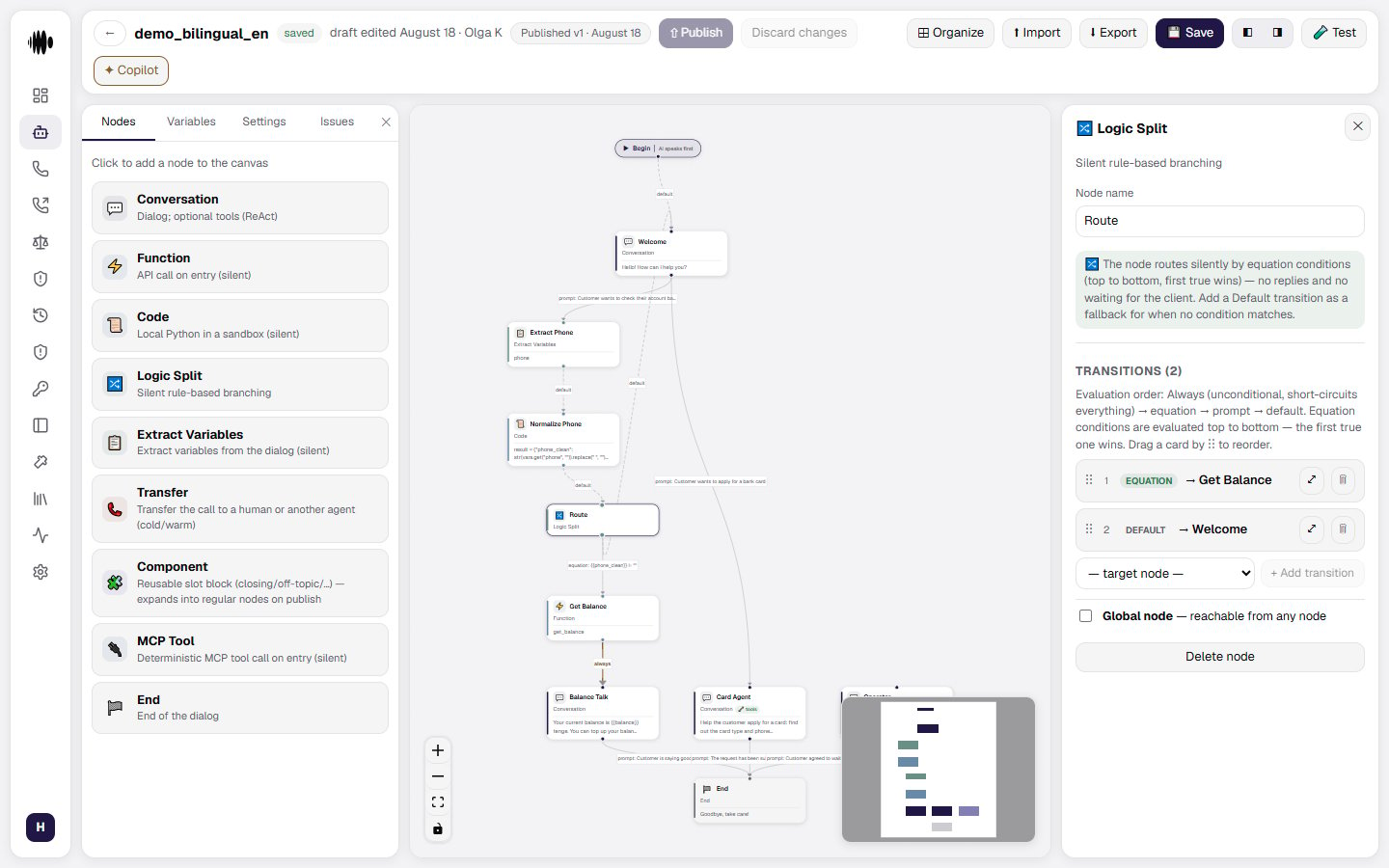
- Node name — identifies the branching step in the flow.
- Silent branching — evaluates conditions without generating a reply or waiting for a new caller response.
- Transitions — define the possible destinations for each branch. A transition can use an Always, Equation, or Prompt condition.
- Evaluation order — conditions are checked from top to bottom. The order is: Always, Equation, Prompt, then Default. The first condition that matches wins.
- Always — routes the flow unconditionally and short-circuits the remaining conditions.
- Equation — evaluates a rule against known values, such as variables returned by previous nodes.
- Prompt — uses the model to evaluate a condition from the available conversation context.
- Default — acts as a fallback when no other condition matches. Add one to prevent the flow from getting stuck.
- Reorder transitions — drag transition cards to change their evaluation priority.
- Global node — make the split reachable from any point in the flow.
- Delete node — remove the branching step from the agent flow.
Extract Variables node
The Extract Variables node silently extracts structured information from the conversation. Use it when the agent needs to capture details such as a name, score, status, date, or another value for later steps.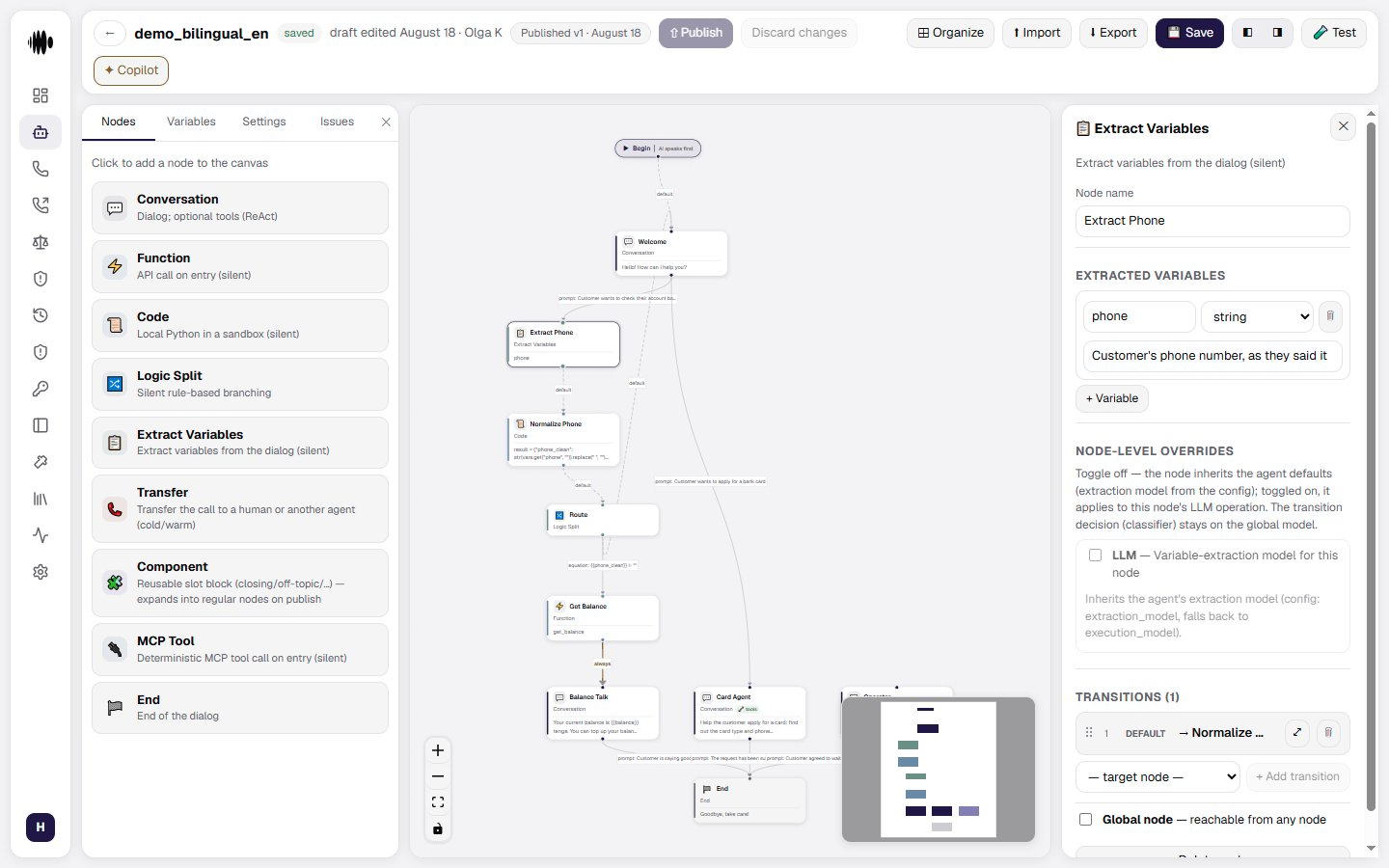
- Node name — identifies the extraction step in the flow.
- Extracted variables — add one or more values that the node should find in the dialogue.
- Variable name — gives the extracted value a name, such as
var1. - Variable type — defines the expected format, such as
string. - Description for the LLM — explains what the variable means and helps the model identify the correct value in the conversation.
- Node-level overrides — optionally use a different extraction model for this node. If no override is enabled, the node inherits the agent’s extraction model.
- Transitions — connect the extraction step to the next node in the flow.
- Global node — make the extraction node reachable from any point in the flow.
- Delete node — remove the extraction step from the agent flow.
Transfer node
The Transfer node moves the call to a human operator or another agent. It supports a direct cold transfer and a warm transfer, where the agent can brief the recipient before connecting the caller.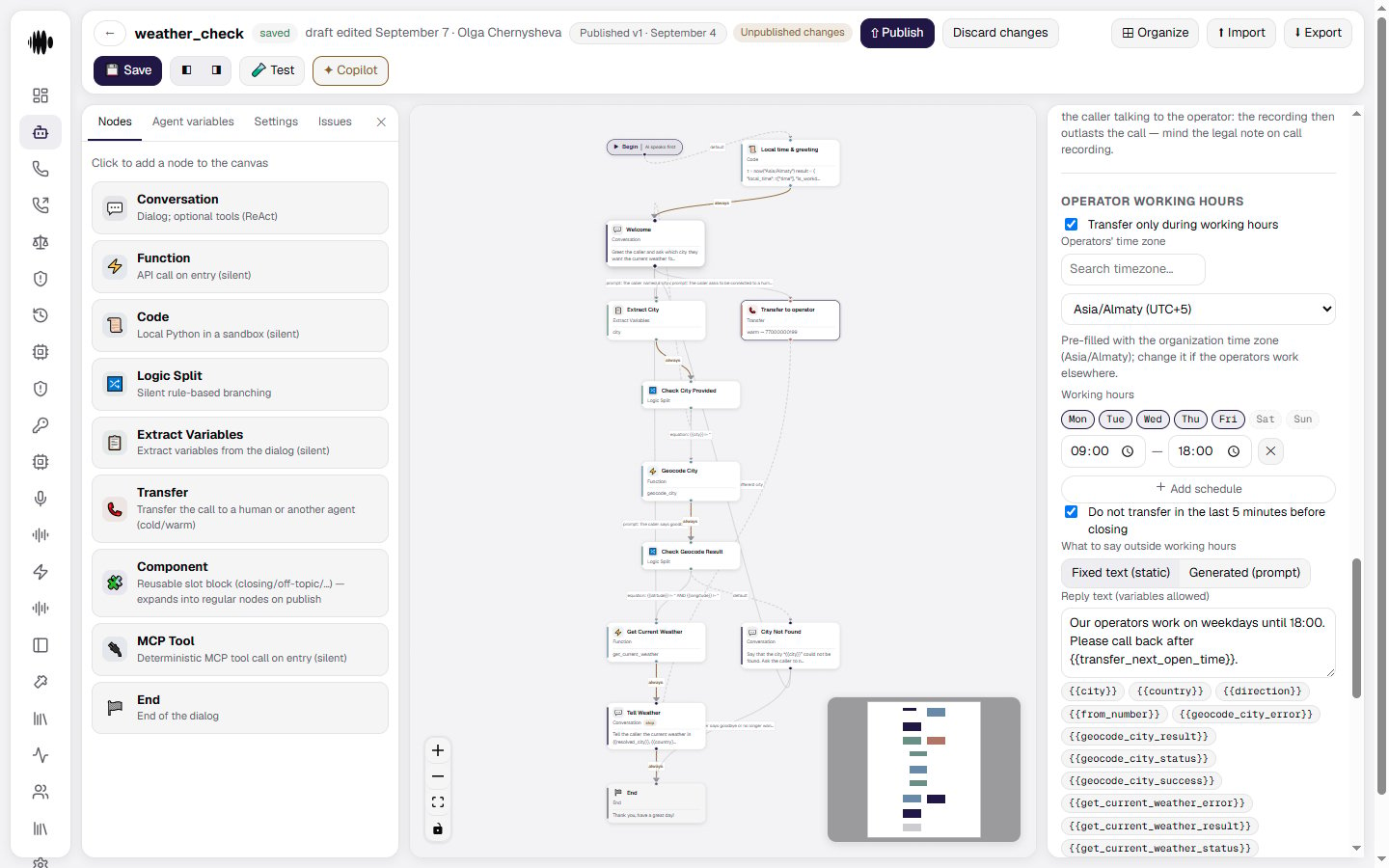
- Node name — identifies the transfer step in the flow.
- Cold (blind) / Warm (with briefing) — connect straight through, or brief the recipient first. On a warm transfer the caller is put on hold, the agent dials the destination, hands over the summary and leaves.
- Destination — select where to send the call, such as a phone number, agent, or URI. A transfer to another agent works in every channel: a phone call, a call from your website, the voice test in the cabinet, chat and WhatsApp.
- Transfer variables — use values such as
{{transfer_status}}and{{transfer_success}}to track the result of the transfer. - Signaling method — choose SIP INVITE or SIP REFER for the transfer signaling.
- Transfer ring duration — set how long the platform waits for the destination to answer. The allowed range is 1-120 seconds.
- Displayed caller ID — choose which caller ID the destination sees, such as the default trunk number.
- SIP headers — add custom
X-*headers. Header values support variables and environment secrets. - Transfer subgroup — picks the trunk line the transfer leg or REFER goes out on: its caller pool, limits, allowed destinations and REFER form. “Default” means the previous behaviour — the call’s own subgroup, otherwise the trunk default. If the five-digit prefix you pick is not provisioned on the call’s trunk, the dial falls back to the default subgroup and the reason shows up in History. The subgroups themselves are created in Telephony.
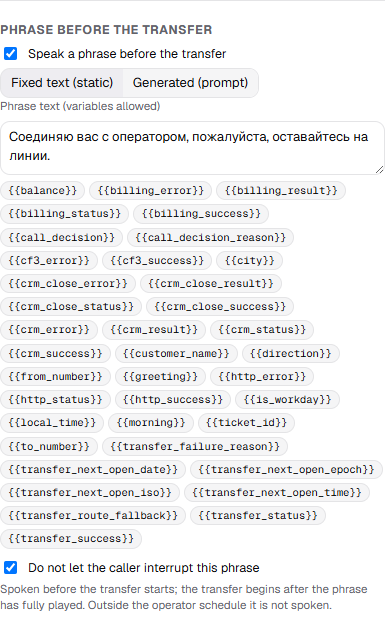
- Phrase before the transfer — the Speak a phrase before the transfer toggle: the node says “Connecting you to an operator…” itself, with no separate conversation node in front of it. The text is either fixed, with variable substitution, or generated from your instruction. The transfer only starts once the phrase has played in full; outside the operator schedule it is not spoken. The Do not let the caller interrupt this phrase checkbox covers every reply of the node, not just this one.
- Operator working hours — the Transfer only during working hours toggle limits handovers to a schedule. Set the Operators’ time zone — pre-filled with the organization time zone, change it if the operators sit elsewhere — and at least one row of days and hours; an enabled schedule with no rows cannot be published, and an interval that crosses midnight is written as two rows. Do not transfer in the last 5 minutes before closing keeps the node from handing over a caller nobody will pick up.
- What to say outside working hours — a fixed text or an instruction for a generated reply. An empty field means the node says nothing. The reply can use
{{transfer_next_open_time}}and{{transfer_next_open_date}}. - Call recording — the Keep recording after the transfer checkbox, off by default. By default the recording ends where the call duration ends — at the end of the conversation with the agent: the hold for a warm transfer, the start of the dial for a blind one. Turn it on to also record the caller talking to the operator: the recording then outlasts the call — mind your obligations around call recording.
- Failure variables — after a failed transfer
{{transfer_status}}holds the reason —no_answer,busy,rejected,transfer_ring_timeoutorerror— and{{transfer_success}}isfalse. Use them in fallback conditions. - Transitions — add fallback destinations for failed transfers. These transitions do not run after a successful transfer because a successful transfer is terminal for the AI.
- Global node — make the transfer reachable from any point in the flow.
- Delete node — remove the transfer step from the agent flow.
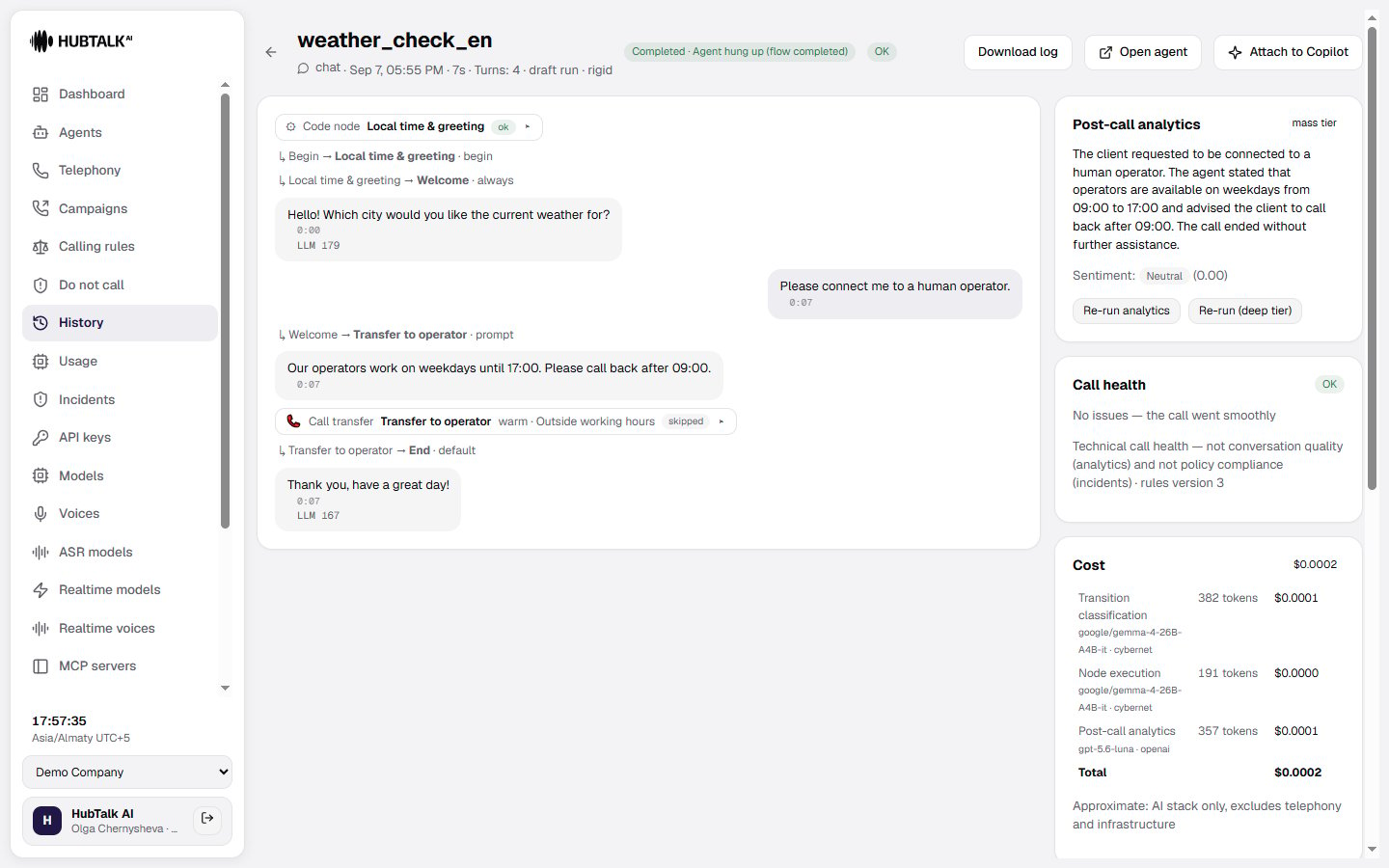
{{transfer_status}} becomes out_of_hours, {{transfer_success}} is false, the next opening is written to {{transfer_next_open_time}}, {{transfer_next_open_date}}, {{transfer_next_open_iso}} and {{transfer_next_open_epoch}}, the reply is spoken if you configured one, and the node leaves through its transitions. Give such a node a Default transition or a condition on {{transfer_status}} == "out_of_hours" — otherwise the validator warns that a call arriving outside the window has nowhere to go.
In the call history the transfer event is marked as skipped with the reason Outside working hours, so a closed window is not counted among the transfers that failed to reach an operator.
A transfer to another agent switches the voice too. When the destination is an agent, the continuation runs on the target agent’s settings: its voice and synthesis model, its speech recognition language, its silence reminders and backchannel words, and its call control limits. Silence timers start again from the first reply of the new agent.
Component node
The Component node inserts a reusable block into the agent flow. Use it for a repeated part of a conversation, such as a verification step, closing sequence, or common topic. When the agent is published, the component expands into its regular nodes.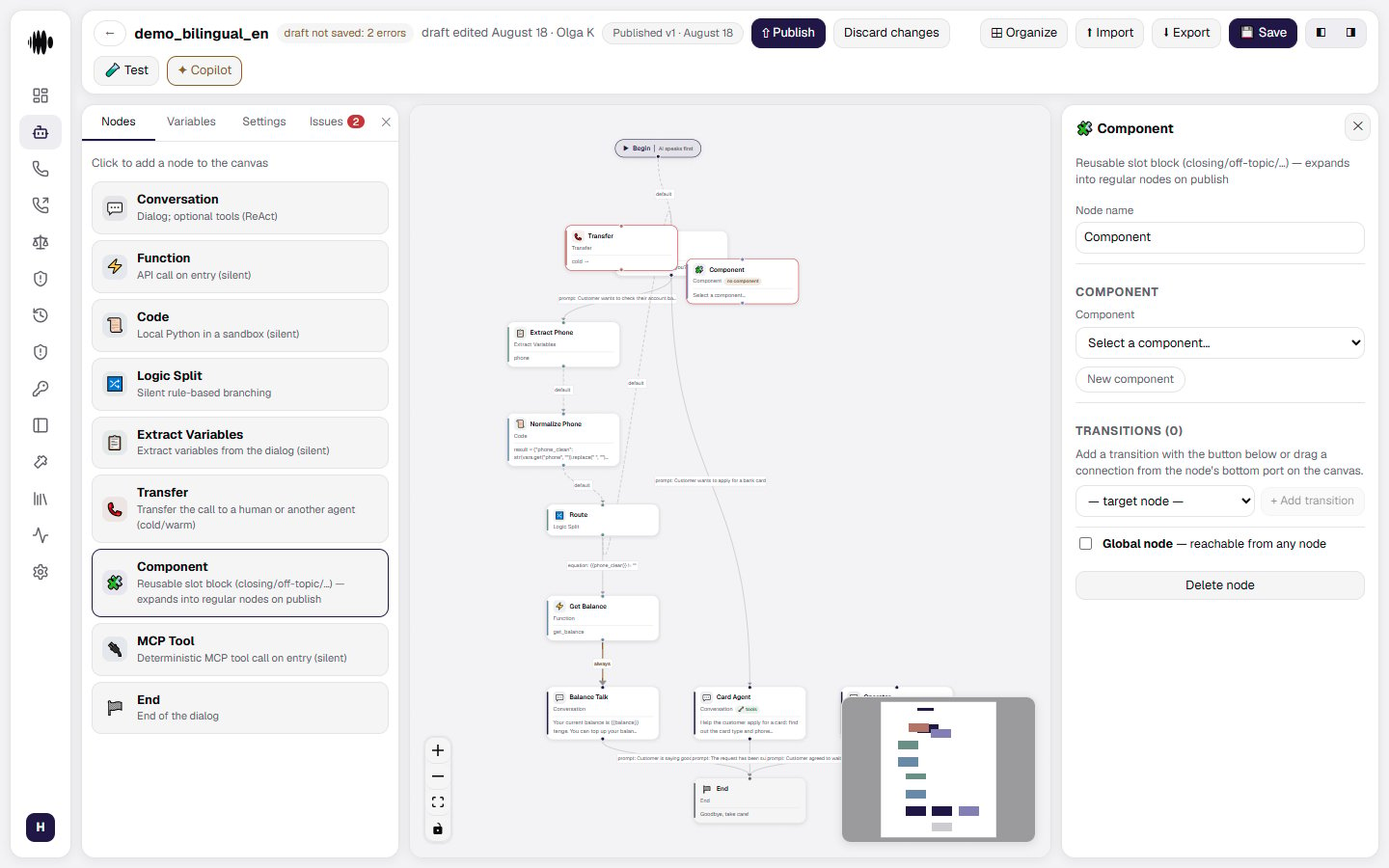
- Node name — identifies the reusable block in the flow.
- Component — select an existing component to insert into the flow.
- Create component — when the block you need is not in the library yet.
- Transitions — connect the component to the next node in the surrounding flow.
- Global node — make the component reachable from any point in the flow.
- Delete node — remove the component reference from the agent flow.
MCP Tool node
The MCP Tool node calls a specific tool through an MCP server without generating a spoken response. Use it when the agent needs to retrieve information or perform an external action through an MCP integration.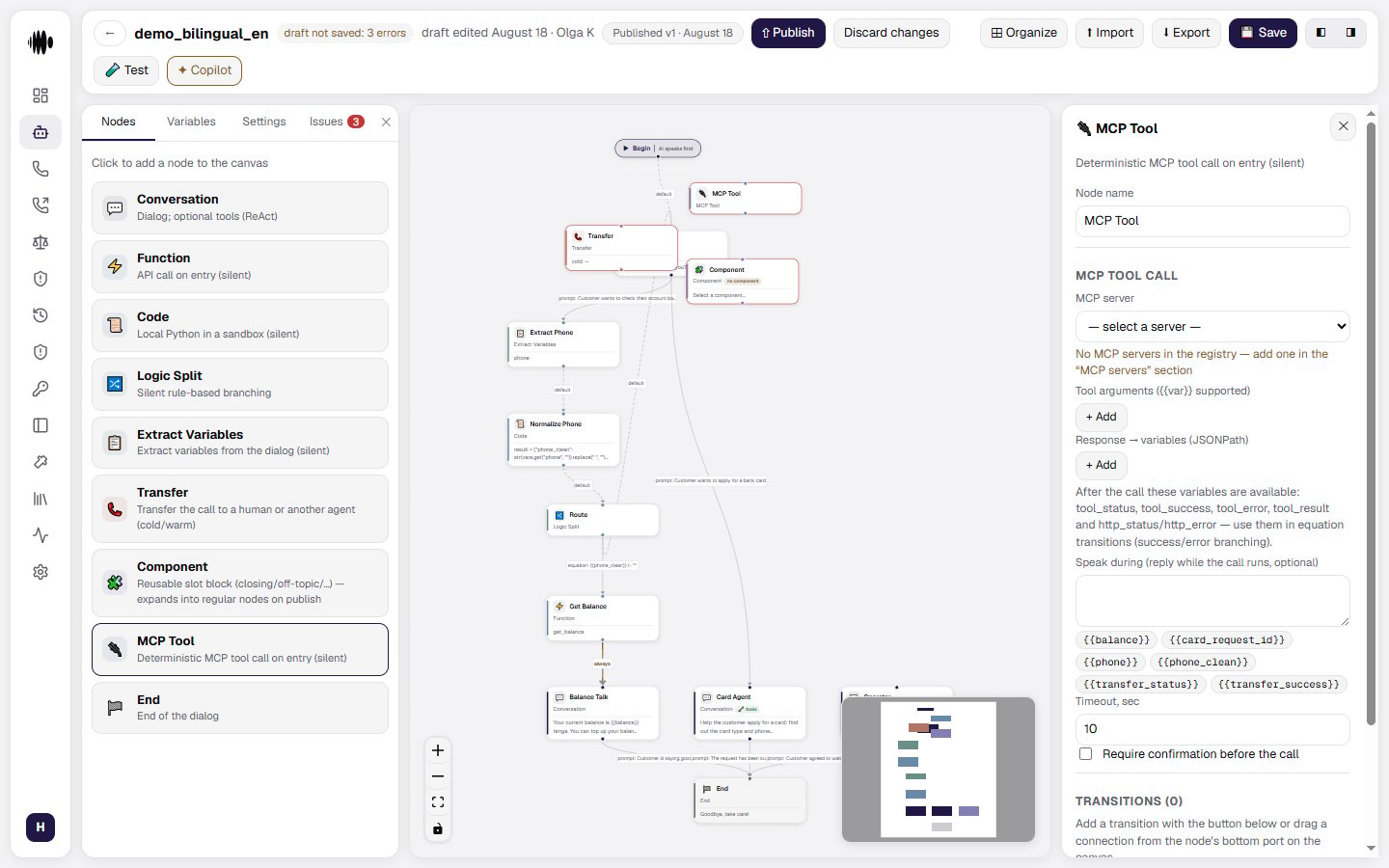
- Node name — identifies the MCP step in the flow.
- MCP server — the server that provides the tool. If no server is available, add one in the MCP servers settings.
- Tool arguments — add the values that the selected tool needs. Arguments can include variables such as
{{var}}. - Response → variables (JSONPath) — map values from the tool response into call variables. These variables are available to later nodes and transitions.
- Tool result variables — use status, success, error, result, and HTTP status values to branch the flow after the call.
- Speak during — what the agent says while the tool is working.
- Timeout — set the maximum time allowed for the MCP call to complete.
- Require confirmation before the call — the agent asks permission first.
- Transitions — connect the tool result to the next node. Response variables can be used for success and error branches.
- Global node — make the MCP tool reachable from any point in the flow.
- Delete node — remove the MCP tool call from the agent flow.
End node
The End node finishes the conversation. Use it when the agent has completed the task and should say a final goodbye before ending the call.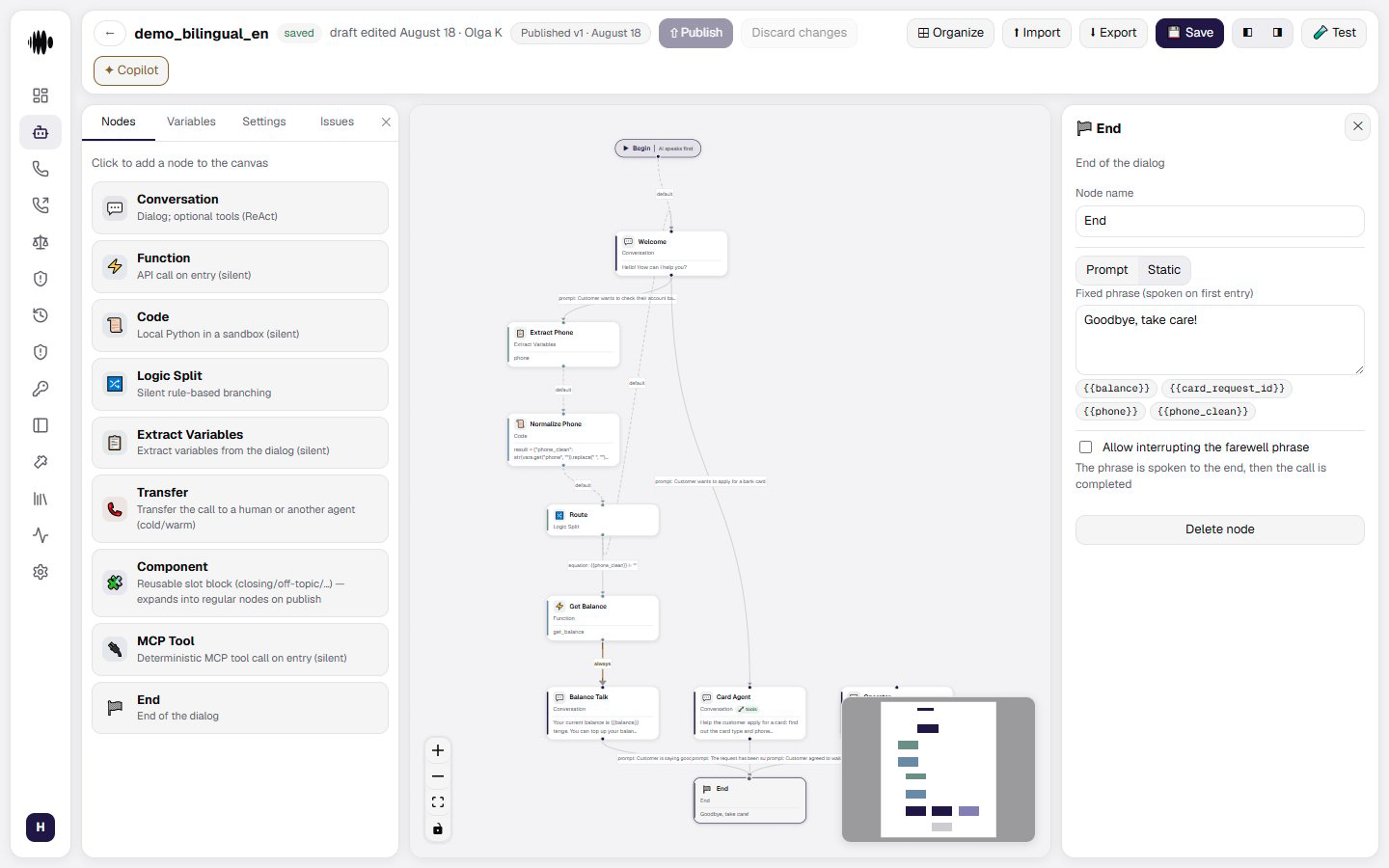
- Node name — identifies the final step in the flow.
- Prompt / Static — generate the farewell from an instruction, or speak a fixed phrase.
- Fixed phrase — write the message spoken when the conversation ends. You can include variables such as
{{transfer_status}}or{{transfer_success}}. - Allow interrupting the farewell phrase — lets the caller interrupt the final message. When disabled, the phrase is spoken to completion and then the call ends.
- Delete node — remove the end step from the agent flow.
- Greeting — the first thing the caller hears
- Language and voice — set the default speaking language and voice style
- Prompt and flow — define how the agent should behave and what it should ask next
- Actions — transfer, end call, webhook events, and follow-up logic