

Conversation: static phrase or prompt
Module goal: learn to choose between a fixed phrase and an LLM instruction and understand the Node-level overrides block.
{{variables}} work in both forms. The Open in editor button opens the reply full screen; on the right there is a Variables list, and a click inserts a variable at the cursor. This is the easiest way to insert the customer’s name, the visit date or the request number without a typo in the variable name.
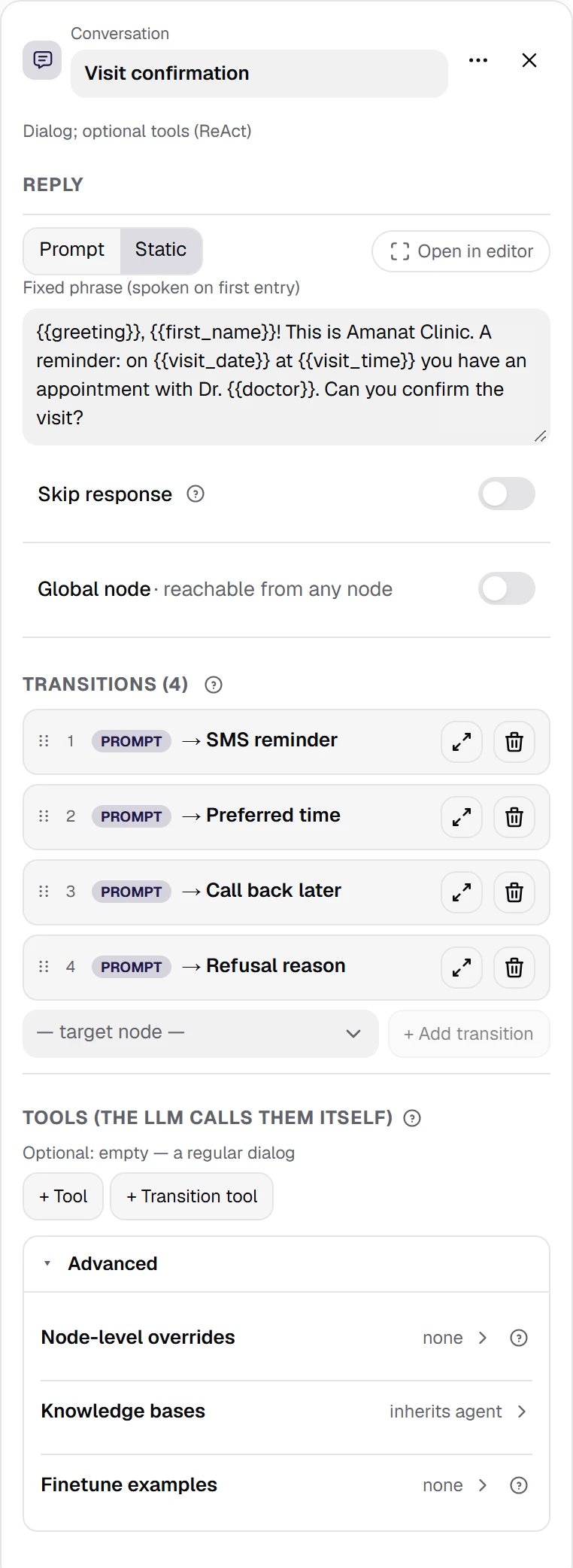
The Visit confirmation node. The agent's first conversation node: a fixed phrase with four variables and four transitions by meaning — SMS reminder, rescheduling, call back later and refusal.
Show the whole panel
Show the whole panel
Node-level overrides
The Node-level overrides block sits in the collapsed Advanced section at the bottom of the inspector; when something is set, the section title shows how many settings are set, and the section is open right away. A switch that is off = the node inherits the agent’s setting. A switch that is on applies only while this node is speaking. This is fine-tuning, not a global setting — it fixes specific spots in the dialog:- Interruption — whether the node’s reply can be interrupted and how easily. Allow interruption unticked ⇒ the node finishes its reply in full (needed for disclaimers). The Interruption Sensitivity slider: 0 — only a long phrase interrupts, 1 — the agent stops immediately. Zero does not turn interruption off: to make the node finish speaking, untick the switch.
- Generation model for this node — a different generation model for this node only, picked from the directory. Useful when one complex node needs a stronger model while the agent as a whole runs on a fast and cheap one. The transition decision out of this node is still made by the agent’s classification model.
- Voice — a different TTS voice while this node is speaking, also from the directory.
- Knowledge bases — a separate row of the same Advanced section: its own set of bases instead of the agent’s (see module 09, Knowledge bases).
Why Skip response changes the flowThe Skip response switch turns the node into “say it and move on”: such a node has exactly one transition, and it becomes
Always. This is how service lines before the next question are built — for example, “Just a reminder: your appointment is at 3 PM with Dr. Smith”. The agent does not wait for the customer’s answer and moves on right away. “Connecting you to the front desk” does not need a separate node: Transfer says this phrase itself (see module 11, Transfer).