

Voice: recognition, synthesis, interruptions
Module goal: set up the agent’s voice so that it hears the customer, sounds natural and stops talking at the right moment — in one language or in two within one call.
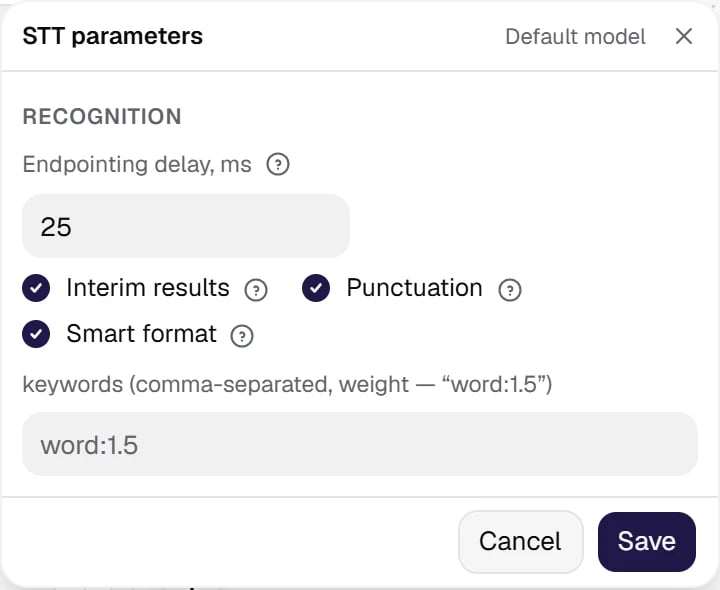
STT — what the agent hears: the model and provider parameters. The recognition model is picked from the directory.
Show the full panel
Show the full panel
- the hints are sent to recognition only if the parameter passport of the selected model declares
keywords; otherwise the pre-publish check warns that they are not sent; - a phrase is 3 to 80 characters long, at most 10 words, Cyrillic only, with no Latin letters, digits or duplicates; the service drops a phrase outside these rules, and the check warns about it;
- more phrases than the model accepts is a check error: the service would refuse such a request entirely.
- Cyrillic letters, including Kazakh ones;
- numbers spelled out as words rather than written as digits;
- an abbreviation read as a word — in capitals;
- an abbreviation read letter by letter — as the names of its letters, written out.
- for a bank —
chargeback, overdraft:2, Zelle, ACH transfer, routing number; - for a clinic —
Medicaid, Dr. Ramirez, A1C test, endocrinologist.
overdraft:2 gives the word a weight of 2.
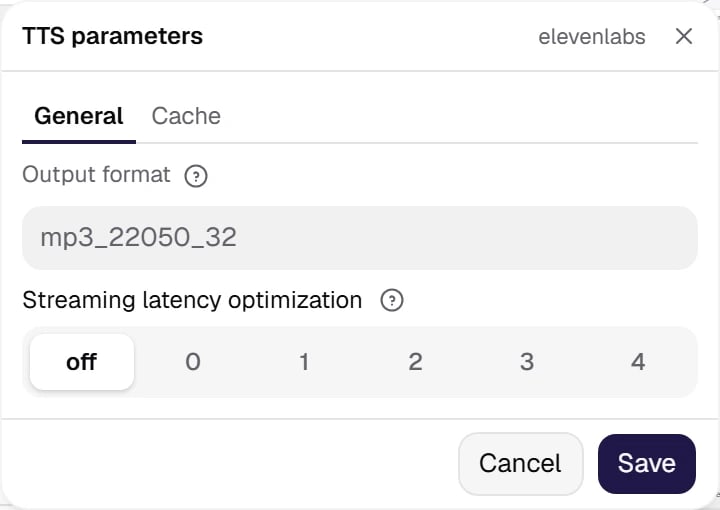
TTS — how the agent sounds. The gear holds the output format and latency optimization. The voice itself, its model and settings are picked in the voice window, and the reserve voice — in Additional → Reserve services.
Show the full panel
Show the full panel
apply_text_normalization. The cabinet highlights a value outside the passport range and does not save it, and a parameter rejected by the passport blocks publishing. The passport of a cybernet voice is strict: it has no field for extra keys, and a key the passport does not know also blocks publishing — the service would silently accept a misspelt key. For a cybernet voice with a Speed of 0.9 or lower, the cabinet warns that the voice quality degrades.
Numbers, dates and abbreviationsHow the voice reads “12:30” or “$49.99” is decided by text normalization at the synthesis provider:
- cybernet —
apply_text_normalizationwith the valuesonandoff. When the agent has a conversation language set, the service spells out numbers, abbreviations and Latin words only withon. If the agent says amounts, dates or times, chooseon; keep in mind thatonmay add to the time to the first sound. - ElevenLabs — the same
apply_text_normalizationwith the valuesauto,onandoff; withautothe vendor decides. - Inworld —
text_normalizationwith the valuesONandOFF.
Two languages in one callThe customer may start in one language and switch to another: in Kazakhstan — for example, from Russian to Kazakh (
ru/kk), in the USA — from English to Spanish (en/es). To make this work:- Agent languages — tick both languages in the Agent languages field of the Agent & prompt card. The first one is primary: the call starts in it. Keep Auto-switch to the caller’s language on — the agent switches to the language the customer speaks and answers in it; the voice, the recognition and the built-in phrases switch along.
- STT — a model that recognizes both languages. For
kk/ru, suitable options are, for example, Soniox Real-time (it detects the language itself and switches within an utterance) and the Cybernet KZ/RU models; foren/es— Deepgram Nova-3, Soniox Real-time, AssemblyAI Universal-3.6 Pro (streaming), Gladia Solaria-1 (live) and Azure Speech STT. The picker itself keeps only the models that know both languages. - TTS — a voice that speaks both languages. For
kk/ru— cybernet and Soniox voices; foren/es— ElevenLabs, Cartesia, Inworld and Soniox voices. - Tip: write fixed phrases in the primary language — the call starts in it.
kk/ru pair, the customer’s language is detected by the Kazakh letters in the utterance. A short Kazakh phrase without them, such as “salamatsyz ba”, keeps the call in Russian until the customer says a phrase with Kazakh letters.VAD and interruptions
The Turn-taking group sets how the agent reacts when the customer starts talking over it:- Allow interruptions — the agent-wide switch; a node can set its own value.
- Min duration and Min words — protection against false triggers: a cough, an “uh-huh” or line noise should not cut off the agent’s reply.
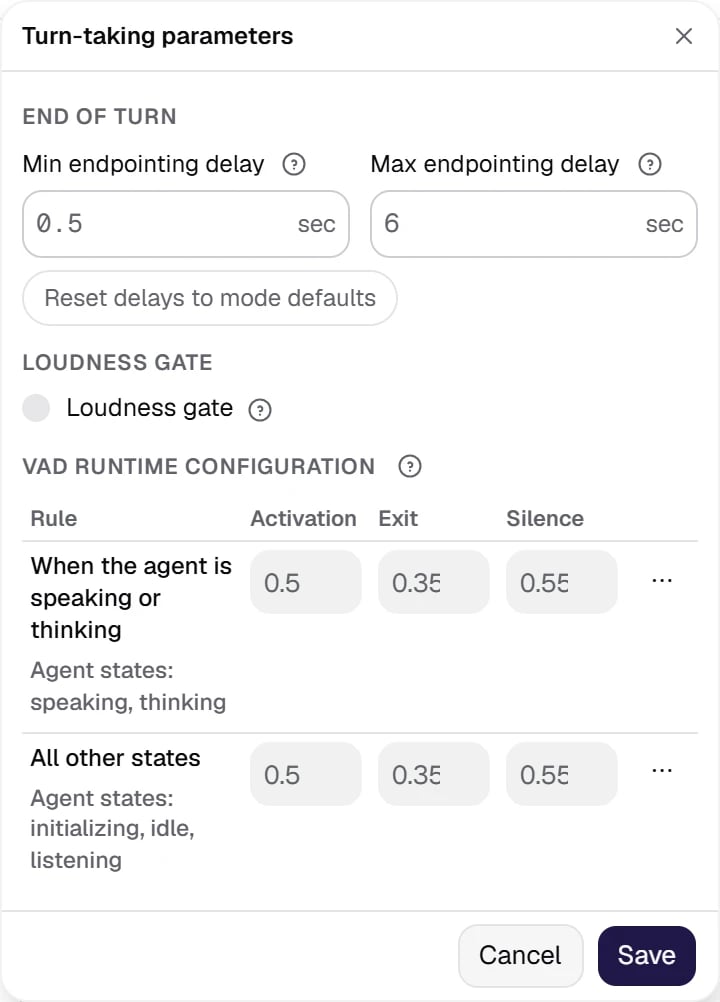
The Turn-taking parameters gear: endpointing delays, the loudness gate and the speech detector thresholds per agent state.
Show the full panel
Show the full panel
kk— VAD only: end of turn by silence; the cabinet recommends it when the language is outside detector support.ru— Text model: the only mode that supports Russian; the model is marked deprecated.enandes— Audio v1-mini: an audio model listens to intonation, rhythm and pauses and knows English and Spanish. Or STT provider, if the recognition model is Deepgram, Soniox, Azure or AssemblyAI: the provider determines the end of turn.
en — “uh-huh”, “mhmm”, “okay”, for es — “ajá”, “mhm”, “vale”, for ru — «угу», «ага», «мгм», for kk — «иә», «жарайды». Frequency (0..1) is 0.8 by default. Tip: 0.6 is a reasonable middle, 1.0 sounds intrusive. The moment for an acknowledgement is chosen most precisely with Deepgram, Soniox and Azure models; with the others, including the batch Cybernet models, the cabinet warns that the words may sound less natural.
The synthesis cache serves already voiced phrases without synthesizing them again; it is on by default. For ElevenLabs, Cartesia, Inworld and cybernet voices, fixed phrases without variables are voiced in advance, at publishing, so the greeting plays without synthesis delay already in the first call; for Soniox and Azure the cache fills up during calls. Tip: Static instead of Prompt at the start of the conversation is not only about wording but also about speed.
A pause in speech —
[pause N]You can put [pause 0.5] between words, and the agent stops for half a second; values from 0.1 to 3.0 are allowed. This is a way to read a phone number in groups rather than in one string, and to give the caller a moment before a question that requires a decision.The tag is understood both by the fixed text of a node and by generated replies — you can tell the model right in the prompt when to put a pause. The tag does not reach the transcript, History or reports: only synthesis sees it.But the pause length depends on the voice. ElevenLabs (except the eleven_v3, eleven_v3_conversational, eleven_v4 and eleven_v4_turbo models), Cartesia, Inworld and Azure hold a pause of exact length. Soniox, cybernet voices and ElevenLabs on these four models cannot, and there the tag turns into a comma or an ellipsis — the stop is audible, but [pause 2] and [pause 0.5] sound the same. A realtime agent has no pauses at all, and the validator warns about it. Check it by ear: make a test call, the transcript does not show pauses. Details are in phrase corrections and pauses.