

Outbound campaign: from a file to the first dial
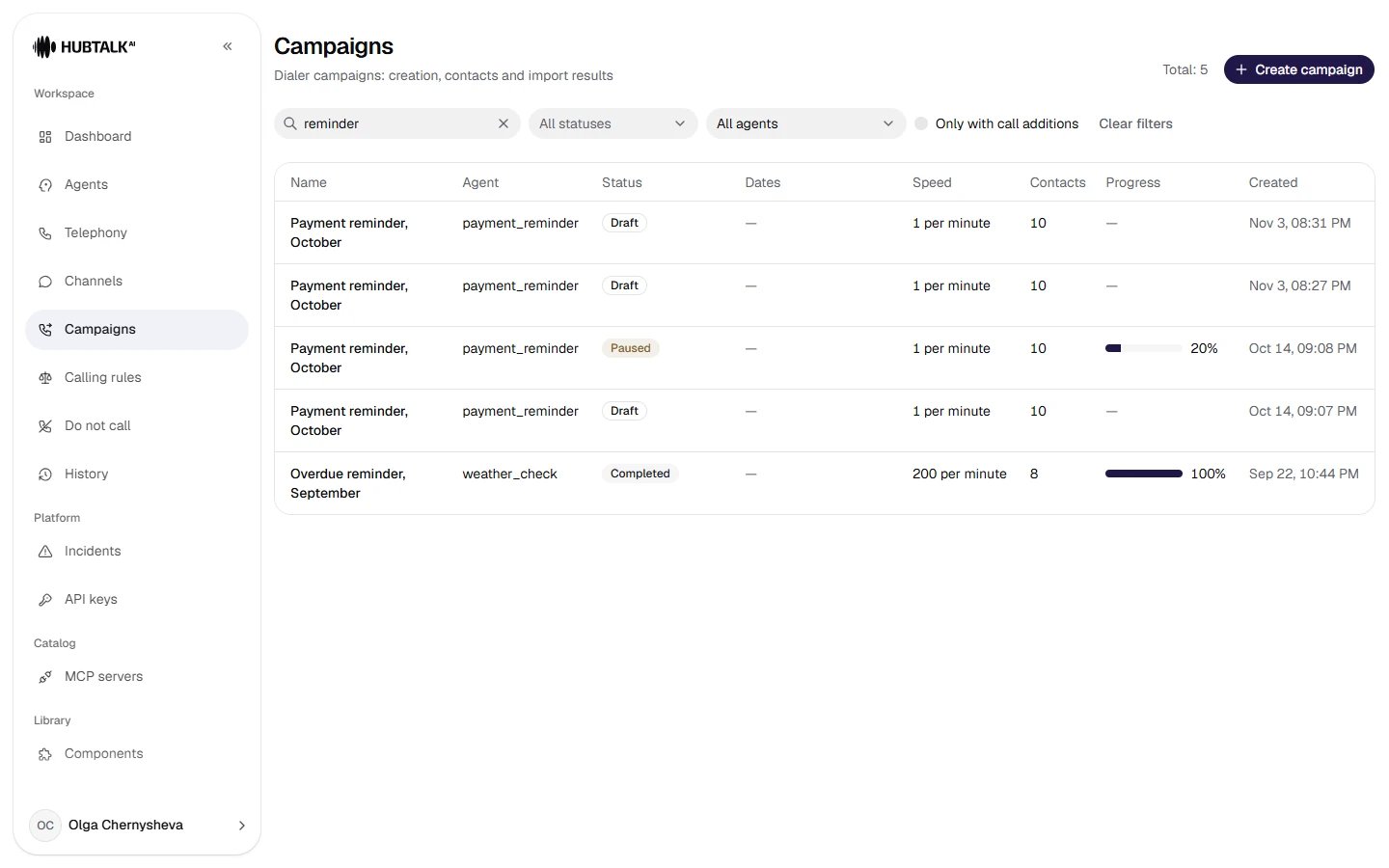
Campaigns — the campaign list: status, dates, speed, number of contacts and progress.
Campaign
Schedule
kz profile — the Call in the contact’s local time checkbox.Dialing
Contacts
Review and launch
Click to open in full
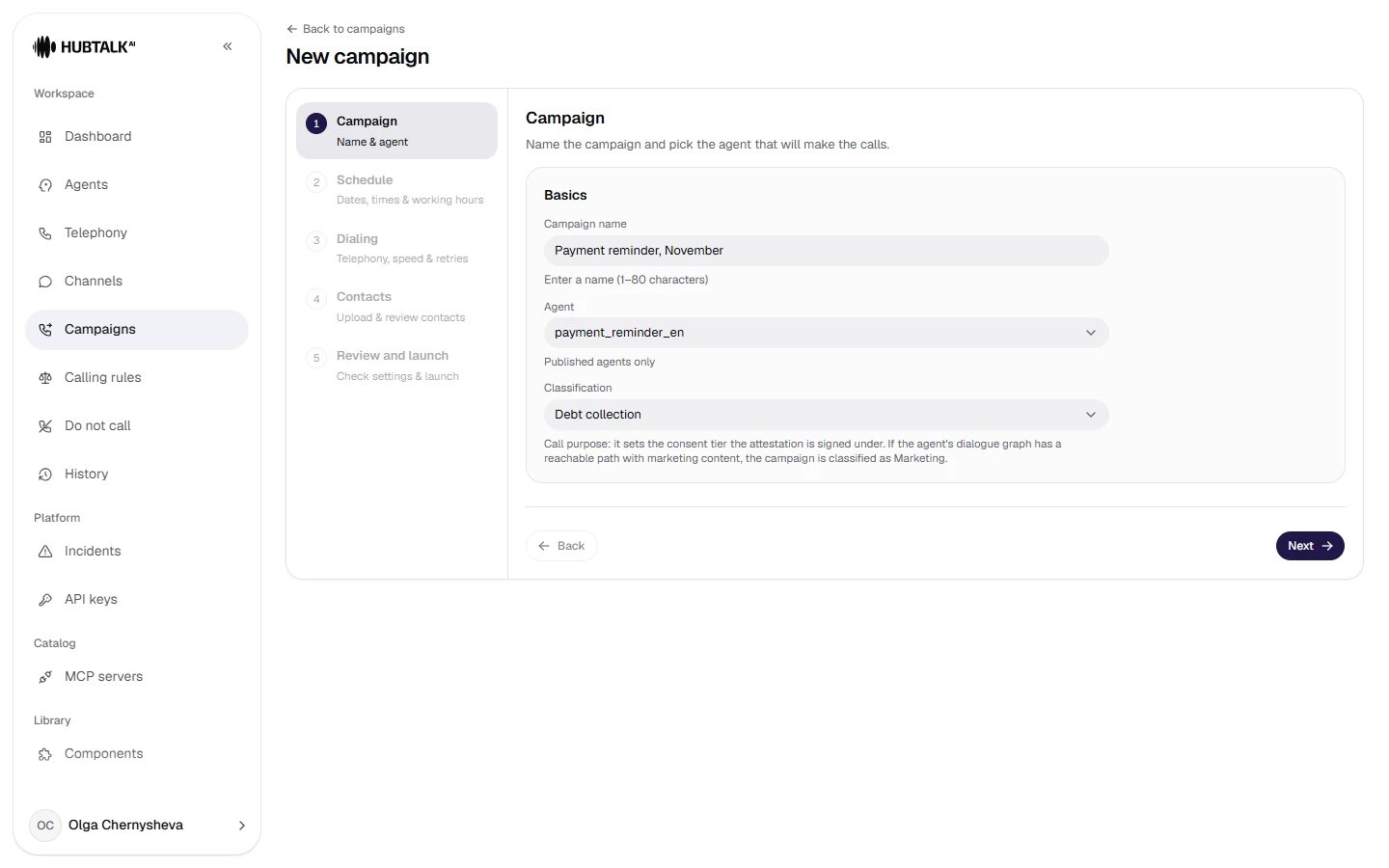
The first wizard step, Campaign: name, agent and classification. Dialing speed and retries come later, on the Dialing step: the speed is picked from fixed tiers or set as a custom number, and Dialing logic is Standard (retries and an interval) or Expert logic (rules by reason).
Click to open in full
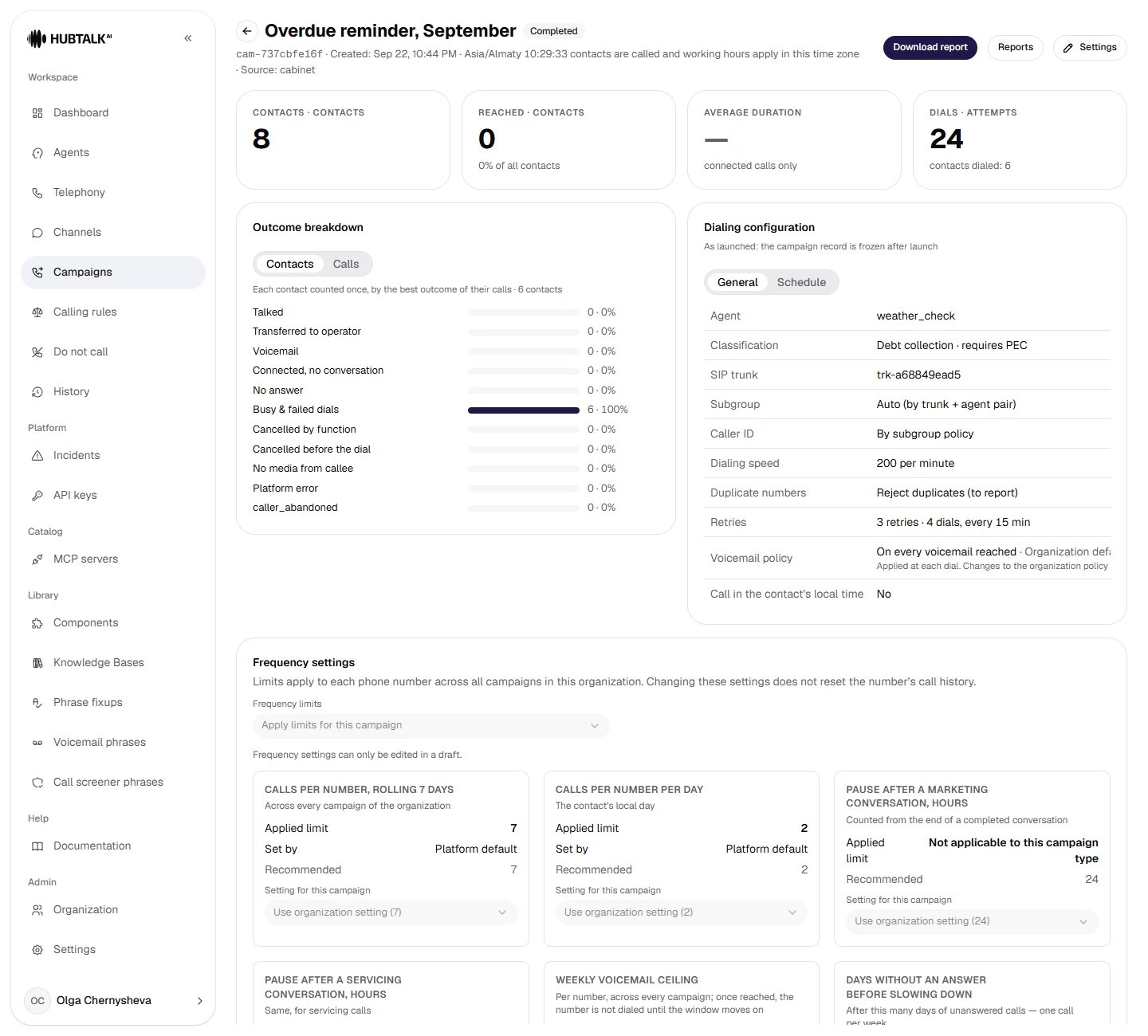
The campaign card: metrics, the outcome breakdown, the dialing configuration (after launch only the dialing speed and auto-speed mode can be changed) and the frequency settings.
Contact file: limits and columns
CSV or XLSX; the old XLS is not supported. Up to 50,000 rows and 10 MB — a file over the limit is rejected in full, not truncated. One column is required — the phone: the platform finds it by its header (phone, mobile, tel and similar), and if there is no recognizable header — by its content. The name is taken from name / full_name or built from first_name and last_name. Every other column becomes a call variable.
us_tcpa profile the file also needs a contact_zip or contact_state column: the platform uses it to determine the contact’s local time and the legal calling window. A file with neither column is rejected in full. On the kz profile no location columns are needed; if Call in the contact’s local time is ticked, the time zone is taken from the timezone column. Details — Campaign contacts.{{variables}} in the nodes with the headers in Excel.The import report — a must-read
In the screenshot: 6 accepted, 1 with warnings, 1 rejected, 1 duplicate found. The report names the row numbers and the reason (rows without a readable phone — row 8), can be exported to CSV/XLSX and is stored with the upload version. A separate note on geography on theus_tcpa profile: if even one row is rejected as having no usable location, the launch is blocked entirely — with the number of rows and the file name. There is no workaround and no partial launch: fix the file and upload it again. Below are the variables table and a red line saying that the agent uses variables the file has no columns for: they will be empty. This is the most common reason for “the agent says strange things”: the prompt has {{doctor}}, and the file has no such column.
Retries: standard and expert logic
Standard logic is “call back up to N times with interval M”. What is counted is retries (0–29); the first dial is not included in that number, and the screen always shows both figures: “9 retries · 10 dials”. The interval is set in two modes:- Same interval — one identical pause between all dials of the same number.
- Per-retry intervals — an interval for each retry separately, on the Retry 1, Retry 2, … pills. This is how “often first, rarely later” is built: 2 min → 5 min → 1 d → 3 d. Values come from a fixed list, from 1 minute to 7 days.
No answer → Redial on the next pass (up to 2 times), Busy → Redial after a delay (in 10 min), Voicemail reached → Stop calling this number, Goal not achieved → redial. For permanent reasons (wrong number, spam block) a retry is forbidden by the schema — as it should be.
You don’t have to assemble the rules by hand every time: above the rule editor is the Strategy preset selector with three built-in sets — Default (busy up to 3 redials, no answer up to 2), Aggressive (busy ×5, no answer ×4, voicemail ×2, a hang-up within the first 15 seconds is redialed) and Conservative (busy ×2, no answer ×1, voicemail and a hang-up within the first 10 seconds stop the number). Your own set is saved with Save as preset and reused in other campaigns; up to 20 presets per organization.
us_tcpa profile; on the kz profile these are transient reasons — the number returns to dialing and spends an attempt.Voicemail without a rule is redialed. Expert logic is standard logic plus rules: an outcome with no rule (or whose rule has used up its Times) is handled by standard logic, and that redials voicemail after the campaign interval. If you don’t want to redial voicemail, add the rule Voicemail reached → Stop calling this number.Frequency: how many times a person may be called at all
Retries answer the question “when to dial again”. Frequency limits answer a different one — “how many times may this number be called at all”, and they are counted per number across all of the organization’s campaigns at once. Two campaigns calling the same person share one budget, so a retry ladder may stop short not because of an error but because of frequency. In the campaign wizard and on the card, each limit shows four things: the Applied limit (what is actually in force), Set by — Organization, Platform default or Campaign, the recommendation, and a Not applicable to this campaign type note when the limit does not apply to this kind of campaign. Legal caps are not in this block: which restriction exactly applied to a contact is visible in its stored frequency decision. The campaign progress has a Frequency block: it separates contacts held by a restriction (we will call later) from contacts closed by it (this campaign will not call them). In the contact listing, each contact shows the reason and the stored frequency decision — which restriction fired, with which counters and until when.us_tcpa— the limits are on from the start, and on top of them the state’s legal caps apply by the contact’s location, and for Debt collection campaigns — Reg F: at most 7 calls in 7 days per debt and a 7-day pause after a conversation.kz— the limits are off: the market norm is the calling window and the do-not-call registry. If you need limits, turn them on yourself — it will be the company’s voluntary self-restriction.
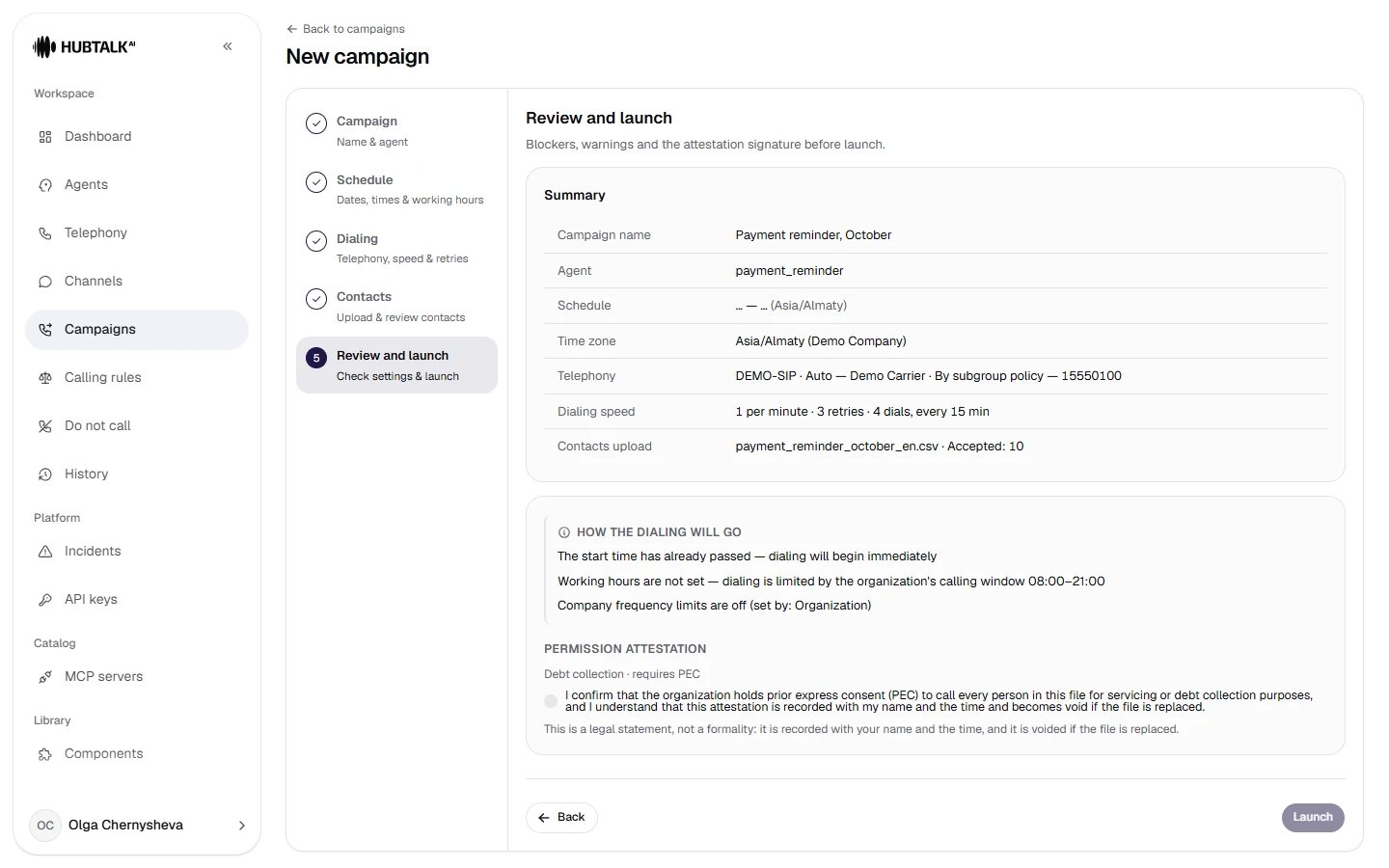
Launch. Before the first dial — the review (the agent is published, the trunk is alive, there are contacts, the windows are set) and the consent attestation: a signature confirming that consent to the call was obtained. The wording comes from the server and depends on the campaign classification; the signature is stored with your name and time and is reset when the contact file is replaced.
us_tcpa. Time is always computed in the contact’s local time, so there is no checkbox: the time zone comes from contact_zip or contact_state. The window is the intersection of the federal one (8:00–21:00), the state’s rules (in many states the evening ends earlier, and there are forbidden days and holidays) and the campaign working hours; the strictest wins. An empty schedule = the whole legal window of the contact’s state. Details — US campaigns.kz. If no schedule is set, the organization’s calling window applies — 08:00–21:00 by default, and the form says so directly. The campaign schedule can only narrow the window: a schedule wider than the window is not saved, a contact outside the window is deferred until it next opens, and if the window and the schedule no longer intersect, the contact is refused with the reason “empty intersection”. The window is set by the platform — in the organization settings it is read-only; a change applies at once to all of the organization’s campaigns, including running ones. The Call in the contact’s local time checkbox takes the time zone from the file’s timezone column: Almaty and Aktobe are an hour apart, and “09:00 campaign time” may turn out to be 08:00 for the customer.