

Transfer to a human

Transfer, warm transfer: the destination, the SIP method, the ring limit, the displayed number, custom X-headers, the briefing for the recipient and what the customer hears on hold.
Show the whole panel
Show the whole panel
- SIP INVITE — the platform dials the second number itself and bridges the conversation. The Transfer ring duration (1 to 120 seconds), SIP headers and the transfer number apply; if nobody answers, the node takes its fallback transition. Works with both modes.
- SIP REFER — a blind handoff to the carrier: the agent leaves at once, dialing and ringing happen on the carrier side. Whether the customer reached a person, the platform no longer learns, and the ring limit does not apply. REFER cannot be used with Warm (with briefing): there is nowhere to put the customer on hold.
- Operator only (the default) — the customer on hold does not hear it. The briefing is spoken only once the customer is confirmed to be cut off from the agent’s audio; if that cannot be confirmed, the operator is connected without the briefing, and the call history shows the line “operator briefing skipped”.
- Operator and caller — the customer is connected to the operator as soon as the operator answers, both hear the briefing, and it cannot be interrupted. Use it when the briefing holds nothing the customer should not hear: “I’m connecting Maria about her appointment tomorrow”.
Where to transfer
The Destination field has three options:{{operator_phone}} from a CRM. The number is checked against the allowed destinations of the transfer line: if the destination is forbidden, the transfer does not start and the node takes its fallback transition.
Phrase before the transfer
“Connecting you to a specialist, please stay on the line” is said by the Transfer node itself — you do not need a separate conversation node in front of it. The Speak a phrase before the transfer toggle sits in the inspector after the transfer settings; under it is the same choice as for the briefing: fixed text with variable substitution or an instruction for the model. The transfer starts only once the phrase has played in full — for a cold transfer, a warm one and a transfer to another agent alike. The toggle is off by default. The Do not let the caller interrupt this phrase checkbox under the field makes the line uninterruptible. It applies to all lines of the node — the phrase before the transfer, the line outside the operator schedule and the transfer failure message: it is a node setting, not a setting of one phrase.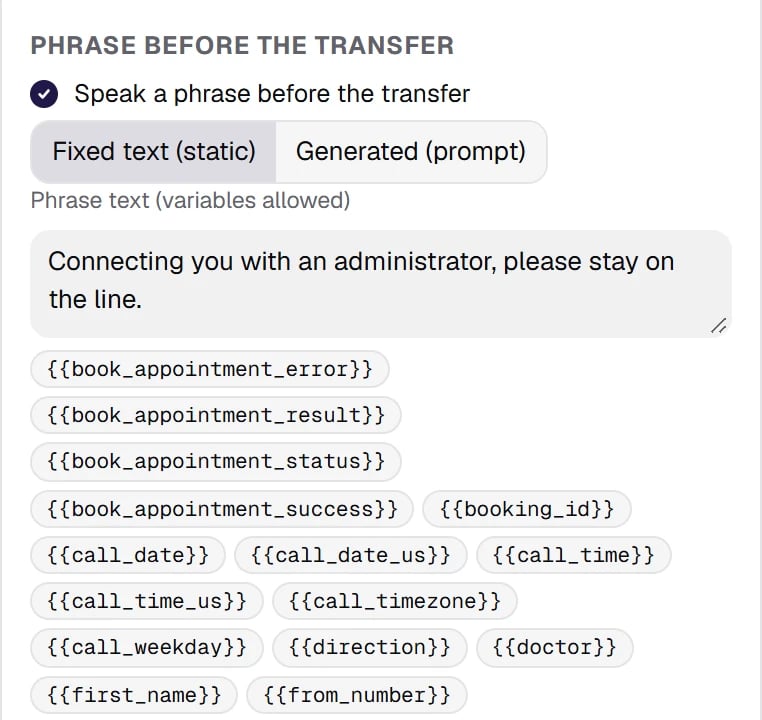
The Phrase before the transfer section in the Transfer inspector: the toggle, the choice between fixed text and a prompt, the phrase field with variable substitution. The Do not let the caller interrupt this phrase checkbox is right under the field.
Which line the transfer goes out on
A transfer to a number can go out on a separate line — a transfer subgroup with its own numbers, limits, allowed destinations and REFER destination form. Transfer subgroups are created in Telephony. In the node, the Transfer subgroup field is a list (only for the Phone number destination). You do not type digits by hand.- Default (call subgroup or trunk default) — an outbound call is transferred through the outbound route it was dialed on, an inbound call through the outbound route the platform assigned to your organization.
- A selected transfer subgroup — everything comes from it: the number pool, limits, allowed destinations, the REFER destination form.
- No prefix — dial the number as is — the number goes out without a line prefix; the line itself is chosen as by default.
Which number the operator sees
The Transfer number field decides which number the operator gets the call from:- Client’s number (default) — on an inbound call, the caller’s number; on an outbound call, the number the agent dialed. The operator sees at once who is on the line.
- Trunk number — a number from the pool of the subgroup the transfer goes through, by its Outgoing number selection setting. A transfer of an outbound call without a transfer subgroup shows the number that call was dialed from.
- Custom number — a number or a variable. The number must be in the outgoing number pool of the transfer subgroup; otherwise the transfer takes the fallback transition.
P-Asserted-Identity and Referred-By headers; whether the carrier applies it to what the recipient sees is the carrier’s decision.
Operator working hours
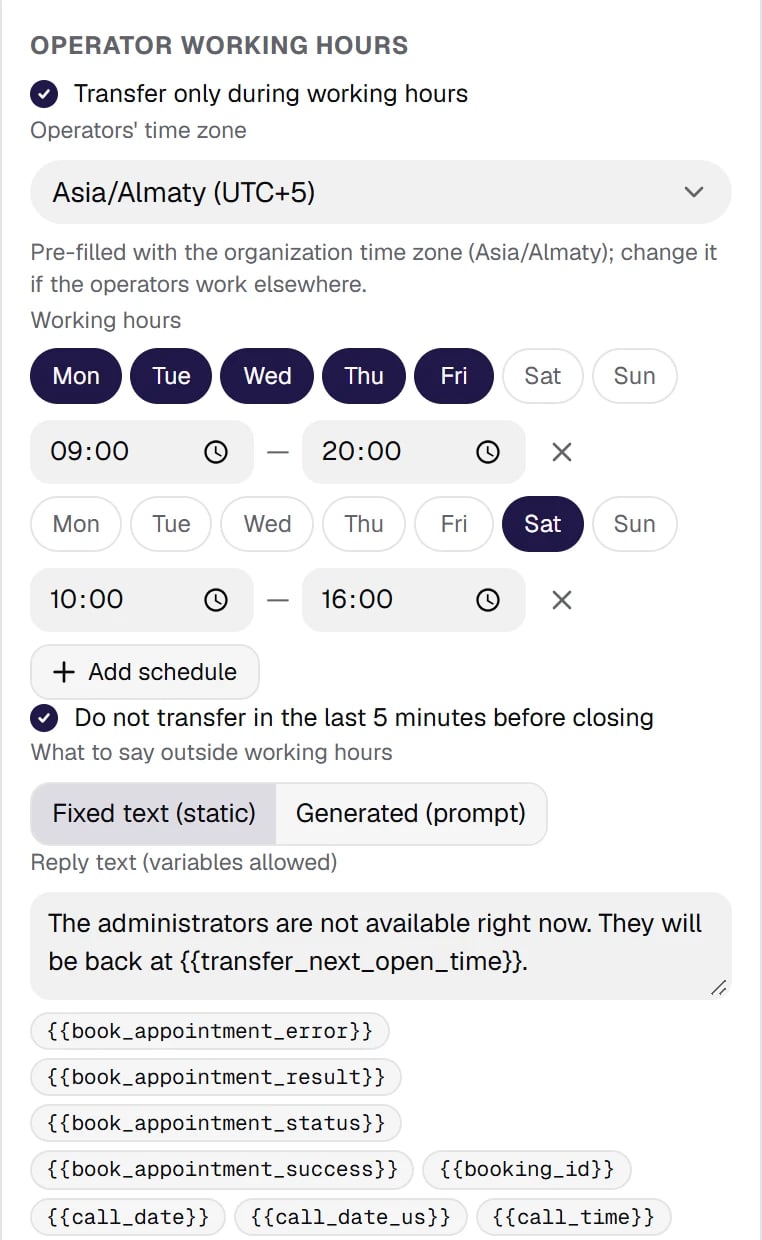
The Operator working hours section in the Transfer inspector: the toggle, the operators' time zone pre-filled with the organization zone, days-and-hours rows, no transfers in the last 5 minutes before closing, and the line outside working hours. The substitution hints show the next-opening variables.
Asia/Almaty or America/Chicago), days-and-hours rows, and the Do not transfer in the last 5 minutes before closing checkbox — so you do not hand a caller to someone who is already heading home. An interval across midnight is written as two rows; an enabled schedule without rows cannot be published.
Outside the schedule the node does not start the transfer: {{transfer_status}} becomes out_of_hours, {{transfer_success}} becomes false, and the next opening time goes into {{transfer_next_open_time}} and {{transfer_next_open_date}} (there are also {{transfer_next_open_iso}} and {{transfer_next_open_epoch}} — for Function and Code). The What to say outside working hours block sets the line: fixed text with substitution — “Our operators work until 9 PM, please call back after {{transfer_next_open_time}}” — or an instruction for the model. An empty field means the node stays silent and simply follows its transition.
In the call history such a case shows up as a transfer event with the status “skipped” and the reason Outside working hours — so in a report it is not mixed up with failed attempts to reach an operator.
Code sandbox has a clock, now("Asia/Almaty") or now("America/New_York"), and for simple cases there are the ready-made variables {{call_time}} and {{call_weekday}} — see module 06. Variables.Where the call ends and where the recording ends
The conversation with the agent ends when the customer is handed to a live operator. The call duration in the history and the recording end there too: for a warm transfer this is the moment of hold, for a blind one the start of dialing or the sending of the REFER. The customer’s further conversation with the operator is not part of the call duration — otherwise two logically identical transfers would give different numbers in a report. The exception is the briefing in Operator and caller mode: the customer hears it, so the duration and the recording include the dialing time and the briefing. The Call recording section of the Transfer node has a Keep recording after the transfer checkbox — off by default. The section exists only for the SIP INVITE method: with REFER the call goes to the carrier, and there is nothing left to record on the platform. Turn the checkbox on if the flow needs the part with the live operator too: the recording then outlasts the call, and that is a deliberate choice. Tip: check the call recording requirements where you call — they differ in Kazakhstan and between US states — and let the caller know.X-* headers are a way to pass context to the telephony side: the customer’s name, the request number, the conversation id. Values support {{var}} variables and environment secrets {{env.NAME}}. If the contact center has a customer card, agree on these fields with your telephony team in advance — it saves tens of seconds on every transfer.When the transfer fails
A phrase instead of silence
If the transfer fails and the flow has nothing to say — there is no failure route, or it leads to a silent ending — the caller listens to dead air until they hang up. For this case there is the Transfer failure message in the agent settings, in the Call card: fixed text or an instruction for the agent. An empty field means a silent ending. The phrase does not return the conversation to the flow: it plays, and the call ends. Bringing the person back into the dialog is the job of the failure route, because “busy” and “number unreachable” deserve different words. The validator also warns about the second form of the same trouble: failure routes exist, but each of them leads to a silent ending. The warning does not block publishing and disappears as soon as the phrase is set.Why it failed — visible at once
The failure reason is recorded in two places:- in the call history — on the transfer event, as a separate line: the destination was busy, did not answer, rejected the call, the ring limit expired, the destination is forbidden by the subgroup policy, the subgroup limit is exhausted, outside working hours;
- in variables —
{{transfer_status}}(no_answer,busy,rejected,transfer_ring_timeout,error,out_of_hours) and, next to it,{{transfer_failure_reason}}with a technical code of the reason. Use them to split failure routes and to pass the reason to an external system through a webhook.
Transferring not to a human but to another agent
The transfer destination can be not only a number or a SIP address but also another published agent of your organization. A typical case is “switching the language”: a Russian-speaking agent hands the conversation to a Kazakh-speaking one, an English-speaking agent to a Spanish-speaking one. The continuation runs entirely on the target agent’s settings: its voice and synthesis model, its speech recognition language, its silence reminders and backchannel words, its call control limits. Silence timers start counting again — from the first reply of the new agent, not from the start of the call. On a warm transfer the first agent’s briefing reaches the new one in the{{transfer_briefing}} variable — that is where it gets the context from.
Such a transfer has no SIP settings: the call stays on the platform, only the agent changes. If the target agent is not published, the validator warns that the transfer will not happen.
It works in every channel, not only in a phone call: a call from your website, the voice test in the cabinet, chat and WhatsApp.