

Calling compliance: Do not call
Module goal: know where a customer’s opt-out lives, how to prove the list was checked and how this affects dialing.
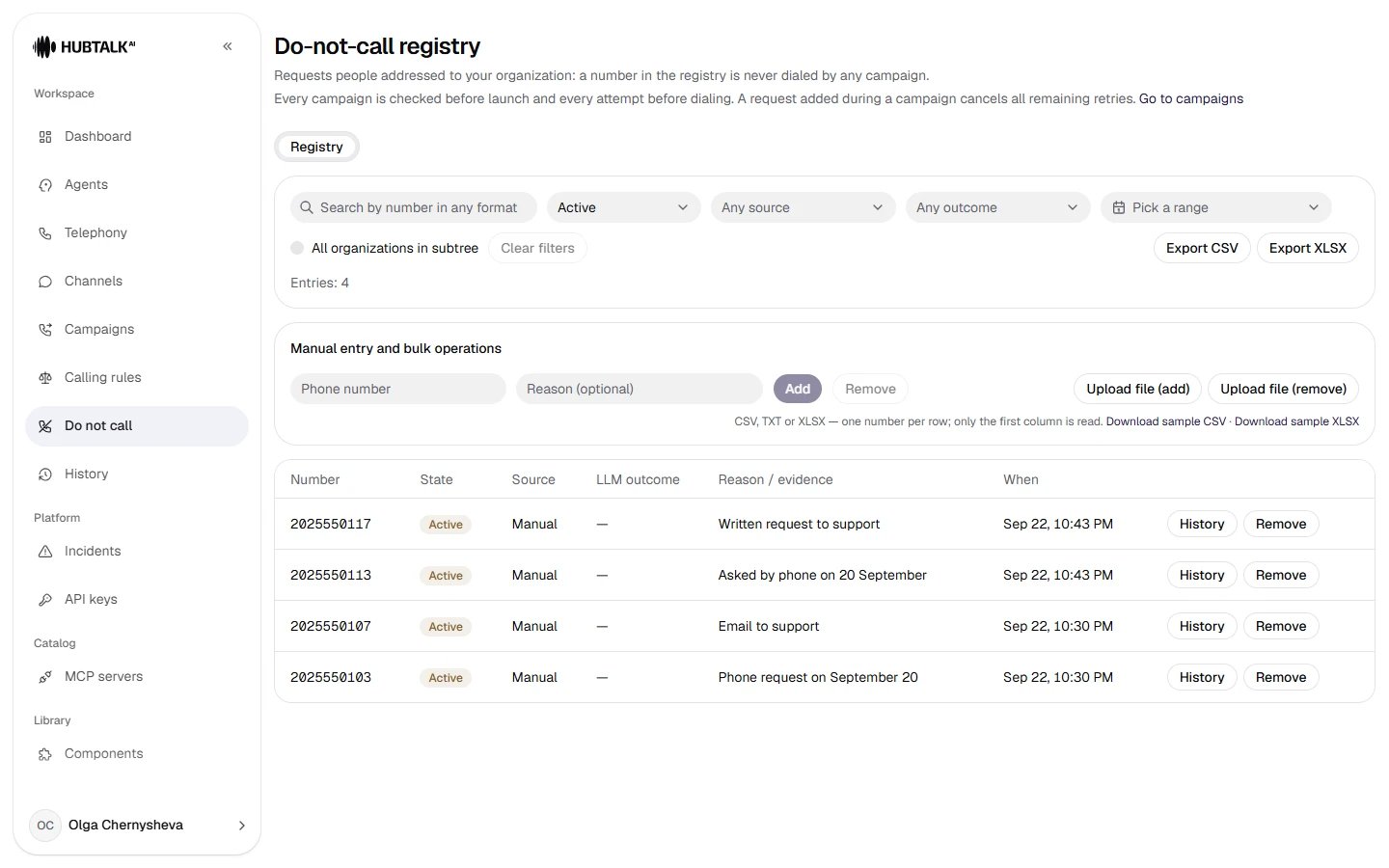
Do not call — the registry of numbers that must not be called: search, period, entry source and the history of a specific number.
us_tcpa profile — automatically from a conversation, when the customer explicitly asks not to be called again.
An upload takes a CSV, TXT or XLSX file up to 10 MB: the number goes in the first column, on the first sheet for XLSX. The old Excel format .xls is not accepted — save the file as .xlsx. Under the upload buttons there is a format hint and sample files in CSV and XLSX.
The format of an entry does not matter:
+1 (212) 555-0142 and 12125550142 are the same person, just like +7 701 555 01 02 and 77015550102. Numbers are compared by their last 10 digits. Entries are not deleted: removing a number (Remove) is a separate entry, and the whole history of the number is kept, so you can always see when the number entered the registry, for what reason and when it was removed.- a “do not call” request that arrives during a campaign cancels all further retries of that number;
- a removed entry makes a contact that has not yet been closed dialable again — without restarting the campaign.
The file check: what you see before launch
The uploaded file is checked against the registry, and the check screen answers the question “what exactly was checked” — not just “how many matched”.
The matches table shows the row, number, name, reason and in the registry since — with full quotes, not hints. If there are many matches, the preview is truncated, and the full list is taken with the Download exact list button (CSV or XLSX).
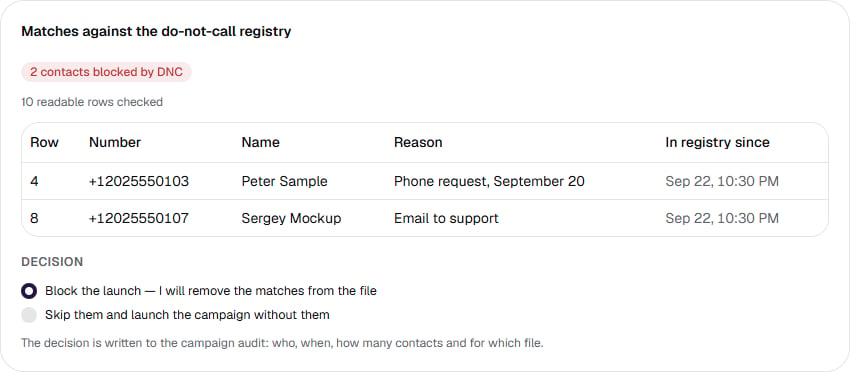
The check screen before launch: two findings with quoted reasons and the date they entered the registry; under the table — the choice of decision.
The file is not changed. The rows stay in place, and the platform refuses at dialing. So “remove the matches” is an edit to your file, not an action of the platform.
The decision and its trail
Before launch the screen requires a decision:- Block the launch — I will remove the matches from the file (the default);
- Skip them and launch the campaign without them.
The cabinet and the Web API check the same way. Both paths recompute the check with the same code, and the transition to dialing records the screen contents, all matches, the import mark and the attestation in one transaction. You can promise an external integrator the same level of compliance as in the cabinet. A member can also decide on the matches — this role runs a campaign end to end, see Roles and access.
How the market profiles differ
- us_tcpa
- kz
Automatic capture from the conversation. If a customer asks not to be called again during the conversation, the number enters the registry by itself — on a trigger phrase or on the agent’s classification of the call. If the organization has a classifier model configured, it weighs the context and tells a genuine request from someone recounting another conversation; in doubtful cases the number is still added and lands in the Review queue. Each entry stores the conversation fragment the decision was based on, and a mistaken entry can be removed with Remove. Trigger phrases and the model are configured on the Capture tab — an administrator and a developer see it.The Calling rules section shows the state rules in force: hours, forbidden days, holidays and legal frequency caps. Details — US campaigns.