

External systems: Function and tools
Module goal: call a CRM in two different ways and understand when each one fits.

Function. The Mock / HTTP switch, params with {{var}}, parsing the response by JSONPath into variables, and a filler reply while the call runs.
Show the whole panel
Show the whole panel
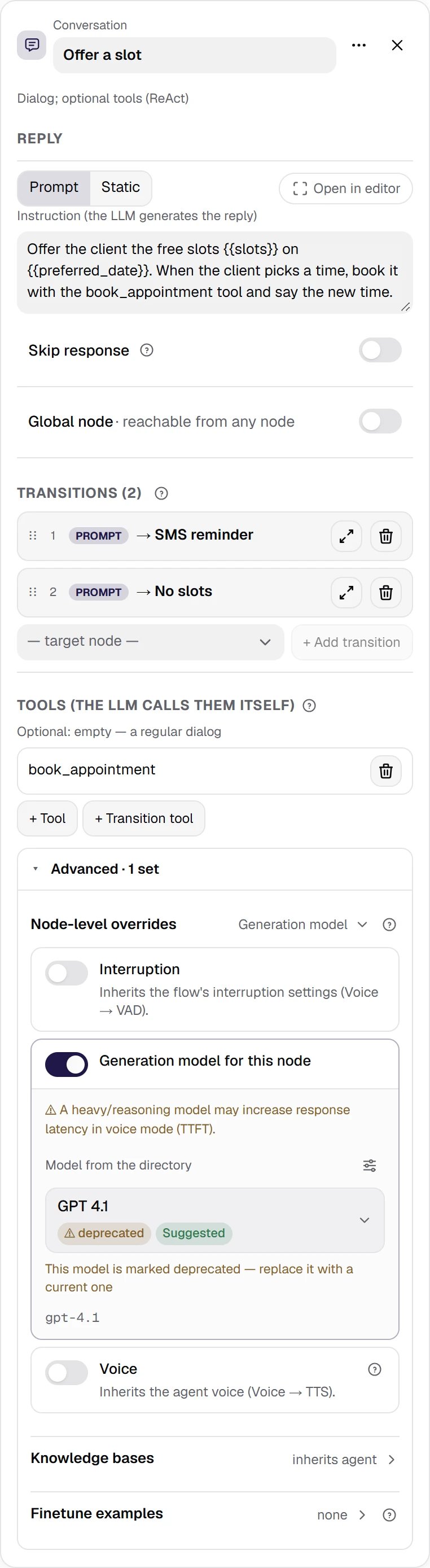
Conversation + tool. The same call, but the model makes the decision: the book_appointment tool plus its own generation model for this node.
Show the whole panel
Show the whole panel
What you configure in a Function
A tool on a Conversation node is configured with the same form, so everything below applies to both ways.- Execution mode — Mock (deterministic response) or HTTP (real call).
- Name in the Function block — the prefix of the service result variables: a function named
get_free_slotswritesget_free_slots_status,get_free_slots_success, and so on. - Method and URL — the method is picked from a list: GET, POST, PUT, PATCH, DELETE. The URL, Query params, Headers, and the body support
{{var}}substitution and{{env.NAME}}secrets. You do not type a secret into the field: you write a reference to it, the value is substituted at execution time and masked in logs. - Body (request body) — for every method except GET; type
json,form, orraw. Content-Type (override) sets the header by hand; left empty, Content-Type follows the body type. - Timeout, sec — 10 by default, applied to each attempt.
- Retries — 0 by default. A retry fires on a network error, a timeout, and a 5xx response; a 4xx response is not retried.
- Backoff, sec — 0.5 by default, doubling with each retry: 0.5 → 1 → 2 s. Retries and backoff make the call longer, and the customer waits all that time.
- Verify TLS certificate (tls_verify) — on by default.
- Success when (success statuses) —
2xxby default; you can list codes and ranges separated by commas, for example200-299, 404. Any other status is a failure. - Response variables —
slots_count ← $.count: the variable name on the left, the JSONPath in the response on the right. Only what is listed here becomes a variable. Besides them, the service variables<name>_status,<name>_success(trueorfalse),<name>_error, and<name>_result— the raw response, absent when there was no response — are always available after the call. The status, success, and error of the last call are also inhttp_status,http_success,http_error. Success / error branching is built on them with an equation. - Speak during — “One moment, let me check the available times…”. The agent says it before the request, and
{{var}}in it are substituted. Advice: in voice this is not decoration — without it the customer hears silence for the whole request. Write the reply in the language of the conversation: for a Russian-speaking agent, for example, «Секунду, смотрю свободное время…». - Mock — a fixed response: Mock status and Mock response (JSON with
{{var}}). Mock scenarios add named variants: a success with its own status and response, or atimeout/networkfailure; Default active scenario picks which one answers. You build and test the flow on the mock while the customer’s API is not ready: nothing leaves the platform. The function also answers with the mock in the chat test when the run options have mock selected for HTTP functions — even if the node is in HTTP mode.
<name>_error is blocked. How the platform builds the request and parses the response is described in detail in the integration contract.