

Agent objectives
Module goal: set up machine-checkable objectives so that the agent does not re-ask for what it already has.
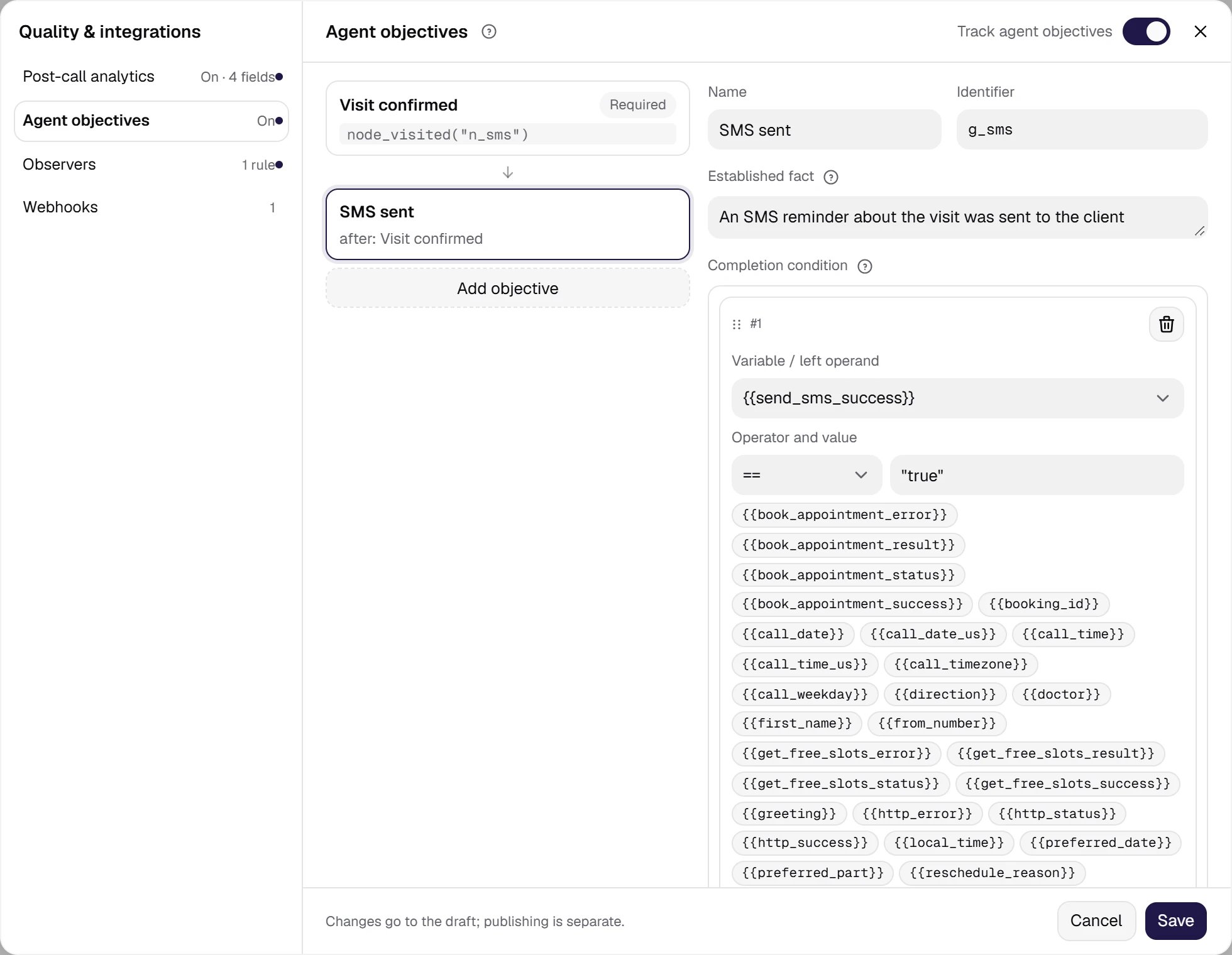
Agent objectives (Quality & integrations → Agent objectives). Two objectives of the tutorial agent: “Visit confirmed” (required) and “SMS sent” — optional, available only after the first one.
Show the full panel
Show the full panel
{{confirm_text}} != "". The code marks it, not the model: the model only reads the objective state and never writes to it. This gives properties a prompt cannot:
- the agent does not re-ask about a closed objective — the summary of what is established goes to the tail of the prompt and is refreshed on every turn, so it never falls out of memory;
- an objective can be made revisable — the customer changed their mind, the cancellation condition fired, the objective is open again;
- preconditions set dependencies: sending an SMS reminder only makes sense after the visit is confirmed;
- transition formulas can use the
goals_completed()predicate — “everything important is established, time to say goodbye”.
Two things people often ask. First: the summary does not appear in the conversation transcript — in the call record you see only the real replies. Second: the mechanism makes no extra language-model calls, so it does not affect call latency. And one more: there is no need to copy the summary into node prompts by hand — it is mixed in automatically, and a hand-written copy quickly drifts away from the settings.
How conditions are set
The Completion condition and the Cancellation condition are assembled with the same condition builder that works on transitions: you pick a variable, an operation and a value, and the cards add up to an expression. A condition can also be edited as text — the Edit as text button. The Node visited check is added as a separate card (the + Add visited node button): the node is picked from a list. It is the only value in an objective condition that the author has nowhere to look up — so it is picked from a list rather than typed in. A moment after an edit, the line under the condition shows Checking…, then Condition parsed or Condition is not valid with the reason. The wording of an objective — the Established fact field — is a statement of fact (“identity confirmed”), not a task (“confirm identity”): the text goes to the agent, and a task-shaped text ends up being read out loud — “right, I still need to find out why the payment was missed”. Proofread the wording on test calls with the same care you give the agent’s replies.Condition cheat sheet
Comparisons are case-insensitive:
"Yes" and "yes" are the same. Expressions with brackets or a mix of AND and OR are edited as text only — the cards do not show that form.
Where field values come from
This is the main practical question of the setup. There are three sources:- Extraction from the conversation — what the agent finds out from the person: a name, a date, a reason, an answer to a question. In free mode extraction runs on every turn, in a rigid flow only on the steps where it is configured.
- Results of calls to your systems — every request automatically exposes
{{name}}_success,{{name}}_status,{{name}}_errorplus the fields you mapped from the response. A useful side effect: if the same request is repeated and returns a failure, the objective stops being closed by itself — no separate cancellation condition is needed for that. - Data known before the call — call and campaign variables: the name from the contact file, the debt amount, the contract number.
A delay of exactly one reply. Objective state is recomputed once at the end of each turn, so an objective closed by the answer on the current reply enters the summary and the
goals_completed() flag starting from the next turn. This is normal, not a fault.The draft keeps an objective with an unparsable condition — but it blocks publishing the agent and making a test call. So an unfinished condition does not stop you from putting the work off until tomorrow, but it will not slip into production unnoticed either.
What is visible in the call history
The History section → call card → the Transcript tab with the Show system events checkbox on (administrators and developers have it). The timeline shows three events: Objective closed (showing on which reply), Objective reopened (with the reason — the cancellation condition fired, the completion condition no longer holds, or a precondition was retracted) and Objective condition error. If a condition breaks during a call — a variable was renamed, say — the call is not interrupted: the objective counts as not closed, the warning is written once, and the conversation goes on normally. More on the card: Call details.The “everything established” flag ≠ call success
Thegoals_completed() flag is raised once every objective marked required is closed — optional ones do not hold it back. The call does not end by itself: a conversation rarely ends on the last checkbox, the person still says goodbye and asks about the date again. Where to route the flag is up to you — to a farewell block, to a handover to an operator, to a final confirmation.
The call success evaluation from post-call analytics — the one that goes into the campaign’s Goal achieved — is computed independently and means something else: “everything planned was established” versus “the call succeeded by your criterion”. Both are visible in the record.
What objectives do not do
- They do not work with speech-to-speech (realtime) agents — such agents do not fill variables as the conversation goes, and without them there is nothing to check. The switch can be turned on, but it will have no effect.
- They do not replace mandatory disclosures. A call-recording notice, identification before discussing a debt and, under the
us_tcpaprofile, telling the person that an AI agent is calling are not objectives: an objective hints to the agent, and a hint can be ignored. Where something must be said, the flow needs a hard route. - They do not impose order — only preconditions, and an unavailable objective is not shown to the agent at all, so it does not raise a blocked topic too early. An answer given early is not lost: the value is kept, and the objective closes the moment its precondition is met.
- In a rigid flow an objective on a variable the flow never fills will not close — free mode has no such limitation.
- Objectives live on the agent and are versioned with it.